[iOS] 日曆套件 JTCalendar
選擇日期這個功能很常見,只要牽涉到日期與時間都會用到,短時間的選擇(如一年、一個月、一星期等)可以使用內建Date Picker,長時間橫跨好幾年的就要考慮使用日曆來挑選日期。在這裡我來推薦我最常用的日曆套件 JTCalendar。
![[iOS] 日曆套件 JTCalendar.PNG](https://cg2010studio.com/wp-content/uploads/2018/06/ios-e697a5e69b86e5a597e4bbb6-jtcalendar.png)
它功能算是相當強大,日曆可以垂直或水平翻前翻後,想客製化顏色、大小等特性皆可。

選擇日期這個功能很常見,只要牽涉到日期與時間都會用到,短時間的選擇(如一年、一個月、一星期等)可以使用內建Date Picker,長時間橫跨好幾年的就要考慮使用日曆來挑選日期。在這裡我來推薦我最常用的日曆套件 JTCalendar。
它功能算是相當強大,日曆可以垂直或水平翻前翻後,想客製化顏色、大小等特性皆可。
隨著Swift發展日益盛行,以Objective C為主開發的我要開始與Swift「交互作用」,這次主題是在Objective C使用Swift的Singleton,這看似很容易達成的用法,卻在我又多了C語言來混用,就變得複雜啊~
![[iOS] 在Objective C使用Swift的Singleton.png](https://cg2010studio.com/wp-content/uploads/2018/06/ios-e59ca8objective-ce4bdbfe794a8swifte79a84singleton.png)
最近在搞藍芽裝置,它是IoT相關的硬體裝置,只要搞定藍芽連線部分,就能實現許多智慧家庭的應用。現在我想要在iOS連結藍芽裝置,照理說綁定藍芽裝置沒什麼稀奇,直到自己進入開發模式,才發現有許多眉眉角角要去深入瞭解,以老闆之前做藍芽眼罩的經驗來看,他說這就是為什麼IoT還無法普及的原因之一,因為光是藍芽連線,就有許多問題要去克服。「連線」是最基本的門檻,很多應用到死在這條線上⋯⋯
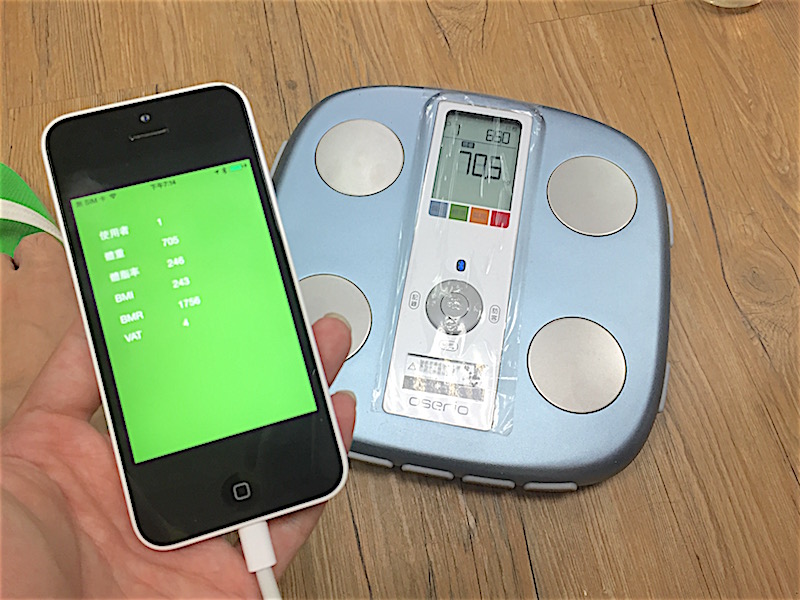
註:物聯網(英語:Internet of Things,縮寫IoT)。
開發單純的iOS App沒什麼難度,可是送審後的議題總會出其不意。原以為可以只拍攝影片給審核人員看,如何連結我們的產品(藍芽裝置)來操作App,可惜我們沒能逃過高人的「法眼」,於是請老闆將一個貴重的藍芽裝置寄送給Apple測試。約莫一週左右,App總算順利上架啦⋯⋯我也順理成章去環島九天:D~
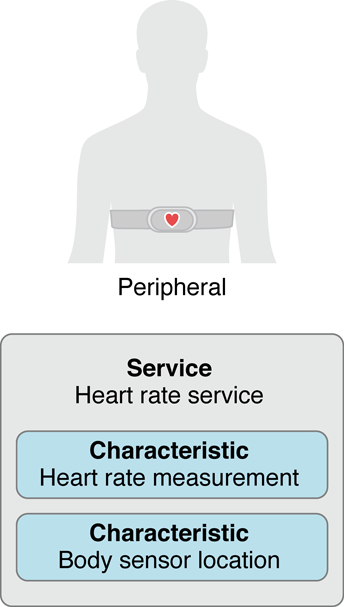
以下就是在iTunes Connect被reject的原因與描述:
From Apple
- 2. 1 Performance: App Completeness
Guideline 2.1 – Information Needed
We have started the review of your app, but we are not able to continue because we need the associated hardware to fully assess your app features.
Next Steps
To help us proceed with the review of your app, please send the necessary hardware/accessory to the address below.
NOTE: Please include your app name and app ID in the shipment; failure to provide this information can delay the review process.
Additionally, it may take several business days for us to receive the hardware once it has been delivered to Apple.
Apple, Inc.
1 Infinite Loop, M/S: 124-2APP
Cupertino, CA 95014
USAATTN: Marcus East
App Name: 快樂健康+
App ID: 1317204377Once you’ve shipped the hardware, please reply to this message with the shipping carrier and tracking information. Once we have received the hardware, we will continue your app’s review.
IMPORTANT: for non-US Developers
To avoid delays with US Customs, please provide the following information with your shipment (required for all radio-frequency devices imported in the US):
– Description of the equipment
– Quantity
– Device Model/Type Name or Number
– FCC ID
– Original Manufacturer’s Name and AddressPlease use FCC form 740 for details on how to provide this information.
Remember:
* A separate FCC Form 740 must be used for each different radio-frequency device or component in the shipment; however, a form is not required for subassemblies, parts, or components of radio-frequency devices.
* The form may be completed by the shipper or recipient, but if the form is not sent with the original shipping documents by the shipper, the shipment may be delayed in customs.
* Ensure all serial and ID numbers are available as well as the name and address of the original manufacturer.
以上問題,2017年11月的時光都耗在這裡啦⋯⋯
之後送審更新版,都不到一天就審核通過!
話說,Apple拿到藍芽裝置且測試過後,不會寄送回來給開發者呢⋯⋯
參考:
四年前(2014年)實作過應用內購買 (In App Purchase),經歷讓人三溫暖的刺激感,終於跟偉大的後台工程師JK,攜手合作打造出給幼兒使用的iOS App,那可是要在美國運行的呢!
![[iOS] IAP 驗證發票 (IAP Verify Receipt).png](https://cg2010studio.com/wp-content/uploads/2018/05/ios-iap-e9a997e8ad89e799bce7a5a8-iap-verify-receipt.png)
如今要再次研究Apple金流部分,IAP 驗證發票 (IAP Verify Receipt)是個必經程序,那我可以怎麼驗證購買真實性?
在Swift剛釋出沒多久,我就研究過如何在同專案整合Objective C和Swift。文章:
儘管還是傾向以Objective C來開發產品,然而Swift的發展日趨重要,不過我大膽推測,就算Apple再怎麼強推Swift,十年內Objective C領導地位依然屹立不搖!為什麼呢?實際接觸4年Swift後,發現Swift變化多端,若猶豫要學Swift還是Objective C可以參考:要學Objective-C還是Swift?。
現在想要混編Objective C、Swift、C/C++,應也不是問題~
![[iOS] 混編Objective C、Swift、C:C++.png](https://cg2010studio.com/wp-content/uploads/2018/04/ios-e6b7b7e7b7a8objective-ce38081swifte38081cc1.png)
最近要讀取藍牙裝置回傳的資料來解析,需要將4 bytes轉成integer,才能知道訊號強度相對值。太久沒搞底層東東,有些生疏,好在嘗試一下就得到正確結果!

最近要整合C/C++高人寫的Source Code,發現我自己好像斷手斷腳XD,因為要搞較為底層的記憶體空間配置⋯⋯先前寫Objective C多麼愜意,用不到的記憶體空間,系統會自動去釋放,但是在C/C++就要自己寫code處理呢!
現在想要配置2D陣列 (Allocate 2D Array),要怎麼做才好辦事呢?
以後都來這兒複製貼上吧XD~
/**
 Theme: Allocate 2D Array
 IDE: Xcode 9
 Language: C
 Date: 107/03/30
 Author: HappyMan
 Blog: https://cg2010studio.com/
 */

#include
#include

float** createArray(int m, int n)
{
    float* values = calloc(m * n, sizeof(float));
    float** rows = malloc(n * sizeof(float*));
    for (int i = 0; i < n; ++i) {
        rows[i] = values + i*m;
    }
    return rows;
}

void destroyArray(float** arr)
{
    free(*arr);
    free(arr);
}

int main()
{
    float** happyArr = createArray(2,3);
    happyArr[0][0] = 1;
    happyArr[0][1] = 1;
    happyArr[1][0] = 2;
    happyArr[1][1] = 2;
    happyArr[2][0] = 3;
    happyArr[2][1] = 3;

    destroyArray(happyArr);
    return 0;
}
我發現顯示code的外掛會讓下面兩行出問題~
#include <stdio.h>
#include <stdlib.h>
最後記得釋放記憶體唷~
在研究所時代有旁聽機器學習課程,當時有親自操作SVM來產生model,可參考最近七年度以來一直很夯的文章:支持向量機器 (Support Vector Machine)。此時想要在iOS上使用SVM model要怎麼做呢?好在Apple釋出轉換model工具,再配合2017年釋出的Core ML,就能輕易在iOS上使用該model。

.
在此跳過轉換model的部分,直接進入套用已轉好的Core ML Models。不管你是阿貓還是阿狗做出來的model,都能透過Apple的轉換工具變身為飛天阿貓阿狗給App使用XD~

實在不曉得怎麼命名這篇技術文章,其實就是想要呼叫Web Service來取得資料,跟我過去平常使用的方式不太一樣,所以就特別來一篇記錄,未來就直接參考囉~
![[iOS] 使用HTTP的POST方法提交的表單](https://cg2010studio.com/wp-content/uploads/2018/03/ios-e4bdbfe794a8httpe79a84poste696b9e6b395e68f90e4baa4e79a84e8a1a8e596ae.png)
後台工程師特別使用x-www-form-urlencoded來呼叫此API,怎麼不跟之前一樣使用raw呢?下次來拷問他XD~強迫我一定要學新的實作方法!

 逍遙文工作室
HappyMan・迴響