[iOS] iBeacon背景偵測流程
半年前在幫朋友阿強研究iBeacon,發現iOS在這方面比Android限制還多!首先來看iBeacon背景偵測流程,是跟前景偵測有何不一樣?

App在前景時,會陸續觸發三支API,didEnterRegion、didRangeBeacons、didExitRegion,如上圖從時間點A到時間點B。

半年前在幫朋友阿強研究iBeacon,發現iOS在這方面比Android限制還多!首先來看iBeacon背景偵測流程,是跟前景偵測有何不一樣?
App在前景時,會陸續觸發三支API,didEnterRegion、didRangeBeacons、didExitRegion,如上圖從時間點A到時間點B。
由於原生SDK沒有辦法直接獲取UIWebView中已下載的影像,因為想避免重複請求消耗資源和避免減損使用者體驗,於是我找到可立馬使用的第三方套件:RNCachingURLProtocol。雖然發現還要修改才能使用XD~
Simple offline caching for UIWebView and other NSURLConnection clients
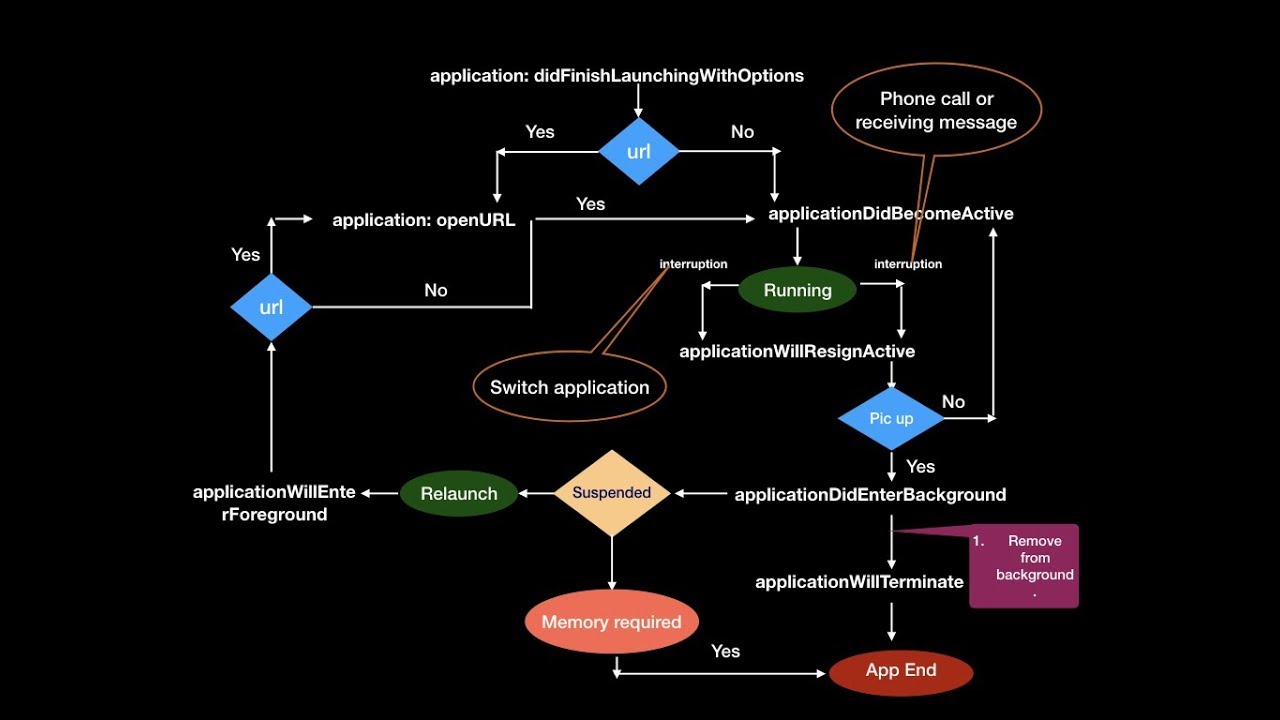
先前已經了解過視圖的生命週期 (View Life Cycle),現在來研究高一層級的應用程式的生命週期 (App Life Cycle)。開發超過六年(從2012年開始)iOS App的我,儘管已爐火純青可以隨意開發一款iOS App,然而再習以為常的開發過程,一定還存在些我不太熟悉的細節!套句郭台銘的霸氣台詞「魔鬼藏在細節中!」所以若能透過圖解的方式來更理解兩個生命週期,想必能研發出品質更好的iOS App。
有幸遇到不會再維護的App,開發者帳號即將過期,若沒有續約的話,照慣例App會被下架(不曉得規則有無改變?)。一年前送審時很不容易才通過而上架,所以若想要上架類似的App,肯定要再重跑一次曠日費時的審核流程!可以參考我先前分享的文章:寄送藍芽裝置給Apple測試。
過去都沒注意轉讓 App (Transfer App)的方式,實際操作過一遍之後覺得超級容易且方便!只要有雙方的Apple ID,能夠登入App Store Connect,登記接手人或團隊的Apple ID和Team ID,持續操作下一步即能進入轉讓程序。

原本想使用區域推播(Local Notification)來提醒使用者,遇到需求只要震動而不要有介面顯示,可以怎麼做呢?原來只要開背景模式(Required background modes)的「App plays audio or streams audio/video using AirPlay」,即可在偵測到Beacon同時震動!
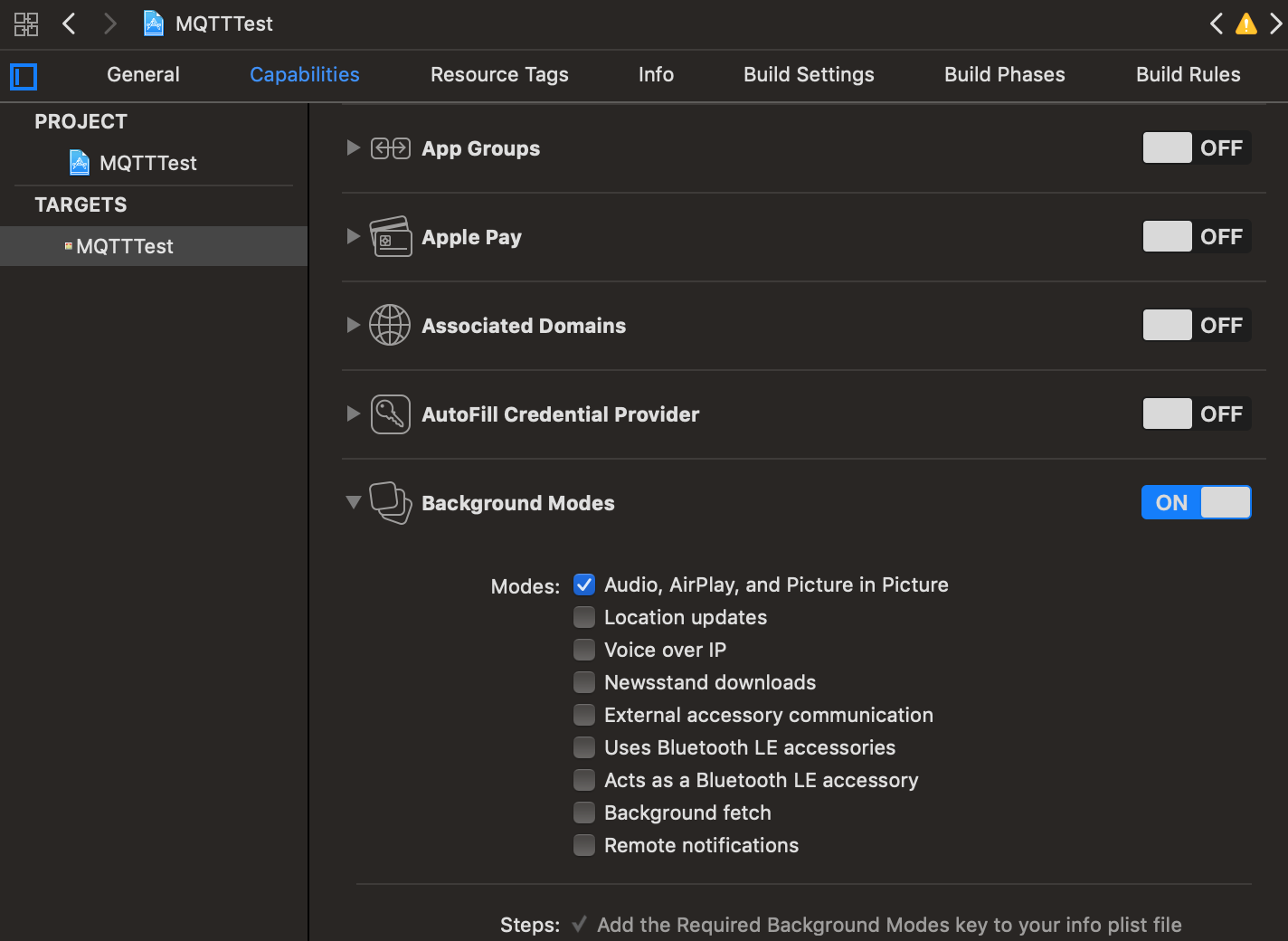
可是送審會不會有問題?畢竟文檔上所描述的使用方式我都沒有實現⋯⋯
四年前(2014年),我已寫過Cocoapods教學:使用 CocoaPods 管理第三方套件,此時要講指定Pod版本。好的第三方套件會時常更新來與時俱進,除了新增feature之外,還有修正既有的bug。
當我們自己開發的App已經過了好幾年,想要再透過Cocospods加入新的套件,此時要考慮到舊有的套件盡可能不要更新,若逼不得已還是得更新啦⋯⋯
使用Cocoapods的好處之一就是可以指定Pod版本。像是我有遇到下一個版本的語法被改掉,太難改的話我就會先返回原先的版本。

原本想透過智慧運動裝置來獲取步數與距離,可惜遲遲等不到韌體開發完成,只好暫且透過HealthKit獲取步數與距離!因為iPhone本身就有運動感測器,會自動算出步數與距離,然後寫入HealthKit,想做運動健康相關App,於是有數據來源可使用。
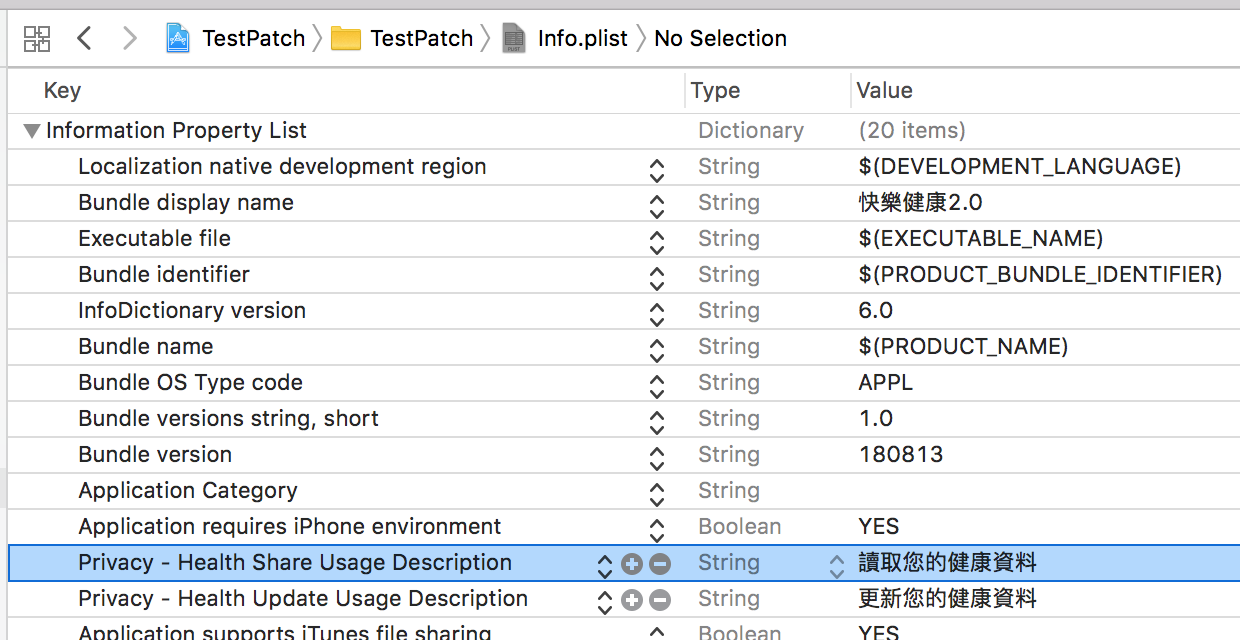
iOS 10開始之後要在info.plist設定Privacy。
「看不到的不代表不存在~」,寫程式也會遇到這個現象!我在比較日期字串時,發現明明兩者都是2018-07-17,卻被判斷出不一樣!?
![[iOS] 移除看不見的字元 (Remove Invisible Character).png](https://cg2010studio.com/wp-content/uploads/2018/08/ios-e7a7bbe999a4e79c8be4b88de8a68be79a84e5ad97e58583-remove-invisible-character.png)
好在透過取得字串長度,才發現真有看不見的字元「\0」!
(lldb) po firmwareVersionLabel.text.length
32(lldb) po newVersionLabel.text.length
10
實際上2018-07-17只有10個字元,而韌體回傳卻有32個字元,於是知道後面看不到的字元共有22個。
先前已寫過[iOS] 列出資料夾裡的檔案名稱 (List Contents of Directory),然而現在想要以最後修改時間列出檔案名稱 (List Contents of Directory By Last Modification Date),直接來看程式碼:
/**
 Theme: List Contents of Directory By Last Modification Date
 IDE: Xcode 9
 Language: Objective C
 Date: 107/08/02
 Author: HappyMan
 Blog: https://cg2010studio.com/
 */

+(NSArray *)listFileAtPathSortedByModificationDate:(NSString *)folderPath
{
    NSError* error = nil;
    NSArray* filesArray = [[NSFileManager defaultManager] contentsOfDirectoryAtPath:folderPath error:&error];
    if(error != nil) {
        NSLog(@"Error in reading files: %@", [error localizedDescription]);
        return @[];
    }

    // sort by creation date
    NSMutableArray* filesAndProperties = [NSMutableArray arrayWithCapacity:[filesArray count]];
    for(NSString* file in filesArray) {
        NSString* filePath = [folderPath stringByAppendingPathComponent:file];
        NSDictionary* properties = [[NSFileManager defaultManager]
                                    attributesOfItemAtPath:filePath
                                    error:&error];
        NSDate* modDate = [properties objectForKey:NSFileModificationDate];

        if(error == nil)
        {
            [filesAndProperties addObject:[NSDictionary dictionaryWithObjectsAndKeys:
                                           file, @"fileName",
                                           modDate, @"lastModificationDate",
                                           nil]];
        }
    }

    // sort using a block
    // order inverted as we want latest date first
    NSArray* sortedFiles = [filesAndProperties sortedArrayUsingComparator:
                            ^(id path1, id path2)
                            {
                                // compare
                                NSComparisonResult comp = [[path1 objectForKey:@"lastModificationDate"] compare:
                                                           [path2 objectForKey:@"lastModificationDate"]];
                                // invert ordering
                                if (comp == NSOrderedDescending) {
                                    comp = NSOrderedAscending;
                                }
                                else if(comp == NSOrderedAscending){
                                    comp = NSOrderedDescending;
                                }
                                return comp;
                            }];

    return sortedFiles;
}
以我的範例取得:
<__NSArrayI 0x137459190>(
{
fileName = “2018-08-02 10:17:20~2018-08-02 10:19:20.ecg";
lastModificationDate = “2018-08-02 02:19:24 +0000″;
},
{
fileName = “2018-08-02 10:11:32~2018-08-02 10:13:32.ecg";
lastModificationDate = “2018-08-02 02:14:48 +0000″;
},
{
fileName = “2018-08-02 10:09:28~2018-08-02 10:11:28.ecg";
lastModificationDate = “2018-08-02 02:11:31 +0000″;
},
{
fileName = “2018-08-02 10:06:47~2018-08-02 10:08:47.ecg";
lastModificationDate = “2018-08-02 02:08:50 +0000″;
},
{
fileName = “2018-08-02 09:02:28~2018-08-02 09:04:28.ecg";
lastModificationDate = “2018-08-02 01:04:30 +0000″;
},
{
fileName = “2018-07-31 23:40:03~2018-07-31 23:42:03.ecg";
lastModificationDate = “2018-07-31 15:42:07 +0000″;
},
{
fileName = “2018-07-31 14:43:38~2018-07-31 14:45:38.ecg";
lastModificationDate = “2018-07-31 06:45:40 +0000″;
},
{
fileName = “2018-07-31 14:40:58~2018-07-31 14:42:58.ecg";
lastModificationDate = “2018-07-31 06:43:01 +0000″;
}
)


 逍遙文工作室
HappyMan・迴響