Just My Life & My Work

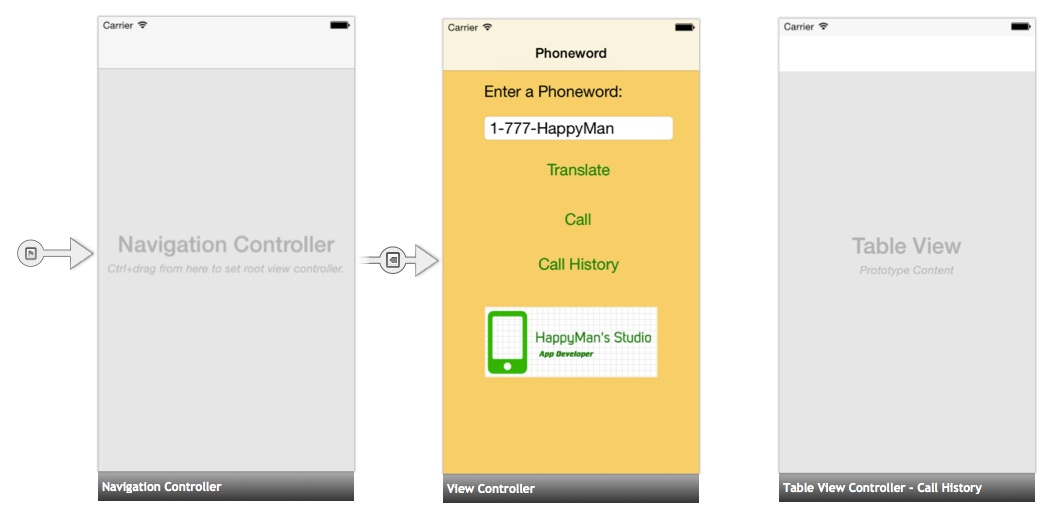
承接深度了解專案:電話字 (Sample Project: Phoneword),再來學習多螢幕架構,同樣也是跟Xcode非常相似的做法,看到介面很快就能上手!

Xamarin phoneword00010

簡直就一模一樣嘛⋯⋯view controller的連結也是透過拉藍色線

過去我鮮少使用Storyboard,多使用Xib,不過因Apple一直在推廣Storyboard(範例程式都以它為主),我們豈能守舊而唯Xib獨尊?想想過去技術高手只想用code,來處理App所有層面的事情,現在看起來是多麽不切實際呢!之所以會發明新的工具,就是想增進開發效率,所以讓我們來擁抱改變吧!

繼續閱讀文章 »

承接範例專案:電話字 (Sample Project: Phoneword),再來就是解釋它怎麼運作,包含Xamarin介面C#程式碼,還有很重要的是Xamarin.iOS Application的剖析。

Xamarin iOS Application03

  • References – Contains the assemblies required to build and run the application. If we expand the directory, we’ll see references to .NET assemblies such as System , System.Core, and System.Xml , as well as a reference to Xamarin’s Xamarin.iOS assembly.
  • Components – The Components directory houses ready-made features from the Xamarin Components store , a public marketplace for Xamarin code. This is similar to the NuGet Gallery for those familiar with Visual Studio. For more information on Xamarin Components, refer to the Xamarin Components walkthrough .
  • Resources – The Resources folder stores icons, launch images, and other media. Xamarin has a separate guide for Working with Resources that explores the role of this directory further.
  • Main.cs – This contains the main entry point of the application. To start the application, we pass in the name of the main application class, the AppDelegate .
  • AppDelegate.cs – This file contains the main application class and is responsible for creating the Window, building the user interface, and listening to events from the operating system.
  • MainStoryboard.storyboard – The Storyboard contains the visual design of the application’s user interface. Storyboard files open in a graphical editor called the iOS Designer.
  • Phoneword_iOSViewController.cs – The View Controller powers the screen (View) that a user sees and touches. The View Controller is responsible for handling interactions between the user and the View.
  • Phoneword_iOSViewController.designer.cs – The designer.cs is an auto-generated file that serves as the glue between controls in the View and their code representations in the View Controller. Because this is an internal plumbing file, the IDE will overwrite any manual changes and most of the time we can ignore this file. For more information on the relationship between the visual Designer and the backing code, refer to the Introduction to the iOS Designer guide.
  • Info.plist – Info.plist is where we set application properties such as the application name, icons, launch images, and more. This is a powerful file and a thorough introduction to it is available in theWorking with Property Lists guide.
  • Entitlements.plist – The entitlements property list lets us specify application capabilities (also called App Store Technologies) such as iCloud, PassKit, and more. More information on theEntitlements.plist can be found in the Working with Property Lists guide. For a general introduction to entitlements, refer to the Device Provisioning guide.

看起來和Xcode裡的檔案架構很類似呢!學習來格外輕鬆~

繼續閱讀文章 »

超慢跑成員們相約,為了今年三月的二鐵做準備,我們人手一台自行車(小摺、Ubike、公路車、越野車),透早八點就出發,從永和騎乘到八里,再從八里搭渡輪到淡水!這一路上景色美不勝收,還有邊騎邊吃的在地美食~

騎小折從永和到淡水

第一次騎自行車超過50公里(包含板橋和永和來回),而且是騎速度不怎麼快的小折!測試過後,發現想要在兩小時內,騎完規定的45公里,好像挺有難度的呢><。

可以看到速度剛開始相當快,然後就越來越慢嚕⋯⋯

繼續閱讀文章 »

關於小折

今日和超慢跑成員們相約從永和騎自行車到淡水,為兩個月後的二鐵做準備!

若包含來回騎板橋和永和,我騎腳踏車的距離就超過50公里啦~

騎小折從永和到淡水

繼續閱讀文章 »

在瞭解Xamarin介紹與研究後,接著就去下載並且安裝Xamarin Studio,再來當然就是要來跑「飯粒」專案囉~如此可快速上手Xamarin!

官方提供的範例專案:工作清單 (Sample Project: Tasky),下載後開啟專案,即可直接編譯執行,除了在模擬器 (Simulator)上跑,也能在實機 (Device)上跑呢!而模擬器居然是開啟Xcode附帶的iOS模擬器,所以感覺相當親切:)~

Xamarin before

繼續閱讀文章 »

有目標的學習是最快學會一套工具的最好方式!於是乎,Xamarin官方的快速開始教學範例專案:電話字 (Sample Project: Phoneword),引領我熟悉這有著神秘面紗的IDE (整合開發環境)

Xamarin Phoneword

這畫面看起來是不是很像Xcode的樣子呀?!

繼續閱讀文章 »

想要知道某個國家的物價跟我們台灣差多少,其實可以參考大麥克指數 (Big Mac index),這是我兩年前從同學老胡那兒聽來,最近看到某篇文章說可以參考大麥克指數,於是就去查維基百科,就出現讓人一目了然的圖解!

因為世界各地幾乎都有麥當勞,而且都有賣大小份量一樣的大麥克漢堡,其食材的成本會反映在售價上,因此可以拿來當作非正式的指標!

它以50元美金為例,看各國可以買幾顆大麥克漢堡,我們台灣跟中國大陸一樣可買20顆漢堡,去年二月底去上海出差吃一頓麥當勞套餐,確實是跟台灣的差不多!

而令人欽羨的工程師有百萬年薪的美國,只能買11顆漢堡!儘管可以賺很多錢,但最後能存下來的錢相當有限呢~

大麥克指數 big-mac-index

參考:WiKi – 大麥克指數

[圖解] 教授等級與薪資

這週很高興可以看到圖解教授等級與薪資,不吝嗇分享的台大資工洪士灝教授讓我知道很久以前就想知道的事情!過去多只能用猜的,不然就是認識的教授無意脫口而出,今日這些「數據」如實地呈現在我面前:)~

教授等級與薪資

他表示全國的大學都適用此表,已經一段時間沒有做調整,其實是不太恰當的,因為各地方物價、房價有高有低,人才多會以此作為考量。
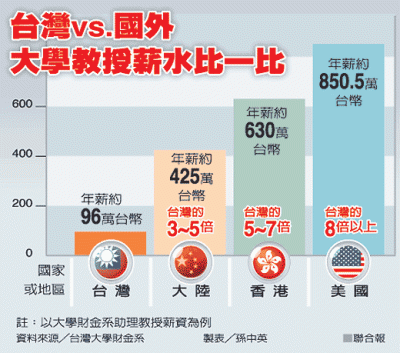
台灣國外教授薪水

這幅圖表感覺有點誇張⋯⋯僅供參考。


此外,比起國外大學教授薪資,我們台灣教授薪資算是少很多。洪教授這麼比喻而我稍加修飾,國外教授100%收入來自學界,國內教授50%收入來自學界、50%收入來自業界。如果國外聘請教授年薪為300萬,國內聘請教授年薪則為150萬,那麼剩下一半的150萬則要自己去外面找!於是研究成果差異就會很大囉~

我想一個非常優秀的人,不能用齊頭式來給予獎賞,能者多勞回饋也要多。若以現在當紅的電腦資訊領域,正業和副業是可以同時進行,因為工作不限時間與地點。於是對外可說自己在公司薪資不高,而實際上總收入就看你多有能力!

優秀人才

對於物品有所謂的性能價格比 (Capability/Price),對於人才我也可定義能力薪資比 (Ability/Wage),這個比值若越高,相信距離自己定義的成功就不遠囉~

註:性價比,字面上就是指性能和價格的比。在經濟學和工程學,性價比指的是一個產品根據它的價格所能提供的性能的能力。在不考慮其他因素下,一般來說有著更高性價比的產品是更值得擁有的。

參考:洪士灝教授臉書牆、WiKi – 性價比

智慧手機平板電腦開始要顛覆傳統的電視節目,過去要call in/out才能夠即時跟電視機前的觀眾互動,現在只要透過App及能一起參與遊戲,實在令我大開眼界呢!台視週六晚上的節目-女王的密室,今日我實際參與問答活動,感覺真是新鮮呢!

女王的密室

繼續閱讀文章 »

我一直覺得最令人欽佩的人是把事情從複雜變簡單,將專業領域的知識術語用非常「親民」的話描述出來,讓普遍大眾都能「啊哈」這樣驚訝地理解!

UI UX

電腦資訊領域使用者體驗與使用者介面 (UX and UI)時常讓人分不清楚,特別是在智慧手機平板電腦出現後,設計師任何人越來越重視UX和UI,因為可以與這些裝置有更多的「互動」,進而讓生活更加豐富與美好。

繼續閱讀文章 »

標籤雲