
許多影像處理軟體都會提供濾鏡效果,其中之一的效果是魚眼鏡頭(Fisheye Lens),會寫程式且對影像處理感興趣的人,多少會想知道如何實做魚眼效果,所以我就動手來做做看囉!

標準的魚眼鏡頭可以由數學式子推導,詳細內容可參照Fisheye Projection。
網路上已經有人實做出來,所以我直接拿來玩:P前提示要先安裝OpenCV喔!
/**
	Theme: Simulate Fisheye Lens
	Compiler: Dev C++ 4.9.9.2
	Date: 101/01/03
	Author: HappyMan
	Blog: https://cg2010studio.wordpress.com/
*/
#include <cv.h>
#include <highgui.h>
#include <math.h>
#include <unistd.h>
#include <getopt.h>
#include <iostream>
void sampleImage(const IplImage* arr, float idx0, float idx1, CvScalar& res){
  if(idx0<0 || idx1<0 || idx0>(cvGetSize(arr).height-1) || idx1>(cvGetSize(arr).width-1)){
    res.val[0]=0;
    res.val[1]=0;
    res.val[2]=0;
    res.val[3]=0;
    return;
  }
  float idx0_fl=floor(idx0);
  float idx0_cl=ceil(idx0);
  float idx1_fl=floor(idx1);
  float idx1_cl=ceil(idx1);

  CvScalar s1=cvGet2D(arr,(int)idx0_fl,(int)idx1_fl);
  CvScalar s2=cvGet2D(arr,(int)idx0_fl,(int)idx1_cl);
  CvScalar s3=cvGet2D(arr,(int)idx0_cl,(int)idx1_cl);
  CvScalar s4=cvGet2D(arr,(int)idx0_cl,(int)idx1_fl);
  float x = idx0 - idx0_fl;
  float y = idx1 - idx1_fl;
  res.val[0]= s1.val[0]*(1-x)*(1-y) + s2.val[0]*(1-x)*y + s3.val[0]*x*y + s4.val[0]*x*(1-y);
  res.val[1]= s1.val[1]*(1-x)*(1-y) + s2.val[1]*(1-x)*y + s3.val[1]*x*y + s4.val[1]*x*(1-y);
  res.val[2]= s1.val[2]*(1-x)*(1-y) + s2.val[2]*(1-x)*y + s3.val[2]*x*y + s4.val[2]*x*(1-y);
  res.val[3]= s1.val[3]*(1-x)*(1-y) + s2.val[3]*(1-x)*y + s3.val[3]*x*y + s4.val[3]*x*(1-y);
}
float xscale;
float yscale;
float xshift;
float yshift;
float getRadialX(float x,float y,float cx,float cy,float k){
  x = (x*xscale+xshift);
  y = (y*yscale+yshift);
  float res = x+((x-cx)*k*((x-cx)*(x-cx)+(y-cy)*(y-cy)));
  return res;
}
float getRadialY(float x,float y,float cx,float cy,float k){
  x = (x*xscale+xshift);
  y = (y*yscale+yshift);
  float res = y+((y-cy)*k*((x-cx)*(x-cx)+(y-cy)*(y-cy)));
  return res;
}
float thresh = 1;
float calc_shift(float x1,float x2,float cx,float k){
  float x3 = x1+(x2-x1)*0.5;
  float res1 = x1+((x1-cx)*k*((x1-cx)*(x1-cx)));
  float res3 = x3+((x3-cx)*k*((x3-cx)*(x3-cx)));
  //  std::cerr<<"x1: "<<x1<<" - "<<res1<<" x3: "<<x3<<" - "<<res3<<std::endl;
  if(res1>-thresh and res1 < thresh)
    return x1;
  if(res3<0){
    return calc_shift(x3,x2,cx,k);
  }
  else{
    return calc_shift(x1,x3,cx,k);
  }
}
int main(int argc, char** argv){
  IplImage* src = cvLoadImage( argv[1], 1 );
  IplImage* dst = cvCreateImage(cvGetSize(src),src->depth,src->nChannels);
  IplImage* dst2 = cvCreateImage(cvGetSize(src),src->depth,src->nChannels);
  float K=atof(argv[3]);
  float centerX=atoi(argv[4]);
  float centerY=atoi(argv[5]);
  int width = cvGetSize(src).width;
  int height = cvGetSize(src).height;

  xshift = calc_shift(0,centerX-1,centerX,K);
  float newcenterX = width-centerX;
  float xshift_2 = calc_shift(0,newcenterX-1,newcenterX,K);

  yshift = calc_shift(0,centerY-1,centerY,K);
  float newcenterY = height-centerY;
  float yshift_2 = calc_shift(0,newcenterY-1,newcenterY,K);
  //  scale = (centerX-xshift)/centerX;
  xscale = (width-xshift-xshift_2)/width;
  yscale = (height-yshift-yshift_2)/height;

  std::cerr<<xshift<<" "<<yshift<<" "<<xscale<<" "<<yscale<<std::endl;
  std::cerr<<cvGetSize(src).height<<std::endl;
  std::cerr<<cvGetSize(src).width<<std::endl;

  for(int j=0;j<cvGetSize(dst).height;j++){
    for(int i=0;i<cvGetSize(dst).width;i++){
      CvScalar s;
      float x = getRadialX((float)i,(float)j,centerX,centerY,K);
      float y = getRadialY((float)i,(float)j,centerX,centerY,K);
      sampleImage(src,y,x,s);
      cvSet2D(dst,j,i,s);
    }
  }
#if 0
  cvNamedWindow( "Source1", 1 );
  cvShowImage( "Source1", dst);
  cvWaitKey(0);
#endif
  cvSaveImage(argv[2],dst,0);
#if 0
  for(int j=0;j<cvGetSize(src).height;j++){
    for(int i=0;i<cvGetSize(src).width;i++){
      CvScalar s;
      sampleImage(src,j+0.25,i+0.25,s);
      cvSet2D(dst,j,i,s);
    }
  }
  cvNamedWindow( "Source1", 1 );
  cvShowImage( "Source1", src);
  cvWaitKey(0);
#endif
}
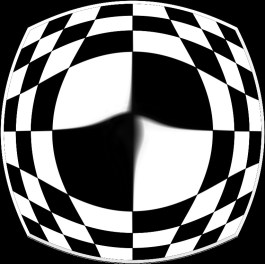
編譯後產生執行檔,可以直接在命令提示字元中下指令,格式有五個參數:|input image| |output image| |K which controlls amount of distortion (typically try values around 0.001)| |x coordinate of center of distortion| |y coordinate of center of distortion|
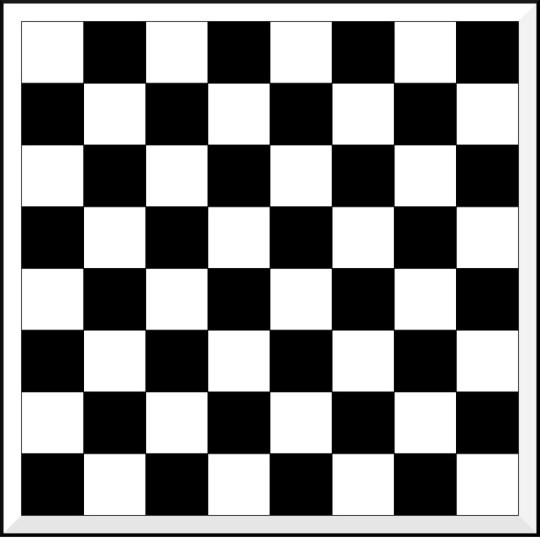
我使用黑白相間的棋盤,來看看魚眼效果如何。
C:\test>xx chessboard.jpg “1 382 382.jpg" 1 382 382
374.785 374.785 0.0188681 0.0188867
764
765
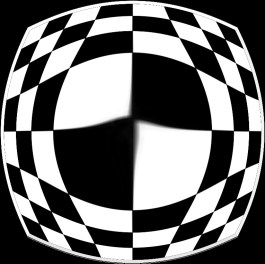
C:\test>xx chessboard.jpg “0.1 382 382.jpg" 0.1 382 382
366.571 366.571 0.0403572 0.040391
764
765
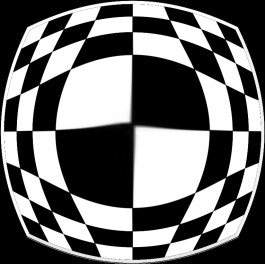
C:\test>xx chessboard.jpg “0.01 382 382.jpg" 0.01 382 382
349.281 349.281 0.0855572 0.0856518
764
765
C:\test>xx chessboard.jpg “0.001 382 382.jpg" 0.001 382 382
314.027 314.027 0.177814 0.177939
764
765
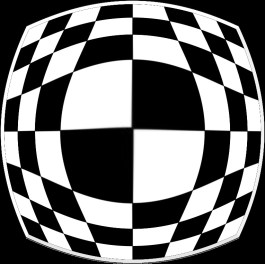
C:\test>xx chessboard.jpg “0.0001 382 382.jpg" 0.0001 382 382
246.776 246.776 0.353744 0.35399
764
765
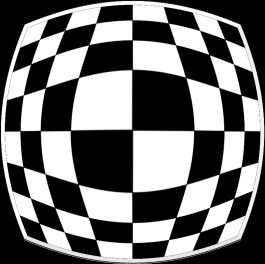
例子:xx是執行檔的名字,chessboard.jpg是輸入影像名稱,"0.001 382 382.jpg"是輸出影像名字,0.001是變形參數,382 382分別是x和y的變形中心點。
變形參數大於0.001效果就變得很奇怪,0表示無任何變形。原本想要使用負數來表現反魚眼效果,可惜該數學模式沒辦法做到。
參考:Fisheye Projection、How to simulate fisheye lens effect by openCV?。


 逍遙文工作室
Comments on: "[OpenCV] 模擬魚眼鏡頭 (Simulate Fisheye Lens)" (12)
你好,請問有辦法將做出來的魚眼效果圖形是圓形的嗎?
讚讚
It’s hard to find educated people in this particular topic, however, you sound like
you know what you’re talking about! Thanks
讚讚
你好 上面的影片我已經公開權限嚕 我後來用朋友的小筆電WIN XP系統 跑 但她不會停 就黑色螢幕過就沒有停下 請問 是還缺什麼設定的地方 還是有哪邊要更新?
WIN XP 執行過程
在此感謝您的撥空回答
讚讚
我知道你哪裡有問題了,確實我也會發生你影片中當掉的樣子,並出現訊息:
「This application has requested the Runtime to terminate it in an unusual way.
Please contact the application’s support team for more information.」
你可以創一個資料夾像這個路徑:C:\Temp
接著把程式檔丟進去,
編譯完之後會出現.exe檔,
表示成功編譯,
那要怎麼成功執行呢?
就是打開命令提示字元,
到該路徑底下,
然後打五個參數上去,如:
test.exe chessboard.jpg result.jpg 0.0001 382 382
總言之,就是我這個程式碼適用在「命令提示字元」下執行:)
你螢幕錄影的軟體叫什麼名字呀?我也想用~
讚讚
WebEx_Recorder_and_Player_3.17.2109
讚讚
喔喔~謝謝你,有空來玩玩:)
讚讚
你好,我是一個學生,想請問一下 此code 真的可以執行? 我確定安裝好 dev c++ 和 OpenCV 2.0 也可以順利完成 Dev-C++4.9.9.2 安裝 OpenCV 2.0 這個網址 順利開啟圖片 但這次我直接複製 上面的魚眼透鏡 卻在執行時 會當機出現錯誤訊息 ?
我有把圖拍下
https://docs.google.com/open?id=0B86KqjDQBh8lNi1EZjFvSFBaMEk
讚讚
我剛試過,沒有問題,你可以試著使用我的chessboard.jpg當作實驗影像檔,參數記得下對,就如同我文章上所述。
讚讚
你好 不好意思 我的還是不行耶 這是我錄影 PO youtube
我在還沒需要圖片就已經當掉了
讚讚
嗨~你的影片我看不到,可以把權限設公開嗎?也許跟作業系統有關係,這程式碼我沒有在Win 7測試過,你用Win XP跑看看。
讚讚
您好,我是一個目前在做影像相關研究的學生
剛好需要模擬魚眼的功能,但這篇code我並無法使用
問題應該是出在unistd.h以及getopt.h這兩個標頭檔上
請問在windows環境下有沒有什麼解決辦法?
在此先感謝您的撥空回答
讚讚
嗨~你可以參考我這篇環境安裝:
Dev-C++4.9.9.2 安裝 OpenCV 2.0
我這篇文章的程式碼就是在Dev C++和OpenCV 2.0之下順利編譯執行喔~
讚讚