
上一篇「Shadow Mapping 原理」只有理論,這一篇用圖片來說明Shadow Map的概念,另有我實做的結果。
前面投影片是由學長所製作,後頭圖片是我實做結果。

以light(L)角度所看到的場景示意圖。

橙色的線段表示light角度所看見的物體(球和地板)表面。

以light角度的depth buffer(shadow map),深度值小的深色(接近0),深度值大的淺色(接近1)。

各以camera和light的影像中pixel所對應的vertex來比較深度值,PL>SL表示P點在陰影中。

PL>SL表示P點在陰影中。

PL~SL表示P不在陰影中。
vertex shader程式碼(前半部為Phong Shading):
varying vec3 vertex_position;
varying vec3 vertex_light_vector;
varying vec3 vertex_light_half_vector;
varying vec3 vertex_normal;
varying vec4 color;

varying vec4 vertex;

void main()
{
    // Calculate the normal value for this vertex, in world coordinates (multiply by gl_NormalMatrix)
    vertex_normal = normalize(gl_NormalMatrix * gl_Normal);
	vertex_position = vec3(gl_ModelViewMatrix * gl_Vertex);

    // Calculate the light position for this vertex
	vec3 light_position = vec3(0, 0, 0);
	vertex_light_vector = normalize(light_position.xyz - vertex_position.xyz);

    // Calculate the light's half vector
    vertex_light_half_vector = normalize(gl_LightSource[0].halfVector.xyz);

    // Set the front color to the color passed through with glColor*f
    color = gl_Color;

	vertex = gl_Vertex;

	//gl_Position = gl_ModelViewProjectionMatrix * gl_Vertex;
	gl_Position = ftransform();
}
fragment shader程式碼(前半部為Phong Shading):
varying vec3 vertex_position;
varying vec3 vertex_light_vector;
varying vec3 vertex_light_half_vector;
varying vec3 vertex_normal;
varying vec4 color;

const vec3 eye_position = vec3(0.0,0.0,0.0);

uniform sampler2DShadow myTexture;
//uniform sampler2D myTexture;
varying vec4 vertex;

void main()
{
	vec3 E = normalize(vec3(eye_position - vertex_position));
	vec3 R = normalize(vec3(-reflect(vertex_light_vector, vertex_normal)));

    // Defining The Material Colors
    const vec4 AmbientColor = vec4(0.0, 0.0, 0.0, 1.0);
    const vec4 DiffuseColor = vec4(0.0, 0.0, 0.0, 1.0);
    const vec4 SpecularColor = vec4(1.0, 1.0, 1.0, 1.0);

    // Calculate the ambient term
    vec4 ambient_color = AmbientColor * gl_LightSource[0].ambient + gl_LightModel.ambient * gl_FrontMaterial.ambient;

    // Calculate the diffuse term
    vec4 diffuse_color = color * gl_LightSource[0].diffuse;
    //vec4 diffuse_color = DiffuseColor * gl_LightSource[0].diffuse;

    // Calculate the specular value
    //vec4 specular_color = SpecularColor * gl_LightSource[0].specular * pow(max(dot(E, R), 0.0) , 100.0);
    vec4 specular_color = SpecularColor * gl_LightSource[0].specular * pow(max(dot(normalize(vertex_normal), vertex_light_half_vector), 0.0) , 100.0);

    // Set the diffuse value (darkness). This is done with a dot product between the normal and the light
    // and the maths behind it is explained in the maths section of the site.
    float diffuse_value = max(dot(normalize(vertex_normal), vertex_light_vector), 0.0);

	vec4 texel, clip;
	vec4 scolor =color;

	clip = gl_TextureMatrix[0] * vertex;

	// Do the projection divide-by-w and shift to the [0,1] range (from the [-1, 1] range).
	clip.xyz = clip.xyz / clip.w * 0.5 + 0.5;

	texel = shadow2D(myTexture, clip.xyz);

	if (texel.z < clip.z)
		scolor.rgb *= 0.4;

	gl_FragColor = scolor + ambient_color + diffuse_color * diffuse_value + specular_color;
}
其中這一行特別重要:gl_TextureMatrix[0] * vertex
=Light_ProjectionMatrix * Light_ViewMatrix * Camera_ViewInverseMatrix * gl_ModelViewMatrix * gl_Vertex
=Light_ProjectionMatrix * Light_ViewMatrix * Camera_ViewInverseMatrix * Camera_ViewMatrix * ModelMatrix * gl_Vertex
=Light_ProjectionMatrix * Light_ViewMatrix * ModelMatrix * gl_Vertex
轉換過程可由這一張圖示來解釋:
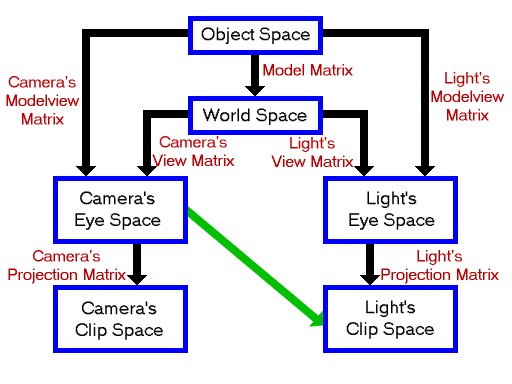
空間矩陣轉換關係圖。
texel就是shadow map,為light所看到的深度圖,clip為camera所看到的場景圖,透過Camera’s View Matrix→Light’s View Matrix→Light’s Projection Matrix轉換後的深度圖,texel和clip比較Z值,前者小於後者(見程式碼),表示該vertex處於陰影之中,最後在對應的frame buffer中的pixel降低亮度(產生陰影)即可。
以下是我實做時的參數特性設定:
light的座標:(6.0, 7.0, 8.0)
地板的特性:
glColor3f(1.0, 0.5, 0.0);
glBegin(GL_QUADS);
glNormal(0,1,0);
glVertex3f(-3, -1.2, -5);
glVertex3f( 3, -1.2, -5);
glVertex3f( 3, -1.2, 5);
glVertex3f(-3, -1.2, 5);
glEnd();
牛模型特性:座標介於單位長度球[0,1],顏色以座標值作為顏色值。

不用shadow map shader時的結果。
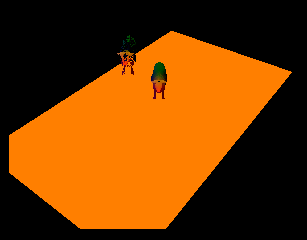
light座標(6,7,8)所看到的場景,depth buffer儲存深度值後,即為shadow map。

平面牛和點狀牛影子相疊的結果。影子有鋸齒狀,可以提高shadow map的size來解決。

超出平面就沒有影子的結果。

兩隻平面牛相疊之後,居然身體有著同樣的影子,上頭那隻不知道發生了什麼事。
參考:Shadow Map陰影貼圖技術之探I、Shadow Map陰影貼圖技術之探II、Shadow Map陰影貼圖技術之探III、Shadow Map陰影貼圖技術之探IV,OpenGL SuperBible, 4th ed CH14 Depth Textures and Shadows、Paul’s Project Shadow Mapping。


 逍遙文工作室
Comments on: "[GLSL] Shadow Map" (8)
前輩您好,有個問題想請教一下
您的文章說clip為camera所看到的場景圖,但在上方的推算過程中(程式碼下方),我感覺clip為light所看到的場景圖??
謝謝前輩!!
讚讚
嗨~你好,
if (texel.z < clip.z)
這一行程式碼表示camera深度大於light深度,
若是的話,就要讓像素變暗,
應該是沒有錯才是喔~
讚讚
謝謝前輩的回答!!這部分我已經懂了~
我還有一個問題,myTexture是shadow map的深度圖嗎?如果是的話,又光源(或整個world)的位置是可變動的,那是不是要先在主程式中算出light’s clip-space的深度圖,再傳入fragment shader?還是說,myTexture就是一張固定的bmp檔?
再次謝謝謝前輩!!
讚讚
這個我有點忘了,可能要請你自己去找答案和理解了~ 😛
讚讚
請問一下前輩,當您在實作時,會不會遇到在虛擬空間中背光面(只有ambient色彩的面)會被誤判成陰影。 還有就是請問一下前輩您的light projection space 是否為 Ortho 而不是 perspective ??
讚讚
背光面不會被誤判。
light projection space應跟camera projection space一致才是,不太清楚你的意思。
讚讚
謝謝前輩指教,我已實作完成。 但是前輩,請問您當初實作時,會不會有影子為鋸齒狀的問題。
讚讚
恭喜你!
我實做結果就如你所見這篇文章的牛,它的影子確實呈現鋸齒狀,若要解決鋸齒狀問題,可以使用??技術,不好意思,太久沒碰,那個關鍵字我忘了ORZ
讚讚