Just My Life & My Work

Archive for the ‘教學’ Category

[iOS] 打包物件 (Archive Object)

有時候我們想要傳遞複雜的物件,比如影像(image)特性字串(AttributedString)放到Dictionary中以Key/Value儲存,我們就能隨意帶著Dictionary到處趴趴走~這時候可以打包物件 (Archive Object)

Archive Object

就如同我們所想的那樣,需要封裝(Archive)解開(Unarchive)

/**
 Theme: Archive Object
 IDE: Xcode 6
 Language: Objective C
 Date: 104/04/23
 Author: HappyMan
 Blog: https://cg2010studio.wordpress.com/
 */
- (void)viewDidLoad {
    [super viewDidLoad];
#pragma mark - 這裡只是準備複雜特性的字串
    NSMutableAttributedString *string = [[NSMutableAttributedString alloc] initWithString:@"Happy World ^_^"];
    NSRange range = NSMakeRange(0,string.length);
    UIFont *markerFeltWide = [UIFont fontWithName:@"Arial" size:20.0f];
    //字型
    [string addAttribute:NSFontAttributeName value:markerFeltWide range:range];
    //前景顏色
    [string addAttribute:NSForegroundColorAttributeName value:[UIColor greenColor] range:range];
    //背景顏色
    [string addAttribute:NSBackgroundColorAttributeName value:[UIColor lightGrayColor] range:range];
    //底線
    [string addAttribute:NSUnderlineStyleAttributeName value:[NSNumber numberWithInt:1] range:range];
    //字間距
    [string addAttribute:NSKernAttributeName value:[NSNumber numberWithInt:5] range:range];
    //陰影
    NSShadow *shadowDic=[[NSShadow alloc] init];
    [shadowDic setShadowBlurRadius:3.0]; //0 ~ ? 清晰~模糊
    [shadowDic setShadowColor:[UIColor blackColor]];
    [shadowDic setShadowOffset:CGSizeMake(3, 3)];
    [string addAttribute:NSShadowAttributeName value:shadowDic range:range];
    //描邊顏色
    [string addAttribute:NSStrokeColorAttributeName value:[UIColor orangeColor] range:range];
    //描邊線條粗細 正數描邊 負數描邊加填滿
    [string addAttribute:NSStrokeWidthAttributeName value:[NSNumber numberWithInt:-3.0] range:range];

#pragma mark - 封裝
    NSMutableDictionary *happyInfo = [NSMutableDictionary new];
    
    UIImage *image = [UIImage imageNamed:@"HappyMan.jpg"];
    NSData *imageData1 = [NSData dataWithData:UIImageJPEGRepresentation(image, 1.0f)];
    happyInfo[@"imageKey"] = [NSKeyedArchiver archivedDataWithRootObject: imageData1];
    NSAttributedString *myString = string;
    happyInfo[@"stringKey"] = [NSKeyedArchiver archivedDataWithRootObject: myString];
    
#pragma mark - 解開
    NSData *archiveImageData = happyInfo[@"imageKey"];
    NSData *imageData = [NSKeyedUnarchiver unarchiveObjectWithData: archiveImageData];
    UIImage *happyImage = [UIImage imageWithData:imageData];
    NSData *stringData = happyInfo[@"stringKey"];
    NSAttributedString *happyString = [NSKeyedUnarchiver unarchiveObjectWithData: stringData];
    
    [self.happyImageView setImage:happyImage];
    [self.happyTextView setAttributedText:happyString];
}

這裡需要注意的是,影像必須要先轉成Data再來封裝,而一般字串類資料可以直接封裝,這還有道理XD~

範例中的特性字串含有者些訊息:

Happy World ^_^{
NSBackgroundColor = “UIDeviceWhiteColorSpace 0.666667 1″;
NSColor = “UIDeviceRGBColorSpace 0 1 0 1″;
NSFont = " font-family: \"Arial\"; font-weight: normal; font-style: normal; font-size: 20.00pt";
NSKern = 5;
NSShadow = “NSShadow {3, 3} blur = 3 color = {UIDeviceWhiteColorSpace 0 1}";
NSStrokeColor = “UIDeviceRGBColorSpace 1 0.5 0 1″;
NSStrokeWidth = “-3″;
NSUnderline = 1;
}

如此就能在有限制情況下傳遞資料囉~這可以用在Watch AppiOS App上的溝通呢!

參考:NSMutableAttributedStringMy Biggest WatchKit Mistake

[iOS] 動態框架 (Dynamic Frame)

不知怎麼稱呼,就先叫做動態框架 (Dynamic Frame)吧!描述一下我想達到的效果,簡單來說就是根據文字多寡,來讓顯示的界面可以跟著調整,最後所想要呈現的字不會被介面擋到。

因為很多時候是不知道字數的多寡,通常是在運行的時候才會知道,特別是從網路上取得的資料,此時我們會想要做這件事。

(繼續閱讀…)

[iOS] TextField Inset

實在不知道怎麼翻TextField Inset,我會把它描述為「留邊」。因為TextField沒有ContentInset這個property,所以要另找技巧來實現。

TextField Inset

可以見到舊密碼密碼確認Placeholder緊靠著左側,設定過後如新密碼,向右邊位移一段距離。

(繼續閱讀…)

[iOS] Watch App Architecture

在瞭解Watch App目標架構後,我們想進一步瞭解:

  • Apple Watch與iPhone溝通
  • Watch App的運行流程
  • ViewController的生命週期

Apple Watch與iPhone溝通

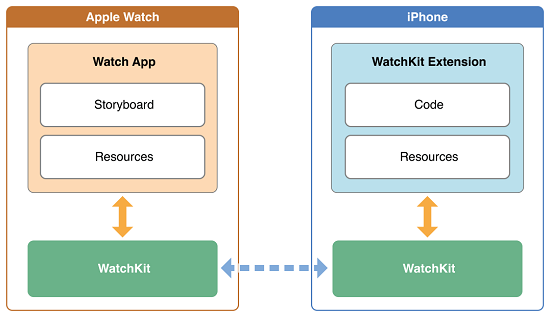
Watch iPhone commucation

包含兩部分:Watch appWatchKit extension。Watch app在Watch上運行,只包含Storyboard和Resource;WatchKit extension在iPhone上運行,與對應的iPhone App在一起。當使用者點擊Watch App後,與Watch配對的iPhone會啟動WatchKit extension,然後與Watch建立連接,於是兩者可以溝通(如獲取資料等)。

(繼續閱讀…)

[iOS] Flurry 追蹤

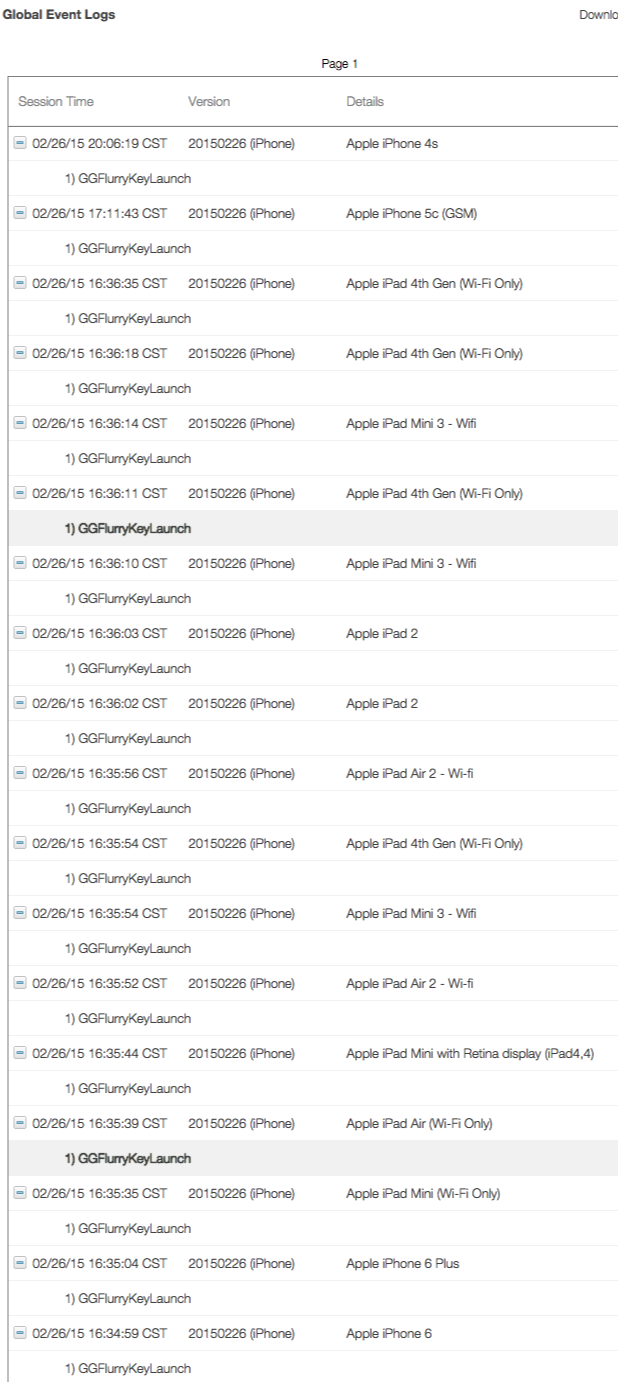
還記得把新版本垃圾管家送審,當天馬上就有奇妙的現象,因為我埋下Flurry追蹤使用者行為,查看Flurry後台,發現有好幾台裝置安裝且執行,不過僅止於「啟動」,就沒有其它行為。猜想這些裝置就是Apple審委所用的裝置,而且都分布於北美,後台還能顯示這六台是不同型號的iPhone與iPad。

Garbage Flurry

可以觀察到,Apple下載後開啟垃圾管家App,就再也沒有動靜:P~

Flurry   App Advertising and Analytics

看了設備清單,Apple可真是一點都不馬乎,任何現行的裝置都要拿來審核我們的App呢!

[iOS] 從WebView取得回傳值 (Get Value from WebView)

有時候我們需要從網頁中獲得回傳資料,比如使用WebView來輸入帳密,成功登入後會回傳token,之後我們需要此token來呼叫相關API,以取得此帳密的相關資訊。

這麼做是想提高安全性,所輸入的帳密不想給App知曉,透過Web輸入後回傳字面上沒啥意義的token給App,而這個token是有效期限,一段時間過後便需要再取得一次,下次取得的token跟上次不一樣,以保護真實帳密資訊。

(繼續閱讀…)

[iOS] Apple Watch 目標架構

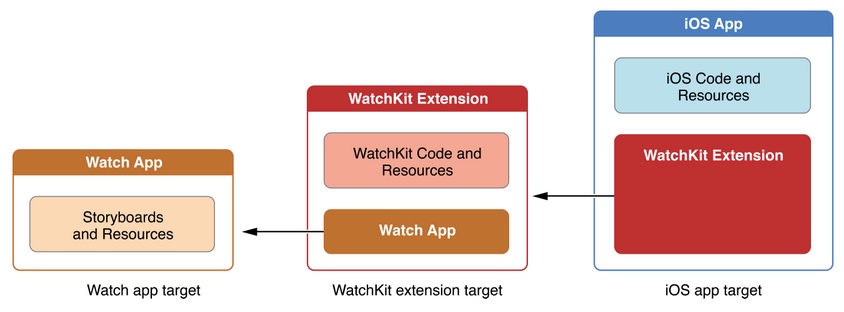
開發Watch App時,所要注意的角色有三個,因為Watch App無法獨自運行,需要透過iOS App來啟動與操作它,而彼此溝通的橋樑則是WatchKit Extension。我們可以很清楚地從下圖得知三個角色的關係:

watch app target structure

使用Xcode 6.2開發Watch App時,原本的專案就是iOS App,操作順序:New->Target->Apple Watch->WatchKit App,便會同時產生WatchKit App與WatchKit Extension到專案中。WatchKit App僅含Storyboards與Resources,WatchKit Extension則含WatchKit Code與Resource。

new target watchkit app

據知未來Watch App可獨立運行,就讓我們拭目以待吧!

參考:Apple Watch开发初探

[iOS] 可可豆莢多目標 (Cocoapods with Multiple Targets)

隨著時間發展,iOS App已經變得更加複雜且龐大,使用使用 CocoaPods 管理第三方套件已成為必要之事,然而這樣還是不夠,因為我們一個專案 (Project)中不再只是一個目標 (Target),這些目標都需要同一個函式庫 (Library),但是可可豆莢 (Cocoapods)預設只為最初的那個目標,我們該怎麼下指令才能讓所有目標都能引用同一函式庫呢?

cocoapods13

原來只要多加link_with關鍵字,後頭接上目標的名稱即可!

/**
 Theme: Podfile with Multiple Targets
 IDE: Xcode 6
 Language: Objective C
 Date: 104/04/01
 Author: HappyMan
 Blog: https://cg2010studio.wordpress.com/
 */
source 'https://github.com/CocoaPods/Specs.git'
platform :ios, '6.0'

link_with 'HappyCan', 'HappyCan Today', 'HappyCan WatchKit Extension'

pod 'AFNetworking'
pod 'ZBarSDK'
pod 'Toast', '~> 2.4'
pod 'LineKit', '~> 1.4.1'
pod 'MBProgressHUD'
pod 'OpenSSL-Universal', '1.0.1.k’

以上範例表示我專案中有三個目標(HappyCan、HappyCan Today、HappyCan WatchKit Extension),都需要引用相同的函式庫。

參考:What is a Podfile?

[iOS] HTML的CSS轉為NSAttributedString

曾經以為TextFieldTextView裡的字只能統一屬性來顯示,從iOS 6開始它們都有了attributedText這個屬性,之後可以在字體間顯示不同的效果。

@property(nonatomic,copy)   NSAttributedString     *attributedText NS_AVAILABLE_IOS(6_0); // default is nil

現在我們想更進一步知道,如何將HTML的CSS轉為NSAttributedString,之後看到網頁排版漂亮,就可直接拿來套用!

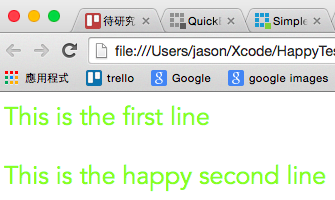
這是html呈現的字樣~

CSS to NSAttributedString - web

此外,可參考先前介紹的文章:多重文字屬性 (Multiple Text Attribute)LABEL裡的行距LABEL裡的字距

(繼續閱讀…)

[iOS] 包含字串 (Contains String)

程式語言會隨著時間進化。本次專案依然會處理字串,我自己定義字串來區別用途,想知道是否包含字串 (Contains String),iOS 7以前的作法很拐彎抹角,我是查詢StackOverflow才知道,而且不是查詢一次就記起來,可見這支NSString的method有多不直覺!

iOS 8以後,就可以用「包含」這個方法:

containsString

我很自然地就使用它,在iPhone 6/6+跑都沒問題,因為一買來就是iOS 8。直到夥伴大鳥跟我說,用它iPhone 5一跑就崩潰,後來得知它手機還是iOS 7,就在想是那支method有問題。答案揭曉⋯⋯

/**
 Theme: Contains String
 IDE: Xcode 6
 Language: Objective C
 Date: 104/03/31
 Author: HappyMan
 Blog: https://cg2010studio.wordpress.com/
 */
/* containsString: returns YES if the target string is contained within the receiver. Same as calling rangeOfString:options: with no options, thus doing a case-sensitive, non-literal search. localizedCaseInsensitiveContainsString: is the case-insensitive variant. Note that it takes the current locale into effect as well.  Locale-independent case-insensitive operation, and other needs can be achieved by calling rangeOfString:options:range:locale: directly.
 */
- (BOOL)containsString:(NSString *)aString NS_AVAILABLE(10_10, 8_0);

//--

/* These methods return length==0 if the target string is not found. So, to check for containment: ([str rangeOfString:@"target"].length > 0).  Note that the length of the range returned by these methods might be different than the length of the target string, due composed characters and such.
*/
- (NSRange)rangeOfString:(NSString *)aString;

//--

    NSString *str;
    if ([str rangeOfString:@"HappyDay"].location != NSNotFound) {
        // iOS 7以前拐彎抹角
    }

    if ([str containsString:@"HappyDay"]) {
        // iOS 8以後可以很開心
    }

把method的名稱設計得很直覺,真的是件好事呀~

參考:。

標籤雲