
有時候需要刪除所有檔案與資料夾 (Delete all File and Folder),來重新下載檔案,因為有可能下載來的檔案是壞掉的。
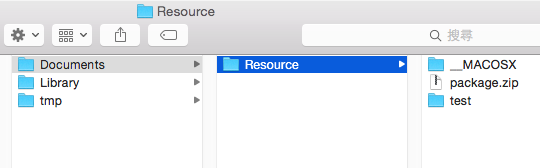
原來只要一行程式碼就能搞定,之前我還想說要跑資料夾下的所有檔案來一一刪除,會使用這篇列出檔案名稱 (List File Name)。
/**
 Theme: Delete all File and Folder
 IDE: Xcode 6
 Language: Objective C
 Date: 104/09/29
 Author: HappyMan
 Blog: https://cg2010studio.wordpress.com/
 */
    // Documents 資料夾
    NSArray *paths = NSSearchPathForDirectoriesInDomains (NSDocumentDirectory, NSUserDomainMask, YES);
    NSString *documentsPath = [paths objectAtIndex:0];
    NSString *folderPath = [documentsPath stringByAppendingPathComponent:@"Resource"];
    NSError *error = nil;
    BOOL isSuccess = [fm removeItemAtPath:folderPath error:&error];
    if (!isSuccess || error) {
        // something went wrong
    }
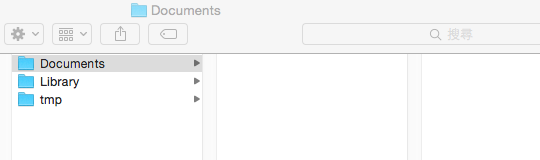
執行後,結果為:
參考:How to delete ALL FILES in a specified directory on the app?。


 逍遙文工作室
隨意留個言吧:)~