
區域通知的做法已經在指定時間本地通知 (Local Notification in Particular Time),它的行為其實有兩種,一種是當APP為背景執行時出現訊息,另一種則是APP在前景執行時跳出提示。
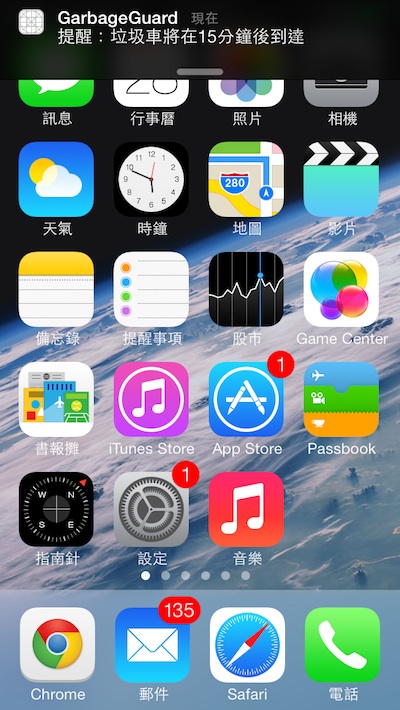
這是APP背景執行的時候,或沒有執行的時候。
如果只照著指定時間本地通知這篇實作,只能得到上圖結果,若能在AppDelegate.m中實作以下方法,就能在APP前景執行時有對應的動作喔!
/**
 Theme: Local Notification Behavior
 IDE: Xcode 5
 Language: Objective C
 Date: 103/04/30
 Author: HappyMan
 Blog: https://cg2010studio.wordpress.com/
 */
- (void)application:(UIApplication *)app didReceiveLocalNotification:(UILocalNotification *)notif {
    // Handle the notificaton when the app is running

    DxLog(@"Recieved Notification %@",notif);

    UIAlertView *av = [[UIAlertView alloc] initWithTitle:@"提醒" message:notif.alertBody delegate:nil cancelButtonTitle:@"OK" otherButtonTitles:nil, nil];

    [av show];
}
很簡單地用alert view處理,結果就如你所見~
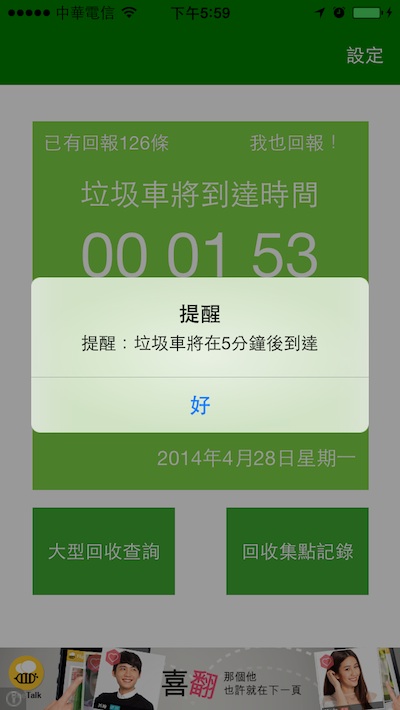
這是APP前景執行時的行為。
參考:。


 逍遙文工作室
Comments on: "[iOS] 區域通知的行為 (Local Notification Behavior)" (1)
[…] 好,一切準備妥當,這時候利用我之前介紹的區域通知的行為 (Local Notification Behavior),將音檔名稱設定好,即能在APP前景與背景運行時播放我們指定的音樂旋律囉~當然我們也可以惡搞使用者啦⋯⋯ […]
讚讚