
會在地圖上顯示自己目前的位置和得知經緯度後,接下來做更有趣的應用吧!在此我想要在YouBike所在地插上地標,未來還可把圖釘換成腳踏車的icon喔!
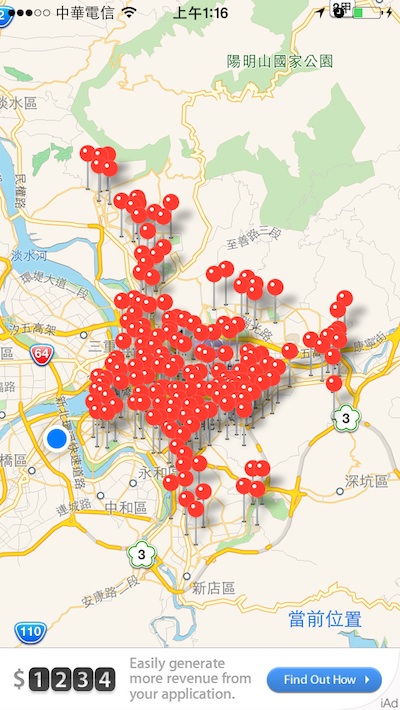
目前YouBike租借站有這麼多喔!
自從去年四月開始,全台政府開始實施開放資料(Open Data)計劃,許多屬於人民們的資料得以再被應用,如此就能使我們的生活更加便利。
按照開發者文件說明,若要使用此功能就必須建立一個使用MKAnnotation的類別,並宣告該類別的三個屬性(特別注意括號裡的性質)和一個初始化方法。
我有使用AFNetworking來獲取YouBike的開放資料,特別去抓取租借站的經緯度,如此就能將圖釘插在目的地。
註解掉的部分則是以臺北101為原點,任意亂數插了17根圖釘。
/**
 Theme: Put Annotation on Map
 IDE: Xcode 5
 Language: Objective C
 Date: 103/04/09
 Author: HappyMan
 Blog: https://cg2010studio.wordpress.com/
 */
// HTStationPin.h
#import <Foundation/Foundation.h>
#import <MapKit/MapKit.h>
@interface HTStationPin : NSObject <MKAnnotation>

@property (nonatomic) CLLocationCoordinate2D coordinate;
@property (nonatomic, retain) NSString *title;
@property (nonatomic, retain) NSString *subtitle;
- (id)initWithCoordinate:(CLLocationCoordinate2D)coordinate;
@end

// HTStationPin.m
#import "HTStationPin.h"
@implementation HTStationPin
- (id)initWithCoordinate:(CLLocationCoordinate2D)coordinate
{
    self = [super init];
    if (self != nil) {
        self.coordinate = coordinate;
    }
    return self;
}
@end

// HTMapViewController.m
#import "HTMapViewController.h"
#import "HTStationPin.h"
#import "AFHTTPClient.h"
#import "AFJSONRequestOperation.h"

@implementation HTMapViewController

- (void)viewDidLoad
{
    [super viewDidLoad];
    [self setupMapView];
    [self fetchYoubikeStationInfo];
//    [self setupStationPin];
}

-(void)setupMapView
{
    // 顯示目前位置(藍色白框的圓點)
    myMapView.showsUserLocation = YES;

    // MapView的環境設置
    myMapView.mapType = MKMapTypeStandard;
    myMapView.scrollEnabled = YES;
    myMapView.zoomEnabled = YES;

    // 將MapView顯示於畫面
    [self.view insertSubview:myMapView atIndex:0];
}

-(IBAction)onNowLocacion:(id)sender {
    // 取得現在位置
    double X = myMapView.userLocation.location.coordinate.latitude;
    double Y = myMapView.userLocation.location.coordinate.longitude;

    // 自行定義的設定地圖函式
    [self setMapRegionLongitude:Y andLatitude:X withLongitudeSpan:0.05 andLatitudeSpan:0.05];
}

// 自行定義的設定地圖函式
-(void)setMapRegionLongitude:(double)Y andLatitude:(double)X withLongitudeSpan:(double)SY andLatitudeSpan:(double)SX
{
    // 設定經緯度
    CLLocationCoordinate2D mapCenter;
    mapCenter.latitude = X;
    mapCenter.longitude = Y;

    // Map Zoom設定
    MKCoordinateSpan mapSpan;
    mapSpan.latitudeDelta = SX;
    mapSpan.longitudeDelta = SY;

    // 設定地圖顯示位置
    MKCoordinateRegion mapRegion;
    mapRegion.center = mapCenter;
    mapRegion.span = mapSpan;

    // 前往顯示位置
    [myMapView setRegion:mapRegion];
    [myMapView regionThatFits:mapRegion];
}

// 臺北101地標經緯度
double LATITUDE = 25.033611;
double LONGITUDE = 121.564444;
// 自行定義設定地圖標籤的函式
-(void)setupStationPin
{
    // 宣告陣列來存放標籤
    annotationArr = [[NSMutableArray alloc] init];

    for (int i = 1; i <= 17; i++) {

        // 隨機設定標籤的緯度
        CLLocationCoordinate2D pinCenter;
        pinCenter.latitude = LATITUDE + (float)(arc4random() % 100) / 10000;
        pinCenter.longitude = LONGITUDE + (float)(arc4random() % 100) / 10000;

        // 建立一個地圖標籤並設定內文
        HTStationPin *annotation = [[HTStationPin alloc] init];
        annotation.coordinate = pinCenter;
        annotation.title = @"HappyMan's Studio";
        annotation.subtitle = [NSString stringWithFormat:@"Happy - %i", i];

        // 將製作好的標籤放入陣列中
        [annotationArr addObject:annotation];
    }

    // 將陣列中所有的標籤顯示在地圖上
    [myMapView addAnnotations:annotationArr];
}

-(void)fetchYoubikeStationInfo
{
    AFHTTPClient *clinet = [[AFHTTPClient alloc] initWithBaseURL:[NSURL URLWithString:@"http://210.69.61.60:8080/"]];
    [clinet registerHTTPOperationClass:[AFJSONRequestOperation class]];

    [clinet postPath:@"you/gwjs_cityhall.json"
          parameters:nil
             success:^(AFHTTPRequestOperation *operation, id responseObject) {
                 NSDictionary *resultDict = responseObject;
                 [self setupYouBikeStationPin:resultDict[@"retVal"]];
                 NSLog(@"resultDict: %@", resultDict);
             }
             failure:^(AFHTTPRequestOperation *operation, NSError *error) {
                 NSLog(@"error: %@", error);
             }
     ];
}

-(void)setupYouBikeStationPin:(NSArray *)dataArr
{
    // 宣告陣列來存放標籤
    youBikeStationAnnotationArr = [[NSMutableArray alloc] init];

    for (int i = 0; i < [dataArr count]; i++) {

        // 隨機設定標籤的緯度
        CLLocationCoordinate2D pinCenter;
        pinCenter.latitude = [dataArr[i][@"lat"] doubleValue];
        pinCenter.longitude = [dataArr[i][@"lng"] doubleValue];

        // 建立一個地圖標籤並設定內文
        HTStationPin *annotation = [[HTStationPin alloc] init];
        annotation.coordinate = pinCenter;
        annotation.title = dataArr[i][@"sna"];
        annotation.subtitle = dataArr[i][@"ar"];

        // 將製作好的標籤放入陣列中
        [youBikeStationAnnotationArr addObject:annotation];
    }

    // 將陣列中所有的標籤顯示在地圖上
    [myMapView addAnnotations:youBikeStationAnnotationArr];
}
來看看我母校師大分部也有個Youbike站,天天都可以騎到公司去上班呢!
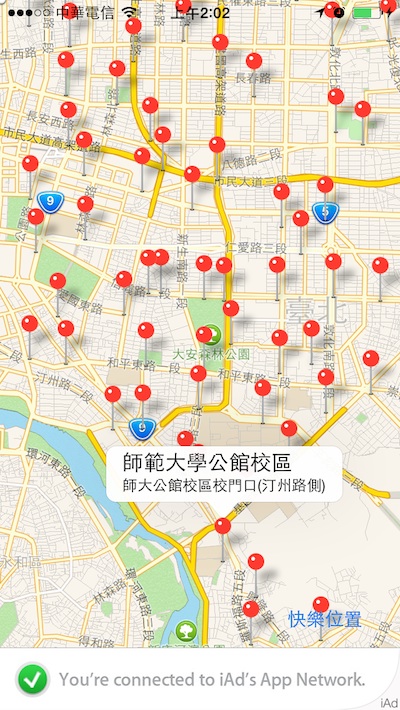
點擊圖釘,會彈出主標和副標。


 逍遙文工作室
隨意留個言吧:)~