
在視圖圓角這篇文章中介紹過,只要是繼承UIView的子類別都可以實現圓角的效果~所以當然TextField和TextView也可以顯示圓角囉!除了可以變成不同程度的圓角,還可以改變框的厚度和顏色。
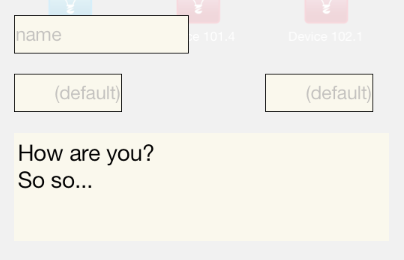
預設TextField和TextView的角都是直角

經過程式設定後變圓,而且顏色設定為灰色
使用前先做兩個步驟:
- add QuartzCore.framework
- import <QuartzCore/QuartzCore.h>
/**
 Theme: Frame of TextField and TextView
 IDE: Xcode 5
 Language: Objective C
 Date: 102/12/29
 Author: HappyMan
 Blog: https://cg2010studio.wordpress.com/
 */
-(void)adjuctUI
{
    self.nameTextField.layer.cornerRadius = 10.0;
    self.nameTextField.layer.borderWidth = 1.0;
    self.nameTextField.layer.borderColor = [[UIColor grayColor] CGColor];

    self.timeTextField.layer.cornerRadius = 10.0;
    self.timeTextField.layer.borderWidth = 1.0;
    self.timeTextField.layer.borderColor = [[UIColor grayColor] CGColor];

    self.intensityTextField.layer.cornerRadius = 10.0;
    self.intensityTextField.layer.borderWidth = 1.0;
    self.intensityTextField.layer.borderColor = [[UIColor grayColor] CGColor];

    self.commentTextView.layer.cornerRadius = 10.0;
    self.commentTextView.layer.borderWidth = 1.0;
    self.commentTextView.layer.borderColor = [[UIColor grayColor] CGColor];
}
程式已經能調得很好看呢!這樣簡單的界面就不用特地請美術出圖嚕~


 逍遙文工作室
Comments on: "[iOS] TextField和TextView顯示圓角" (3)
變圓視覺上比較圓滑,有何特別好處?
讚讚
看到的人在做人處事方面會比較圓融! 😛
讚讚
haha.
讚讚