
使用非同步呼叫的好處是,不需要等到函式結束返回,即可執行接下來的函式。如此從網路下載較大容量的資料,就不會讓使用者界面卡住。下載過程中的事件可請delegate處理。

在.h中宣告好IB需使用到的變數和代理:
@interface HTImageViewController : UIViewController <NSURLConnectionDataDelegate>
@property (nonatomic, retain) NSMutableData *data;
@property (nonatomic, retain) IBOutlet UIImageView *imageView;
@property (nonatomic, retain) IBOutlet UILabel *label;
@end
在.m中實作對應事件的處理:
- (void)viewDidLoad
{
    [super viewDidLoad];
    self.navigationController.navigationBarHidden = YES;
    [self beginDownload];
}

-(void)beginDownload
{
    NSURL *url = [NSURL URLWithString:@"https://cg2010studio.com/wp-content/uploads/2011/11/happymans-name-card-qr-code-qq-20130304s.jpg"];
    NSURLRequest *request = [NSURLRequest requestWithURL:url];
    NSURLConnection *connection = [[NSURLConnection alloc] initWithRequest:request delegate:self startImmediately:YES];
    if (connection) {
        self.data = [NSMutableData data];
    }
    else {
        UIAlertView *alertView = [[UIAlertView alloc] initWithTitle:@"連線失敗" message:@"無法建立連線" delegate:nil cancelButtonTitle:@"OK" otherButtonTitles:nil, nil];
        [alertView show];
    }
}

#pragma mark - NSURLConnectionDataDelegate
-(void)connection:(NSURLConnection *)connection didReceiveResponse:(NSURLResponse *)response
{
    self.label.text = @"接收到回應";
    [self.data setLength:0];
}

-(void)connection:(NSURLConnection *)connection didReceiveData:(NSData *)data
{
    self.label.text = @"下載中";
    [self.data appendData:data];
}

-(void)connectionDidFinishLoading:(NSURLConnection *)connection
{
    self.label.text = @"下載完成";
    UIImage *image = [UIImage imageWithData:self.data];
    [self.imageView setImage:image];
}

-(void)connection:(NSURLConnection *)connection didFailWithError:(NSError *)error
{
    UIAlertView *av = [[UIAlertView alloc] initWithTitle:@"連線失敗"
                                                 message:@"無法順利完成連線"
                                                delegate:nil
                                       cancelButtonTitle:@"OK"
                                       otherButtonTitles:nil, nil];
    [av show];
}
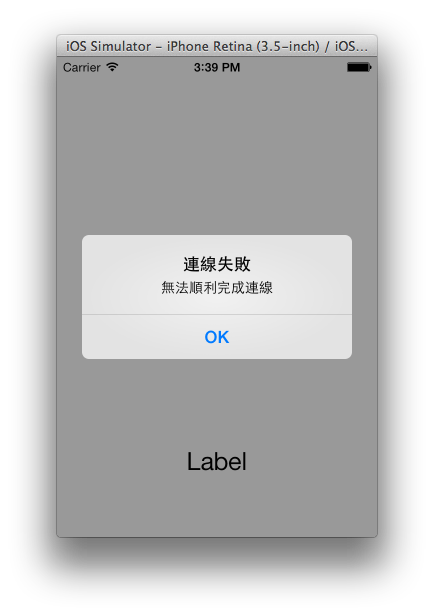
- 在http連線得到回應時,代理物件的connection:didReceiveResponse:會被呼叫。
- 之後不斷接收到http的資料時,代理物件的connection:didReceiveData:會被呼叫。
- 完成接收時,代理物件的connectionDidFinishLoading:會被呼叫。
- 如果沒有網路,就會出現警示,代理物件的connection:didFailWithError:會被呼叫。
接著使用同步呼叫與GCD的非同步執行,此時不需要用到delegate,主程式需要同步下載時,呼叫另一個執行緒來進行同步下載,當另一個執行緒下載完畢後,再呼叫主執行緒來進行畫面的更新。在下載的過程中,主執行緒因沒有被阻擋而能夠執行許多其它命令。
-(void)beginDownload
{
    NSURL *url = [NSURL URLWithString:@"https://cg2010studio.com/wp-content/uploads/2011/11/happymans-name-card-qr-code-qq-20130304s.jpg"];
    NSURLRequest *request = [NSURLRequest requestWithURL:url];
    dispatch_queue_t downloadQueue = dispatch_queue_create("downloadQueue", DISPATCH_QUEUE_CONCURRENT);
    dispatch_async(downloadQueue, ^{
        NSLog(@"開始下載");
        NSData *data = [NSURLConnection sendSynchronousRequest:request returningResponse:nil error:nil];
        if (data) {
            NSLog(@"下載完成");
            UIImage *image = [UIImage imageWithData:data];
            dispatch_async(dispatch_get_main_queue(), ^{
                [self.imageView setImage:image];
            });
        }
        else {
            NSLog(@"下載失敗");
            dispatch_async(dispatch_get_main_queue(), ^{
                UIAlertView *alertView = [[UIAlertView alloc] initWithTitle:@"連線失敗" message:@"無法建立連線" delegate:nil cancelButtonTitle:@"OK" otherButtonTitles:nil, nil];
                [alertView show];
            });
        }
    });
}
參考:前進APP Store iOS 6 SDK 實戰演練。


 逍遙文工作室
隨意留個言吧:)~