
在瞭解結構相似性 (Structural SIMilarity)後,接下來就是驗證它的效果~我使用和峰值信號雜訊比 (Peak Signal to Noise Ratio)同樣的影像來示範。

定義可參考:結構相似性 (Structural SIMilarity),在此只列出數學方程式:

顯示有問題,可點圖查看。
其中,l(x, y)比較x和y的亮度(luminance),c(x, y)比較x和y的對比度(contrast),s(x, y)比較x和y的結構(structure),α>0、β>0、γ>0、μσ,為調整l(x, y)、c(x, y)、s(x, y)相對重要性的參數,μx及μy、σx及σy分別為x和y的平均值和標準差,σxy為x和y的共變異數,C1、C2、C3 皆為常數,用以維持l(x, y)、c(x, y)、s(x, y)的穩定。
為了節省時間,我拾人牙慧,在這列出他的版權宣告:
* The equivalent of Zhou Wang’s SSIM matlab code using OpenCV.
* from http://www.cns.nyu.edu/~zwang/files/research/ssim/index.html
* The measure is described in :
* “Image quality assessment: From error measurement to structural similarity"
* C++ code by Rabah Mehdi. http://mehdi.rabah.free.fr/SSIM
*
* This implementation is under the public domain.
* @see http://creativecommons.org/licenses/publicdomain/
* The original work may be under copyrights.
/**
	Theme: SSIM (Structural SIMilarity)
	compiler: Dev C++ 4.9.9.2
	Library: OpenCV 2.0
	Date: 102/01/07
	Author: HappyMan
	Blog: https://cg2010studio.wordpress.com/
*/

#include <cv.h>
#include <highgui.h>
#include <iostream.h>

int main(){
	// default settings
	double C1 = 6.5025, C2 = 58.5225;

	IplImage
		*img1=NULL, *img2=NULL, *img1_img2=NULL,
		*img1_temp=NULL, *img2_temp=NULL,
		*img1_sq=NULL, *img2_sq=NULL,
		*mu1=NULL, *mu2=NULL,
		*mu1_sq=NULL, *mu2_sq=NULL, *mu1_mu2=NULL,
		*sigma1_sq=NULL, *sigma2_sq=NULL, *sigma12=NULL,
		*ssim_map=NULL, *temp1=NULL, *temp2=NULL, *temp3=NULL;

	/***************************** INITS **/
	img1_temp = cvLoadImage("landscape.png");
	img2_temp = cvLoadImage("landscape100Q.jpg");

	if(img1_temp==NULL || img2_temp==NULL)
		return -1;

	int x=img1_temp->width, y=img1_temp->height;
	int nChan=img1_temp->nChannels, d=IPL_DEPTH_32F;
	CvSize size = cvSize(x, y);

	img1 = cvCreateImage( size, d, nChan);
	img2 = cvCreateImage( size, d, nChan);

	cvConvert(img1_temp, img1);
	cvConvert(img2_temp, img2);
	cvReleaseImage(&img1_temp);
	cvReleaseImage(&img2_temp);

	img1_sq = cvCreateImage( size, d, nChan);
	img2_sq = cvCreateImage( size, d, nChan);
	img1_img2 = cvCreateImage( size, d, nChan);

	cvPow( img1, img1_sq, 2 );
	cvPow( img2, img2_sq, 2 );
	cvMul( img1, img2, img1_img2, 1 );

	mu1 = cvCreateImage( size, d, nChan);
	mu2 = cvCreateImage( size, d, nChan);

	mu1_sq = cvCreateImage( size, d, nChan);
	mu2_sq = cvCreateImage( size, d, nChan);
	mu1_mu2 = cvCreateImage( size, d, nChan);

	sigma1_sq = cvCreateImage( size, d, nChan);
	sigma2_sq = cvCreateImage( size, d, nChan);
	sigma12 = cvCreateImage( size, d, nChan);

	temp1 = cvCreateImage( size, d, nChan);
	temp2 = cvCreateImage( size, d, nChan);
	temp3 = cvCreateImage( size, d, nChan);

	ssim_map = cvCreateImage( size, d, nChan);
	/*************************** END INITS **/

	//////////////////////////////////////////////////////////////////////////
	// PRELIMINARY COMPUTING
	cvSmooth( img1, mu1, CV_GAUSSIAN, 11, 11, 1.5 );
	cvSmooth( img2, mu2, CV_GAUSSIAN, 11, 11, 1.5 );

	cvPow( mu1, mu1_sq, 2 );
	cvPow( mu2, mu2_sq, 2 );
	cvMul( mu1, mu2, mu1_mu2, 1 );

	cvSmooth( img1_sq, sigma1_sq, CV_GAUSSIAN, 11, 11, 1.5 );
	cvAddWeighted( sigma1_sq, 1, mu1_sq, -1, 0, sigma1_sq );

	cvSmooth( img2_sq, sigma2_sq, CV_GAUSSIAN, 11, 11, 1.5 );
	cvAddWeighted( sigma2_sq, 1, mu2_sq, -1, 0, sigma2_sq );

	cvSmooth( img1_img2, sigma12, CV_GAUSSIAN, 11, 11, 1.5 );
	cvAddWeighted( sigma12, 1, mu1_mu2, -1, 0, sigma12 );

	//////////////////////////////////////////////////////////////////////////
	// FORMULA

	// (2*mu1_mu2 + C1)
	cvScale( mu1_mu2, temp1, 2 );
	cvAddS( temp1, cvScalarAll(C1), temp1 );

	// (2*sigma12 + C2)
	cvScale( sigma12, temp2, 2 );
	cvAddS( temp2, cvScalarAll(C2), temp2 );

	// ((2*mu1_mu2 + C1).*(2*sigma12 + C2))
	cvMul( temp1, temp2, temp3, 1 );

	// (mu1_sq + mu2_sq + C1)
	cvAdd( mu1_sq, mu2_sq, temp1 );
	cvAddS( temp1, cvScalarAll(C1), temp1 );

	// (sigma1_sq + sigma2_sq + C2)
	cvAdd( sigma1_sq, sigma2_sq, temp2 );
	cvAddS( temp2, cvScalarAll(C2), temp2 );

	// ((mu1_sq + mu2_sq + C1).*(sigma1_sq + sigma2_sq + C2))
	cvMul( temp1, temp2, temp1, 1 );

	// ((2*mu1_mu2 + C1).*(2*sigma12 + C2))./((mu1_sq + mu2_sq + C1).*(sigma1_sq + sigma2_sq + C2))
	cvDiv( temp3, temp1, ssim_map, 1 );

	CvScalar index_scalar = cvAvg( ssim_map );

	// through observation, there is approximately
	// 1% error max with the original matlab program

	cout << "(R, G & B SSIM index)" << endl ;
	cout << index_scalar.val[2] * 100 << "%" << endl ;
	cout << index_scalar.val[1] * 100 << "%" << endl ;
	cout << index_scalar.val[0] * 100 << "%" << endl ;

	// if you use this code within a program
	// don't forget to release the IplImages
	system("pause");
	return 0;
}
我實驗幾張圖,分別由png檔轉存jpg檔為不同壓縮品質(100%+High Quality、100%、90%、60%、30%、10%),再與png檔做比較。
執行結果:
100%+High Quality:
(R, G & B SSIM index)
99.5964%
99.6377%
98.7424%
請按任意鍵繼續 . . .

100%:
(R, G & B SSIM index)
96.3409%
98.4572%
74.6872%
請按任意鍵繼續 . . .

90%:
(R, G & B SSIM index)
88.9117%
91.2599%
68.1714%
請按任意鍵繼續 . . .
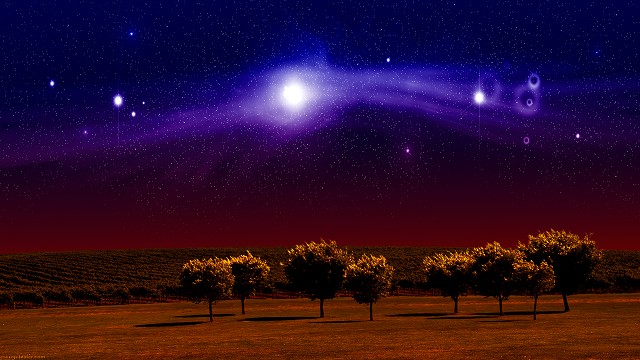
60%:
(R, G & B SSIM index)
72.509%
78.4402%
58.869%
請按任意鍵繼續 . . .

30%:
(R, G & B SSIM index)
63.4032%
69.9152%
55.8927%
請按任意鍵繼續 . . .
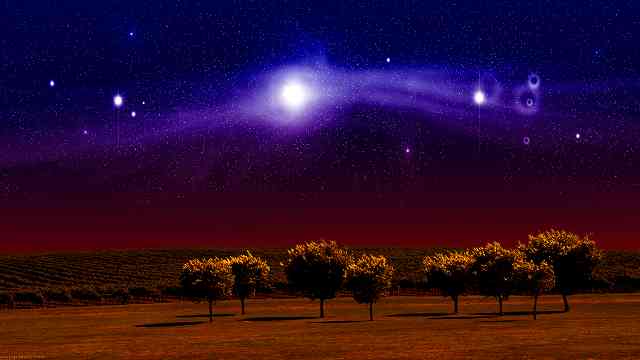
10%:
(R, G & B SSIM index)
50.5813%
54.033%
54.6787%
請按任意鍵繼續 . . .

可以對照峰值信號雜訊比 (Peak Signal to Noise Ratio),能發現是成正相關。
參考:WiKi – 結構相似性、SSIM implementation for OpenCV2.x (c++)。


 逍遙文工作室
隨意留個言吧:)~