
之前在OpenCV 2.4 beta玩的tutorial code是較為完整的教學程式碼,我以為還有其它鏡頭校正 (Camera Calibration)的方法,但試驗該sample code之後,發現其實校正方式一模一樣,還是達不到我的要求,不過在此依然紀錄實驗結果,以供參考。

- 範例程式:C:\OpenCV2.4beta\samples\cpp\calibration.cpp
- 環境設定:Visual Studio 2010 安裝 OpenCV 2.4 beta
我所使用的校正用影像為右邊鏡頭所拍攝的相片,可以看上頭總共有八張影像。棋盤大小為9×6。
程式找到棋盤內角總共8×5個,會標記如下圖:(點圖可放大)
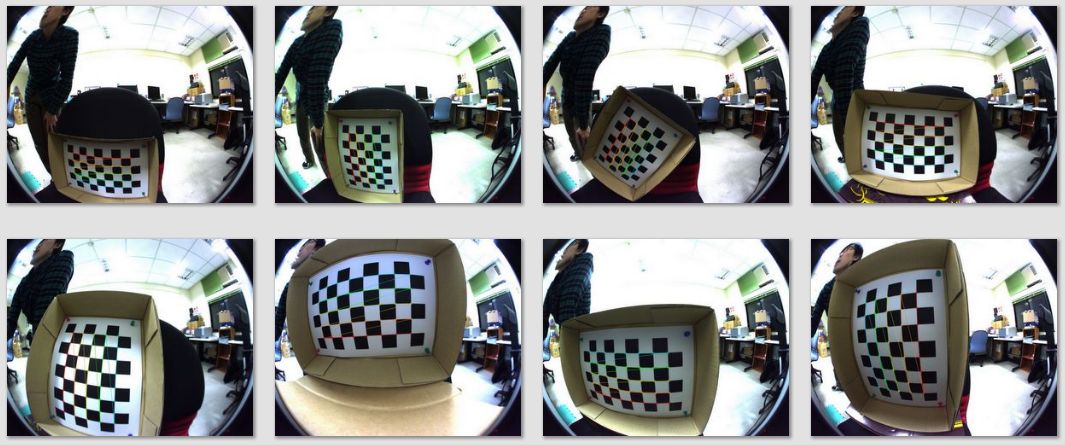
根據以上八章影像所找到的棋盤內角,程式會進行校正運算,再以原本八張影像作為校正對象,其校正結果如下圖:(點圖可放大)

此程式可以使用webcam來取的影像,也可使用圖檔來取得影像。
程式使用範例:
- calibration.exe -w 8 -h 5 -s 0.025 -o camera.yml -op -oe file.xml
程式使用方法:
- -w <board_width> # the number of inner corners per one of board dimension
- -h <board_height> # the number of inner corners per another board dimension
- [-pt <pattern>] # the type of pattern: chessboard or circles’ grid
- [-n <number_of_frames>] # the number of frames to use for calibration
# (if not specified, it will be set to the number
# of board views actually available) - [-d <delay>] # a minimum delay in ms between subsequent attempts to capture a next view
# (used only for video capturing) - [-s <squareSize>] # square size in some user-defined units (1 by default)
- [-o <out_camera_params>] # the output filename for intrinsic [and extrinsic] parameters
- [-op] # write detected feature points
- [-oe] # write extrinsic parameters
- [-zt] # assume zero tangential distortion
- [-a <aspectRatio>] # fix aspect ratio (fx/fy)
- [-p] # fix the principal point at the center
- [-v] # flip the captured images around the horizontal axis
- [-V] # use a video file, and not an image list, uses
# [input_data] string for the video file name - [-su] # show undistorted images after calibration
- [input_data] # input data, one of the following:
# – text file with a list of the images of the board
# the text file can be generated with imagelist_creator
# – name of video file with a video of the board
# if input_data not specified, a live view from the camera is used
file.xml全部內容:
<?xml version="1.0″?>
<opencv_storage>
<images>
a1.jpg
a2.jpg
a3.jpg
a4.jpg
a5.jpg
a6.jpg
a7.jpg
a8.jpg
</images>
</opencv_storage>
ax.jpg為想要作為校正用的影像。
camera.yml部份內容:
%YAML:1.0
calibration_time: “05/05/12 14:58:13″
nframes: 8
image_width: 1280
image_height: 1024
board_width: 8
board_height: 5
square_size: 2.5000000372529030e-002
flags: 0
camera_matrix: !!opencv-matrix
rows: 3
cols: 3
dt: d
data: [ 5.1071821593764429e+002, 0., 6.3051054207798882e+002, 0.,
5.0977660977712299e+002, 5.1000061871235062e+002, 0., 0., 1. ]
distortion_coefficients: !!opencv-matrix
rows: 5
cols: 1
dt: d
data: [ -3.1421595155282861e-001, 9.1783527643939114e-002,
-4.4915505204101361e-004, 1.2020915220247500e-004,
-1.1457381174191541e-002 ]
avg_reprojection_error: 9.3127563437128957e-001
per_view_reprojection_errors: !!opencv-matrix
rows: 8
cols: 1
dt: f
data: [ 6.95756018e-001, 5.64228654e-001, 6.18453860e-001,
7.01186538e-001, 1.06855989e+000, 1.11666107e+000,
1.17461216e+000, 1.22194541e+000 ]
# a set of 6-tuples (rotation vector + translation vector) for each view
extrinsic_parameters: !!opencv-matrix
rows: 8
cols: 6
dt: d
data: [ -3.9843277597320970e-001, 2.8861063865948992e-002,
-4.6245901196823688e-002, -1.6914597147771646e-001,…
image_points: !!opencv-matrix
rows: 8
cols: 40
dt: “2f"
data: [ 3.44058594e+002, 7.63874634e+002, 3.76756073e+002,
7.70987976e+002, 4.13439178e+002, 7.77496582e+002,…
看來魚眼鏡頭曲率太大,以致校正結果邊緣效果相當差,雖然中間部份彎曲已校正為筆直。
結論:此程式只適用曲率較低的鏡頭校正使用!


 逍遙文工作室
Comments on: "[OpenCV] 鏡頭校正 (Camera Calibration)" (9)
你好,最近我有接觸影像拼貼的演算法,對於其中有部分是在說明相機校正的部分,想請教您關於此部分的結果,該如何分析程式產生的結果!?
讚讚
這個我就沒花時間研究了呢~如果你有分析後的心得,歡迎分享給大家喔! 😉
讚讚
請問一下,攝影機有沒有校正會對SURF找特徵點在匹配有影像嗎?會不會影響到匹配的結果
讚讚
因為校正後會改變某些pixel的位置,而SURF會根據pixel來計算出特徵,於是匹配結果就會被影響到囉~
讚讚
所以說校正過後再找特徵點匹配會比較不會有找錯特徵點的情形?匹配結果也會比較好?
讚讚
還是要看校正後的影像和想要匹配的影像中的特徵是否相似,越相似的話當然匹配結果會比較好囉~
讚讚
不好意思,再請問一下,OPENCV校正的範例怎麼使用啊??看了半天看不懂,我已經把要校正的棋盤照片都拍好了,可是不知道該怎用,冏
讚讚
基本上就是這個指令:
calibration.exe -w 8 -h 5 -s 0.025 -o camera.yml -op -oe file.xml
後頭是你想帶入的參數,file.xml要編輯你想要作為校正用的影像,camera.yml會產生校正後詳細資料。
讚讚
[…] 註:這篇相機校準 (Camera Calibration)其實比鏡頭校正 (Camera Calibration)那篇還要早寫,兩篇使用同一魚眼鏡頭做一樣的實驗,然而使用不同的演算法(前者:兩顆鏡頭;後者:一顆鏡頭),就效果而言表面上是這篇比較出色,畢竟它已把校正完然而不理想的區域給截除掉。 Share this:共享EmailPrintFacebookTwitterLike this:喜歡Be the first to like this post. […]
讚讚