Just My Life & My Work

Archive for 2016 年 05 月 22 日

[C] 轉 uint8_t 為 uint16_t

因為串接藍芽裝置,想要從藍芽裝置獲得資訊或是傳送指令到藍芽裝置,需要瞭解其溝通協定,才能順利互通有無。

因為資料長度的關係,需要把資料型別短的組合成長的,如轉 uint8_t 為 uint16_t

原始資料:

uint8_t d1 = 0x01;
uint8_t d2 = 0x07;

轉成:

uint16_t wd = 0x0701;

此時需要瞭解點位元操作,就能寫程式實現。

程式實作:

uint16_t wd = ((uint16_t)d2 << 8) | d1;

原理:

(0x0007 << 8) | 0x01 = 0x0700 | 0x0001 = 0x0701

意思是d1向左位移8位元,再和d2結合。

參考:Combining two uint8_t as uint16_t


[iOS] 應用查詢格式 (Application Query Schemes)

看這標題應用查詢格式 (Application Query Schemes)不知在表達啥咪,那就用白話文解釋⋯⋯就是我們的App想要跳轉到他人App時,所要遵從的規範。在iOS 9之後Apple更改遊戲規則,必須在info.plist注明我們想要跳轉的格式,不然程式就會報錯:

This app is not allowed to query for scheme

比如我想要跳轉到Google Map App,我會在程式碼中設定開頭:

comgooglemaps://

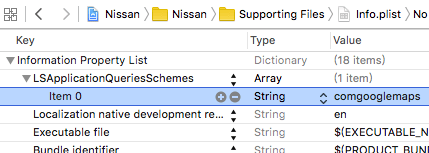
iOS 9以後就要在info.plist加入:

iOS Application Query Schemes plist.png

果真加入後立馬編譯執行,就能跳轉到Google Map App,而不是到App Store App的Google Map App頁面呢~

參考:[iOS] 使用Google Map導航[iOS] 使用Google Map顯示地點、Google SDK –
Google 地圖 URL 配置canOpenUrl – This app is not allowed to query for scheme instragram iOS9

標籤雲