
有時候我們使用某些APP,想要分享訊息或影像的時候,會從螢幕下方跳出選單,這個選單中的功能十分齊全,可說應有盡有!讓我們不用實作多個分享平台,只要已經內建在系統中的分享平台如Facebook和Twitter,即可輕鬆讓使用者分享訊息和影像!

除了分享平台之外,它還可以儲存相片、寄送給聯絡人、複製、列印,甚至使用AirDrop和AirPlay!
實作上非常簡單,只要三行程式碼,就能解決一切!也就是準備好想要分享的文字和影像,叫出活動視圖控制器 (UIActivityViewController),接下來就隨意選擇囉~
/**
 Theme: ActivityViewController
 IDE: Xcode 5
 Language: Objective C
 Date: 103/05/29
 Author: HappyMan
 Blog: https://cg2010studio.wordpress.com/
 */
-(IBAction)shareButtonClicked:(UIButton *)button
{
    UIImage *happyImage = [UIImage imageNamed:@"HappyMan.jpg"];
    UIActivityViewController *avc = [[UIActivityViewController alloc] initWithActivityItems:[NSArray arrayWithObjects:@"我是快樂測試人!", happyImage, nil] applicationActivities:nil];
    [self presentViewController:avc animated:YES completion:nil];
}
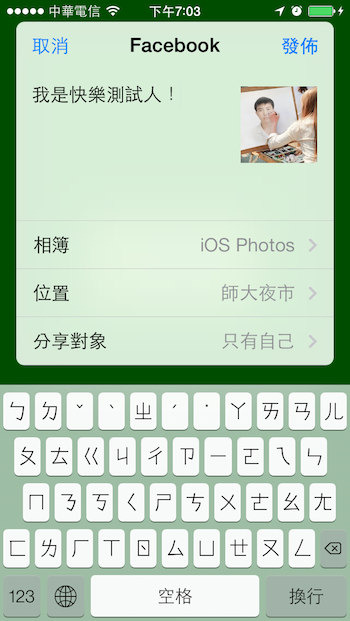
然而我們會見到,並不是所有分享平台都在上頭,我測試過得到的結論是,在系統Setting中登入內建的分享平台,才會顯示出來給我們點選喔!
此外像我還會想使用Line分享或使用Skype、What’sApp分享,此時就要找其它方法囉!
171116更新:最近又使用到分享功能,忘記自己曾經有寫這篇文章XD~
/**
 Theme: UIActivityViewController
 IDE: Xcode 9
 Language: Objective C
 Date: 106/11/16
 Author: HappyMan
 Blog: https://cg2010studio.com/
 */

-(IBAction)shareButtonClicked:(UIButton *)button
{
    // grab an item we want to share
    UIImage *image;

    NSArray *items = @[image, NSLocalizedString(@"friend_share_message", @""), SDAppDownloadURL];

    // build an activity view controller
    UIActivityViewController *controller = [[UIActivityViewController alloc] initWithActivityItems:items applicationActivities:nil];

    // exclude several items
    //    NSArray *excluded = @[UIActivityTypePostToFacebook, UIActivityTypePostToTwitter];
    //    controller.excludedActivityTypes = excluded;

    // and present it
    [self.navigationController presentViewController:controller animated:YES completion:^{

    }];

    // access the completion handler
    controller.completionWithItemsHandler = ^(NSString *activityType,
                                              BOOL completed,
                                              NSArray *returnedItems,
                                              NSError *error){
        // react to the completion
        if (completed) {

            // user shared an item
            DXLog(@"We used activity type: %@", activityType);

        } else {

            // user cancelled
            DXLog(@"We didn't want to share anything after all.");
        }

        if (error) {
            DXLog(@"An Error occured: %@, %@", error.localizedDescription, error.localizedFailureReason);
        }
    };
}


 逍遙文工作室
Comments on: "[iOS] 活動視圖控制器 (UIActivityViewController)" (4)
今日又用到內建分享功能囉~是要分享曬單圖! 😀
讚讚
請問何謂「在系統Setting中登入內建的分享平台」?可否描述一下如何操作。非常感謝。
讚讚
謝謝您的提問,這篇是在2014年寫出來,當時內建的系統Setting App可以登入Twitter、Weibo、Facebook等(如文章中的截圖)社交App,現在iOS最新作業系統已移除此功能囉~所以我的那句話可以忽略。 😉
讚讚
謝謝您的說明。
讚Liked by 1 person