
最近的案子需要實作側欄選單,曾經看過Facebook、Nike++、全家等APP都有實現,研究後發現有現成的open source可直接取用,實在太方便了!我直接使用 PPRevealSideViewController,它有非常多客製化參數可供調整。
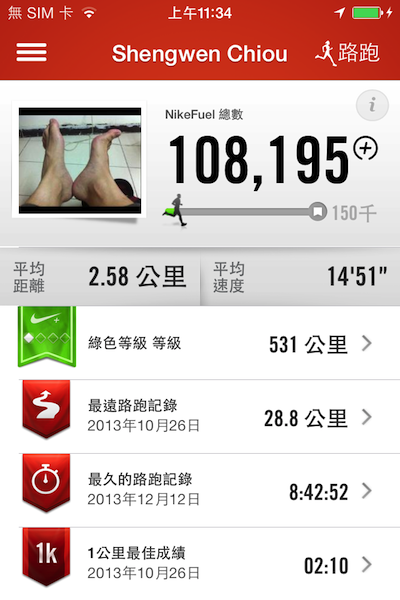
這是我的Nike++紀錄~

按左上三條橫線按鈕,左側即會跳出選單。
PPRevealSideViewController 這是一個開放資源,我的使用方式為:
- 下載PPRevealSideViewController.h與PPRevealSideViewController.m,並將兩者匯入專案。
- 要先在 -Prefix.pch 預編譯文件裡面 加上 #import “PPRevealSideViewController.h"。
- 建立主要的ViewController,接著將它塞到NavigationViewController,接著再將它塞到TabBarViewController,最後塞到RevealSideViewController,此為四層架構。
/**
 Theme: PPRevealSideViewController
 IDE: Xcode 5
 Language: Objective C
 Date: 103/01/16
 Author: HappyMan
 Blog: https://cg2010studio.wordpress.com/
 */
//HMAppDelegate.h
@property (nonatomic, strong) PPRevealSideViewController *revealSideViewController;
+(HMAppDelegate *)sharedAppDelegate;

//HMAppDelegate.m
+(HMAppDelegate *)sharedAppDelegate
{
    return (id)[[UIApplication sharedApplication] delegate];
}

- (BOOL)application:(UIApplication *)application didFinishLaunchingWithOptions:(NSDictionary *)launchOptions
{
    // ViewController & Navigation ViewController
    UIViewController *paceVC = [[HMPaceViewController alloc] init];
    UINavigationController *paceNC = [[UINavigationController alloc] initWithRootViewController:paceVC];
    paceNC.navigationBarHidden = YES;
    NSArray *controllerArr = @[paceNC,paceNC,paceNC,paceNC,paceNC];
    NSArray *imageArr = @[[UIImage imageNamed:@"icon1.png"],
                          [UIImage imageNamed:@"icon2.png"],
                          [UIImage imageNamed:@"icon3.png"],
                          [UIImage imageNamed:@"icon4.png"],
                          [UIImage imageNamed:@"icon5.png"]];
    NSArray *highlightImageArr = @[[UIImage imageNamed:@"icon1.png"],
                                   [UIImage imageNamed:@"icon2.png"],
                                   [UIImage imageNamed:@"icon3.png"],
                                   [UIImage imageNamed:@"icon4.png"],
                                   [UIImage imageNamed:@"icon5.png"]];

    // TabBarController
    ZSTabBarController *tbc = [[ZSTabBarController alloc] initWithViewControllers:controllerArr imageArray:imageArr highlightImageArray:highlightImageArr];

    // RevealSideViewController
    _revealSideViewController = [[PPRevealSideViewController alloc] initWithRootViewController:tbc];

    self.window.rootViewController = _revealSideViewController;
    return YES;
}

//HMMainViewController.m
- (void)viewDidLoad
{
    [super viewDidLoad];
    [self.menuButton addTarget:self action:@selector(enterLeftNavication) forControlEvents:UIControlEventTouchUpInside];
}

- (void)enterLeftNavication
{
    WTRevealSideViewController *leftVC = [[WTRevealSideViewController alloc] init];
    UINavigationController *leftNavVC = [[UINavigationController alloc]initWithRootViewController:leftVC];
    [[WTAppDelegate sharedAppDelegate].revealSideViewController pushViewController:leftNavVC onDirection:PPRevealSideDirectionLeft animated:YES];
}
執行結果如文章上端的圖,點擊左上那三條線的按鈕,即有想要的效果!此開源demo做得相當強大,有許多參數可供調整,立即可看到設定後的效果呢!
參考:


 逍遙文工作室
隨意留個言吧:)~