
原以為只有在ViewController繼承UITableViewController之下才能移動TableView中的Cell,然而試驗ViewController繼承UIViewController也可以做到,在view中拉table view即可實作。

在IB上拉好table view,客制化好cell,在view controller中將cell塞到table view。
 /**
 Theme: Move Cell of tableView
 IDE: Xcode 5
 Language: Objective C
 Date: 102/11/26
 Author: HappyMan
 Blog: https://cg2010studio.wordpress.com/
 */
- (void)viewDidLoad
{
    [super viewDidLoad];
    itemArray = [NSMutableArray array];
    [itemArray addObjectsFromArray:@[@"happy one",@"happy two",@"happy three"]];
}

#pragma mark - UITableViewDelegate
-(NSInteger)tableView:(UITableView *)tableView numberOfRowsInSection:(NSInteger)section
{
    return [itemArray count];
}

-(UITableViewCell *)tableView:(UITableView *)tableView cellForRowAtIndexPath:(NSIndexPath *)indexPath
{
    HTTableCell *cell = [HTTableCell cell];
    cell.label.text = itemArray[indexPath.row];

    return cell;
}

-(CGFloat)tableView:(UITableView *)tableView heightForRowAtIndexPath:(NSIndexPath *)indexPath
{
    return 100.0;
}

-(BOOL)tableView:(UITableView *)tableView canEditRowAtIndexPath:(NSIndexPath *)indexPath
{
    return YES;
}

-(BOOL)tableView:(UITableView *)tableView canMoveRowAtIndexPath:(NSIndexPath *)indexPath
{
    return YES;
}

-(void)tableView:(UITableView *)tableView moveRowAtIndexPath:(NSIndexPath *)sourceIndexPath toIndexPath:(NSIndexPath *)destinationIndexPath
{
    //移動項目
    id item = self.productArr[sourceIndexPath.row];
    [self.productArr removeObjectAtIndex:sourceIndexPath.row];
    [self.productArr insertObject:item atIndex:destinationIndexPath.row];
}

-(void)tableView:(UITableView *)tableView didSelectRowAtIndexPath:(NSIndexPath *)indexPath
{
    if (indexPath.row == 0) {
        tableView.editing = YES;
    }
}
我們移動cell到另一處要執行三個步驟,先暫存想移動的那個cell,接著刪除在原本cell,再把暫存cell塞到目的地(其餘cell陸續往下移),當然我們的容器是array。
這裡觸發可移動cell的機制是在點擊第一個cell,接著就會在cell左右分別出現刪除和移動按鈕。
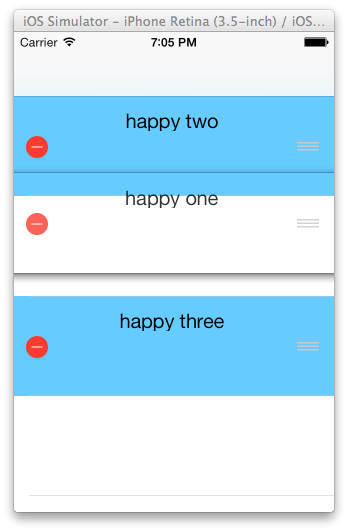
真的會移動耶!真是好玩~
參考:Managing the Reordering of Rows、UITableView 中移動項目的方法、Reordering Rows From TableView。


 逍遙文工作室
隨意留個言吧:)~