
什麼是plist?全名為property list,在所有的資料儲存方法中,最容易莫過於Property List了,陣列、字典、字串和資料都可以存成XML格式的Property List,事實上,NSUserDefaults就是一個Property List。
不過並非所有的資料都適合用它來儲存,像是過多的資料或是自己設計的一些複雜物件都不太適合,因為Property List會一次將整個文件內容讀取到記憶體中,無論效率上或是空間上都不是很理想。
使用plist存取檔案有什麼特色?
- Property list 可以為 binary 格式或 XML 格式
- plist 檔案可用一般文字編輯器做修改或 property list editor 做修改
- NSArray、NSDictionary 都有方法能直接將內容以 XML plist 的格式記錄於檔案
- property list object 也就是 plist 結構支援的物件型態
| 資料型態 | XML 元素 | Foundation framework 類別 |
| array | <array> | NSArray |
| dictionary | <dict> | NSDictionary |
| string | <string> | NSString |
| data | <data> | NSData |
| date | <date> | NSDate |
| number – integer | <integer> | NSNumber(intValue) |
| number – floating point | <real> | NSNumber(intFloat) |
| Boolean | <true/>或<false/> | NSNumber(boolValue) |
在專案Resources資料夾按右鍵新增plist檔,new file -> iOS -> Resource -> Property List。
程式碼這樣寫就好囉~
-(void)initArrayList
{
    NSString *plistPickPath = [[NSBundle mainBundle] pathForResource:@"HBPickList" ofType:@"plist"];
    NSDictionary *plistDictionary = [[NSDictionary alloc] initWithContentsOfFile:plistPickPath];

    purposeList = [plistDictionary objectForKey:@"purposeList"];
    purposeListEn = [plistDictionary objectForKey:@"purposeListEn"];
    contactStatusList = [plistDictionary objectForKey:@"contactStatusList"];
    contactStatusListEn = [plistDictionary objectForKey:@"contactStatusListEn"];

    buildingTypeList = [plistDictionary objectForKey:@"buildingTypeList"];
    buildingTypeListEn = [plistDictionary objectForKey:@"buildingTypeListEn"];
    roomTypeList = [plistDictionary objectForKey:@"roomTypeList"];
    roomTypeListEn = [plistDictionary objectForKey:@"roomTypeListEn"];
    parkingTypeList = [plistDictionary objectForKey:@"parkingTypeList"];
    parkingTypeListEn = [plistDictionary objectForKey:@"parkingTypeListEn"];
    depositList = [plistDictionary objectForKey:@"depositList"];
    depositListEn = [plistDictionary objectForKey:@"depositListEn"];
    qualifyList = [plistDictionary objectForKey:@"qualifyList"];
    qualifyListEn = [plistDictionary objectForKey:@"qualifyListEn"];
}
HBPickList.plist在Xcode中,長這樣子:
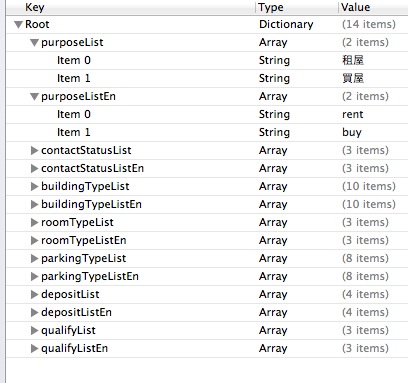
Root表示程式首要存取的位置,若Type為Dictionary,可以用NSDictionary去裝,若Type為Array,則可以用NSArray去裝,其餘Type可以類推。其中,Dictionary可以編輯Key和Value的值,而Array則只能編輯Value。
起初我沒用plist,很原始地使用Array去裝element,程式碼因此變得很雜亂,經由老闆指點,讓我知道plist可以如此方便!以後資料若有更動,只要修改plist檔就可以輕鬆解決~
NSString *plistPickPath = [[NSBundle mainBundle] pathForResource:@"HBPickList" ofType:@"plist"];
NSDictionary *plistDictionary = [[NSDictionary alloc] initWithContentsOfFile:plistPickPath];

purposeList = @[@"租屋", @"買屋"];
purposeListEn = @[@"rent", @"buy"];
contactStatusList = @[@"屋主", @"仲介", @"代理人"];
contactStatusListEn = @[@"landlord", @"agent", @"deputy"];

buildingTypeList = @[@"套房", @"華廈", @"住宅大樓", @"公寓", @"商辦", @"店面", @"透天厝", @"廠辦", @"工廠", @"其他"];
buildingTypeListEn = @[@"suite", @"elevator_10down", @"elevator_11up", @"apartment", @"office", @"store", @"townhouse", @"factory_office", @"factory", @"other"];
roomTypeList = @[@"正常隔間", @"分租套房", @"分租雅房"];
roomTypeListEn = @[@"normal", @"studio", @"room"];
parkingTypeList = @[@"無車位", @"一樓平面", @"升降平面", @"升降機械", @"坡道平面", @"坡道機械", @"塔式車位", @"其他"];
parkingTypeListEn = @[@"none", @"flat", @"lifting_flat", @"lifting_machine", @"ramp", @"ramp_machine", @"tower", @"others"];
depositList = @[@"面議", @"半個月", @"一個月", @"兩個月"];
depositListEn = @[@"none", @"half", @"onemonth", @"twomonths"];
qualifyList = @[@"學生", @"上班族", @"家庭"];
qualifyListEn = @[@"student", @"salaryman", @"family"];
將plistDictionary列印出來:
plistDictionary:{
    buildingTypeList =     (
        "\U5957\U623f",
        "\U83ef\U5ec8",
        "\U4f4f\U5b85\U5927\U6a13",
        "\U516c\U5bd3",
        "\U5546\U8fa6",
        "\U5e97\U9762",
        "\U900f\U5929\U539d",
        "\U5ee0\U8fa6",
        "\U5de5\U5ee0",
        "\U5176\U5b83"
    );
    buildingTypeListEn =     (
        suite,
        "elevator_10down",
        "elevator_11up",
        apartment,
        office,
        store,
        townhouse,
        "factory_office",
        factory,
        other
    );
    contactStatusList =     (
        "\U5c4b\U4e3b",
        "\U4ef2\U4ecb",
        "\U4ee3\U7406\U4eba"
    );
    contactStatusListEn =     (
        landlord,
        agent,
        deputy
    );
    depositList =     (
        "\U9762\U8b70",
        "\U534a\U500b\U6708",
        "\U3127\U500b\U6708",
        "\U5169\U500b\U6708"
    );
    depositListEn =     (
        none,
        half,
        onemonth,
        twomonths
    );
    parkingTypeList =     (
        "\U7121\U8eca\U4f4d",
        "\U4e00\U6a13\U5e73\U9762",
        "\U5347\U964d\U5e73\U9762",
        "\U5347\U964d\U6a5f\U68b0",
        "\U5761\U9053\U5e73\U9762",
        "\U5761\U9053\U6a5f\U68b0",
        "\U5854\U5f0f\U8eca\U4f4d",
        "\U5176\U5b83"
    );
    parkingTypeListEn =     (
        none,
        flat,
        "lifting_flat",
        "lifting_machine",
        ramp,
        "ramp_machine",
        tower,
        others
    );
    purposeList =     (
        "\U79df\U5c4b",
        "\U8cb7\U5c4b"
    );
    purposeListEn =     (
        rent,
        buy
    );
    qualifyList =     (
        "\U5b78\U751f",
        "\U4e0a\U73ed\U65cf",
        "\U5bb6\U5ead"
    );
    qualifyListEn =     (
        student,
        salaryman,
        family
    );
    roomTypeList =     (
        "\U6b63\U5e38\U9694\U9593",
        "\U5206\U79df\U5957\U623f",
        "\U5206\U79df\U96c5\U623f"
    );
    roomTypeListEn =     (
        normal,
        studio,
        room
    );
}
使用plist存取資料相當簡單:
- 獲取Root下的number值
[plistData objectForKey:@"number"]; - 儲存Root下的number值為99
[plistData setValue:@"99″ forKey:@"number"];
參考:簡易的 .plist存 取方法、對 Document 中的檔案存取方法、WiKi – Plist、iPhone 開發教學 – 使用 Property List 和 SQLite 處理資料儲存、Objective-C Property List、Introduction to Property Lists、第九堂課摘要及心得筆記。


 逍遙文工作室
隨意留個言吧:)~