
有時候我們想知道目前我們記憶體的使用狀況,那要怎麼做才能獲取記憶體當前的資料?這裡有一個方法,使用MS Visual C++中提供的函式,即可獲得實體記憶體和虛擬記憶體的當前使用資訊唷!
不用談什麼理論,只是擷取資訊,所以直接拿程式碼來跑吧!
/**
	Theme: Compute the Usability of Memory
	compiler: MS Visual Studio 2010
	Date: 101/04/09
	Author: HappyMan
	Blog: https://cg2010studio.wordpress.com/
*/
#include<iostream>
#include <windows.h>
#include <stdio.h>

// Use to convert bytes to KB
#define DIV 1024

// Specify the width of the field in which to print the numbers.
// The asterisk in the format specifier "%*I64d" takes an integer
// argument and uses it to pad and right justify the number.
#define WIDTH 7

void main(int argc, char *argv[])
{
  MEMORYSTATUSEX statex;

  statex.dwLength = sizeof (statex);

  GlobalMemoryStatusEx (&statex);

  printf ("There is  %*ld percent of memory in use.\n",
          WIDTH, statex.dwMemoryLoad);
  printf ("There are %*I64d total Kbytes of physical memory.\n",
          WIDTH, statex.ullTotalPhys/DIV);
  printf ("There are %*I64d free Kbytes of physical memory.\n",
          WIDTH, statex.ullAvailPhys/DIV);
  printf ("There are %*I64d total Kbytes of paging file.\n",
          WIDTH, statex.ullTotalPageFile/DIV);
  printf ("There are %*I64d free Kbytes of paging file.\n",
          WIDTH, statex.ullAvailPageFile/DIV);
  printf ("There are %*I64d total Kbytes of virtual memory.\n",
          WIDTH, statex.ullTotalVirtual/DIV);
  printf ("There are %*I64d free Kbytes of virtual memory.\n",
          WIDTH, statex.ullAvailVirtual/DIV);

  // Show the amount of extended memory available.

  printf ("There are %*I64d free Kbytes of extended memory.\n",
          WIDTH, statex.ullAvailExtendedVirtual/DIV);
  system("pause");
}
我執行結果如下:
There is 59 percent of memory in use.
There are 3652840 total Kbytes of physical memory.
There are 1477912 free Kbytes of physical memory.
There are 5580056 total Kbytes of paging file.
There are 2143700 free Kbytes of paging file.
There are 2097024 total Kbytes of virtual memory.
There are 2089280 free Kbytes of virtual memory.
There are 0 free Kbytes of extended memory.
請按任意鍵繼續 . . .
使用Windows工作管理員查看實際狀況:
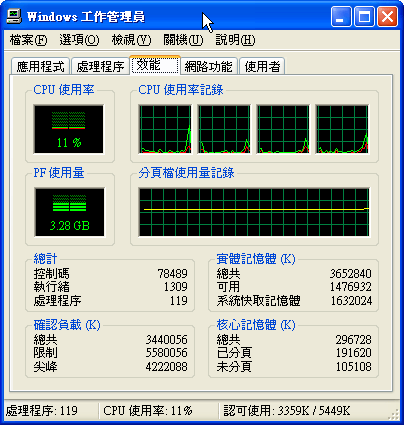
另外再使用Process Explore同時查看:

使用這程式碼的時候是要做高等演算法的一個作業,因為要讀取相當龐大的資料,若能事先得知可用記憶體空間,那麼就可以提早判斷是否該載入,以免資料載入到一半,系統跳出警告視窗跟你說記憶體空間不足而載入失敗,這時候你已經花費相當長的時間在等待,能夠避免這種狀況發生就盡量避免吧!


 逍遙文工作室
隨意留個言吧:)~