
承我剛寫不久的Bump Map,這次要更仔細分析它表現出來的特性,除了bump map的效果之外,我還加了phong shading的diffuse和specular。
實做Bump Map時,必須知道Flat Shading、Gouraud Shading、Phong Shading和它的差異,瞭解了之後實做就變得相當容易!尤其概念若有圖示講解,我就會很容易瞭解,畢竟我不是土生土長的美國人,看到英文敘述還要轉換中文意思瞭解,這樣會曲解原意,有圖示輔助幫了我超多!

是不是覺得過去所學的概念,變得更容易瞭解呢?哈~
上週實做的名稱應改為bumpy surface(沒有理論可言,只是想盡辦法將model表面弄得凹凸不平,隨意更改model的normal),而非bump map,因為沒使用color map和normal map。
語言:GLSL。
模型:OpenGL的Teapot,可逆時針旋轉。
光源:可控制六個方向。

使用兩張texture,左圖為color map,右圖為normal map,利用特殊軟體製作,前者使用Genetica Viewer 3.5軟體得到左圖,由左圖接著使用Crazybump 1.2軟體產生右圖。

只有color map。

color map乘上由normal map所產生的diffuse。

color map乘上model的normal所產生的diffuse。

由normal map所產生的specular。
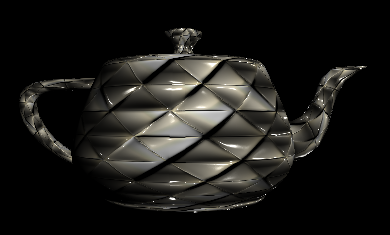
color map乘上由normal map所產生的diffuse乘上model的normal所產生的diffuse,加上由normal map所產生的specular。
另有改進方法叫做tangent space來實做bump map,使用TBN的rotation matrix,推導過程與運算均複雜,但效能好。
實做問題:OpenGL內建的Teapot可成功,但Sphere、Cube、Toros卻有問題。本來想載入cow.obj檔來實現bump map,然而texture座標和model座標卻不知如何對應。
vertex shader程式碼:
	varying vec3 vertex_position;
	varying vec3 vertex_light_vector;
	varying vec3 vertex_light_half_vector;
	varying vec3 vertex_normal;

void main() {
    // Calculate the normal value for this vertex, in world coordinates (multiply by gl_NormalMatrix)
    vertex_normal = normalize(gl_NormalMatrix * gl_Normal);
	vertex_position = vec3(gl_ModelViewMatrix * gl_Vertex);

    // Calculate the light position for this vertex
	vec3 light_position = gl_LightSource[0].position.xyz;
	vertex_light_vector = normalize(light_position.xyz - vertex_position.xyz);

    // Calculate the light's half vector
    vertex_light_half_vector = normalize(gl_LightSource[0].halfVector.xyz);

gl_TexCoord[0] = gl_MultiTexCoord0;

// Set the position of the current vertex
gl_Position = gl_ModelViewProjectionMatrix * gl_Vertex;
}
vertex shader程式碼:
	varying vec3 vertex_position;
	varying vec3 vertex_light_vector;
	varying vec3 vertex_light_half_vector;
	varying vec3 vertex_normal;
	const vec3 eye_position = vec3(0.0,0.0,0.0);

uniform float updown, leftright, farnear;

uniform sampler2D color_texture;
uniform sampler2D normal_texture;

void main() {

// Extract the normal from the normal map
vec3 normal = normalize(texture2D(normal_texture, gl_TexCoord[0].st).rgb * 2.0 - 1.0);

// Determine where the light is positioned
vec3 light_pos = normalize(vec3(leftright, updown, farnear) + vertex_light_vector);

// Calculate the lighting diffuse value
float diffuse = max(dot(normal, light_pos), 0.0);

	vec3 E = normalize(vec3(eye_position - vertex_position));
	vec3 R = normalize(vec3(reflect(-light_pos, normal)));

    // Defining The Material Colors
    const vec4 AmbientColor = vec4(0.0, 0.0, 0.0, 1.0);
    const vec4 DiffuseColor = vec4(0.5, 0.5, 0.5, 1.0);
    const vec4 SpecularColor = vec4(1.0, 1.0, 1.0, 1.0);

    // Calculate the ambient term
    vec4 ambient_color = AmbientColor * gl_LightSource[0].ambient + gl_LightModel.ambient * gl_FrontMaterial.ambient;

    // Calculate the diffuse term
    vec4 diffuse_color = DiffuseColor * gl_LightSource[0].diffuse;
    // Set the diffuse value (darkness). This is done with a dot product between the normal and the light
    // and the maths behind it is explained in the maths section of the site.
    float diffuse_value = max(dot(normalize(vertex_normal), vertex_light_vector), 0.0);

    // Calculate the specular value
    vec4 specular_color = SpecularColor * gl_LightSource[0].specular * pow(max(dot(E, R), 0.0) , 100.0);

vec3 color = diffuse_value * diffuse * texture2D(color_texture, gl_TexCoord[0].st).rgb + specular_color;
//vec3 color = diffuse * texture2D(color_texture, gl_TexCoord[0].st).rgb + diffuse_color * diffuse_value + specular_color;

// Set the output color of our current pixel
gl_FragColor = vec4(color, 1.0);
}
參考:TyphoonLabs’ OpenGL Shading Language tutorials、OpenGL:Tutorials:GLSL Bump Mapping、OpenGL:Tutorials:GLSL Bump Mapping(2)。


Comments on: "[GLSL] Bump Map (2)" (5)
[…] (Normal Texture)其實就是Bump Map (凹凸貼圖),原理與效果可以參考我這篇:Bump Map (2),簡單來說凹凸貼圖是以貼圖 […]
讚讚
[…] Map的嘗試:Bump Map (2)、Bump Map (3)。 Share this:共享EmailPrintFacebookTwitterLike this:喜歡Be the first to like […]
讚讚
[…] – webgl normal map,我寫的GLSLBump Map、Bump Map2、Bump Map3和WebGLBump Map。 Share this:ShareEmailPrintFacebookTwitterLike this:LikeBe the first […]
讚讚
[…] Mapping、Bump Mapping2、Bump Mapping3、Normal Mapping in WebGL、Bump mapping、Bumpy Tunnel、three.js – webgl […]
讚讚
[…] Map、Bump Map (2)。 Share this:ShareEmailPrintFacebookTwitterLike this:LikeBe the first to like this […]
讚讚