
Diffuse Shader若懂其概念的話,就容易實做程式碼。
vertex shader程式碼:
varying vec3 normal;
varying vec3 vertex_to_light_vector;

void main()
{
    // Transforming The Normal To ModelView-Space
    normal = gl_NormalMatrix * gl_Normal;

    // Transforming The Vertex Position To ModelView-Space
    vec4 vertex_in_modelview_space = gl_ModelViewMatrix * gl_Vertex;

    // Calculating The Vector From The Vertex Position To The Light Position
    vertex_to_light_vector = vec3(gl_LightSource[0].position - vertex_in_modelview_space);

    // Transforming The Vertex
    gl_Position = gl_ModelViewProjectionMatrix * gl_Vertex;
}
fragment shader程式碼:
varying vec3 normal;
varying vec3 vertex_to_light_vector;

void main()
{
    // Defining The Material Colors
    const vec4 AmbientColor = vec4(1.0, 0.0, 0.0, 1.0);
    const vec4 DiffuseColor = vec4(0.3, 0.7, 0.0, 1.0);

    // Scaling The Input Vector To Length 1
    vec3 normalized_normal = normalize(normal);
    vec3 normalized_vertex_to_light_vector = normalize(vertex_to_light_vector);

    // Calculating The Diffuse Term And Clamping It To [0;1]
    float DiffuseTerm = clamp(dot(normal, vertex_to_light_vector), 0.0, 1.0);

    // Calculating The Final Color
    gl_FragColor = AmbientColor + DiffuseColor * DiffuseTerm;
}
這裡vertex shader先將gl_normal值讀進來,做完vertex shader後的步驟把normal做內插,接著傳遞到fragment shader,最後顏色呈現就相當平滑!

使用glsl後呈現的cow。

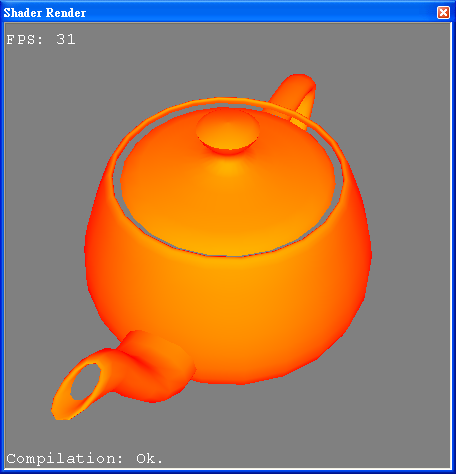
使用ShaderDesigner繪出的teapot。
跟上一篇Ambient Shader一樣,我再次幫NeHe做debug,vertex shader中關鍵字gl_ModelViewMatrix少一個i,還有最後一行減號(-)變成無法式別的字元。
再來就是NeHe沒有優化程式碼,怎麼說呢?明明就有在fragment shader正規化normal和vertex_to_light_vector,卻沒有丟進dot裡頭計算內積,於是我改掉這一行:
float DiffuseTerm = clamp(dot(normal, vertex_to_light_vector), 0.0, 1.0); float DiffuseTerm = clamp(dot(normalized_normal, normalized_vertex_to_light_vector), 0.0, 1.0);
影像結果當然不太一樣囉~以同樣的model可作比較!



 逍遙文工作室
隨意留個言吧:)~