
樹的資料結構相當有趣,用來寫網頁階層是一個不錯的選擇,以下是小小的筆記。

藍色為我點選的default。
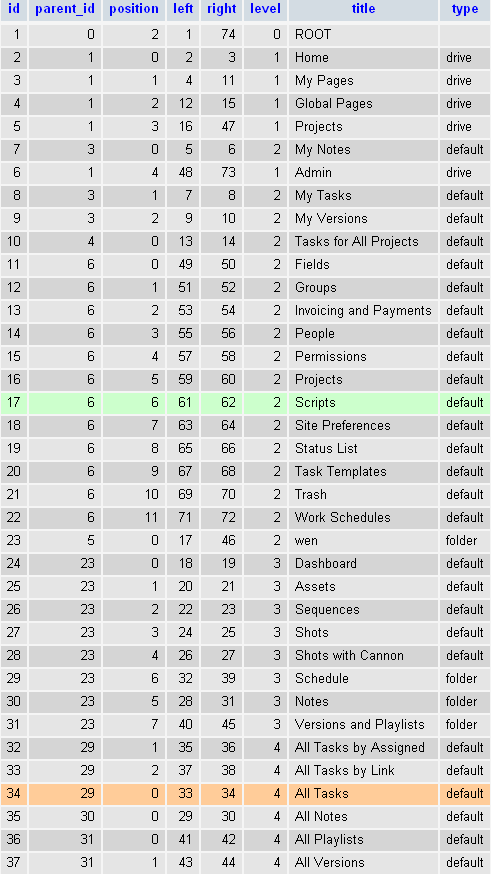
jstree的database中的tree表單。
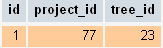
database中的project_tree表單。已知tree_id來找project_id。
以下是程式執行順序,可參考表單來追溯:
start
tree_id : 34
treeRow:
Array
(
    [id] => 34
    [parent_id] => 29
    [position] => 0
    [left] => 33
    [right] => 34
    [level] => 4
    [title] => All Tasks
    [type] => default
)
treeRow:
Array
(
    [id] => 29
    [parent_id] => 23
    [position] => 6
    [left] => 32
    [right] => 39
    [level] => 3
    [title] => Schedule
    [type] => folder
)
treeRow:
Array
(
    [id] => 23
    [parent_id] => 5
    [position] => 0
    [left] => 17
    [right] => 46
    [level] => 2
    [title] => wen
    [type] => folder
)
projectTreeRow:
Array
(
    [id] => 153
    [project_id] => 77
    [tree_id] => 23
)
project_id : 77
end
Array是表單中的欄位,treeRow為tree表單,projectTreeRow為project_tree表單。
至此,我已經從節點往上找到project的節點,並得知project_id。
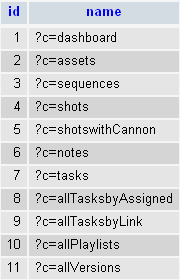
controller表單。樹節點所代表的controller之參數列,以?為始,參數間以&連結。已知controller_id(id)來找controller_name(name)。
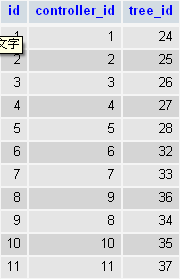
controller_tree表單。已知tree_id,來找controller_id。

點選葉節點後產生的URL。
由此URL可連結至對應的controller->tasks,再加上project_id->77(假設)即可產生所需要的資訊。


 逍遙文工作室
隨意留個言吧:)~