[iOS] Label 文字分散對齊 (Label Text Decentralized Alignment)
原本使用的元件UILabel只有置左、中、右三種選擇,然而有時候我們想要Label文字分散對齊,原本我想要找第三方套件,不過想起上個月研蘋果有在粉絲團上分享解法,於是就拿來嘗試,果真用內建的CATextLayer就能做到!
![[iOS] Label 文字分散對齊 (Label Text Decentralized Alignment)](https://cg2010studio.com/wp-content/uploads/2017/03/ios-label-e69687e5ad97e58886e695a3e5b08de9bd8a-label-text-decentralized-alignment.png?w=540)

原本使用的元件UILabel只有置左、中、右三種選擇,然而有時候我們想要Label文字分散對齊,原本我想要找第三方套件,不過想起上個月研蘋果有在粉絲團上分享解法,於是就拿來嘗試,果真用內建的CATextLayer就能做到!
有時候我們需要開啟藍芽來連結裝置,像是Beacon、Apple Watch或小米手環。那麼如果使用者沒有打開權限怎麼辦?請他/她到設定藍芽 (Setting Bluetooth)去打開囉~
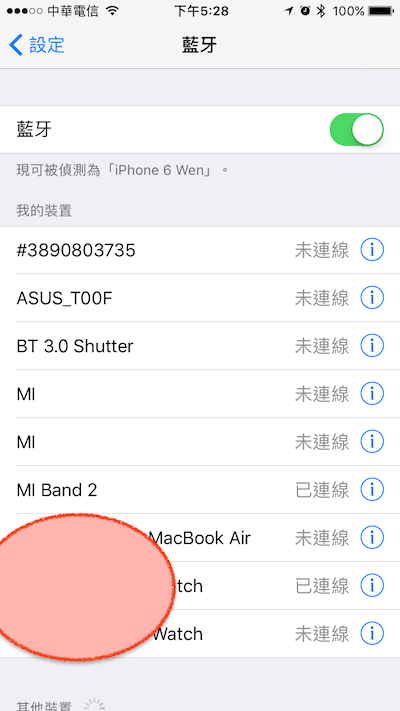
目前iOS SDK尚未有API可以直接改藍芽設定,要是未來Apple有開放的話請再跟我說唷!不過我想應該要等到天荒地老,非常重視用戶隱私的Apple,是不會輕易讓開發者悄悄開啟Bluetooth來進行任何動作。
剛好我們偉大的技術長有無私分享:
/**
 Theme: iOS 10 Setting Bluetooth
 IDE: Xcode 8
 Language: Objective C
 Date: 106/03/07
 Author: HappyMan
 Blog: https://cg2010studio.wordpress.com/
 */
-(void)openBLESetting
{
    NSURL *bluetoothURLOS8 = [NSURL URLWithString:@"prefs:root=General&path=Bluetooth"];
    NSURL *bluetoothURLOS9 = [NSURL URLWithString:@"prefs:root=Bluetooth"];
    NSURL *bluetoothURLOS10 = [NSURL URLWithString:@"App-Prefs:root=Bluetooth"];
    if ([[[UIDevice currentDevice] systemVersion] intValue] >= 10) {
        [[UIApplication sharedApplication] openURL:bluetoothURLOS10];
    }
    else if ([[[UIDevice currentDevice] systemVersion] intValue] >= 9) {
        [[UIApplication sharedApplication] openURL:bluetoothURLOS9];
    }
    else {
        [[UIApplication sharedApplication] openURL:bluetoothURLOS8];
    }
}
這種沒啥邏輯純粹定義的玩意兒,抄,就對了XD~
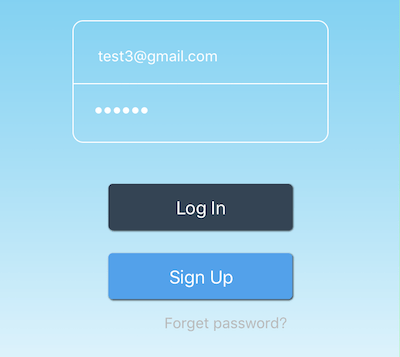
寫了四年多的iOS App,還沒有需要字串去掉前後的空白,可是這次卻因為在資料庫發現,居然有email字串中尾端多打了個「空白」,以至於某些功能判定沒有此帳號,而出現非預期的結果。
過去研究過iOS蘋果推播通知服務 (Apple Push Notification Service),照理說取得Push Token應得心應手,然而理論跟實際有時是有些落差。
像是我自己測試後能順利取得Push Token,誰知道客戶那邊卻收不到⋯⋯
這篇可以說明iOS 10推播問題。
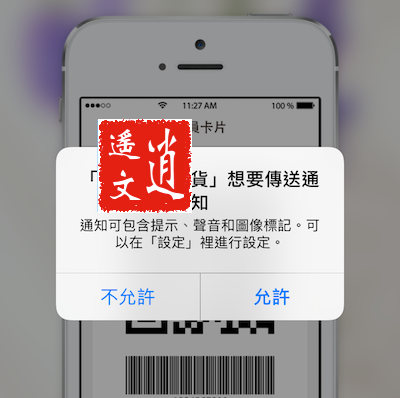
當使用者點擊「允許」後,我們就能取得其Push Token。
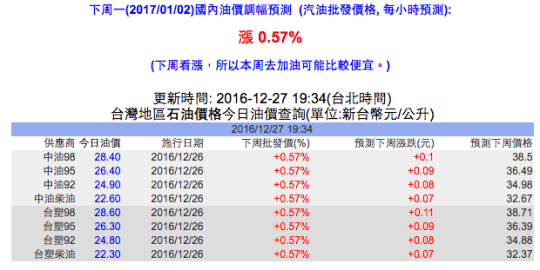
只要會開車騎車的人,都會想知道現在的油價,現在中國石油開放資料可供串接,然而規格是我從來沒碰過的SOAP,這塊「肥皂」比起簡潔的JSON複雜多,於是我還要借助開源來幫我處理~
平台特性真的要好好瞭解一下,原來AngularJS有雙向資料繫結 (2-way Data Binding)的特性。
所謂雙向(2-way)是指controller與view兩邊對資料模型的操作,都會即時更新,使得controller與view兩邊的資料一致。
![[Ionic][AngularJS] 雙向資料繫結 (2-way Data Binding).png](https://cg2010studio.com/wp-content/uploads/2017/01/ionicangularjs-e99b99e59091e8b387e69699e7b9abe7b590-2-way-data-binding.png?w=540)
此圖解釋得相當直覺!
製作一個好的App有非常多因素,而其中使用者體驗非常重要,影響用戶是否會繼續使用我們的App。
原本以為Timer會固定時間就觸發,然而在多線程的狀況下並不是如此,因為每個事件都會被排程,假如前面執行事件會花長時間,就會影響原本我們預定時機點想觸發的Timer。
目前遇到的狀況:
手指滑動TableView,原本每秒執行的Timer卻不運作,直到放開手指。
原來把Timer加入到RunLoop就能解決問題!
程式碼這麼寫:
timer = [NSTimer timerWithTimeInterval:1.0 target:self selector:@selector(updateTime:) userInfo:nil repeats:YES];
[[NSRunLoop mainRunLoop] addTimer:timer forMode:NSRunLoopCommonModes];
果真它就如預期運行了!
iOS App幾乎少不了Navigation Bar,想要客製化Navigation Bar就要多些技巧,因為iOS SDK內建的功能有限(也許我沒發現XD~)。過去我們團隊常自己刻Navigation Bar,每一頁都拉介面設定,儘管麻煩還是依樣畫葫蘆,有時候某些頁面要呈現特別的樣子,就會慶幸我們使用非原生:P~
原生預設長得像下方圖⋯⋯

如果沒有特別設定,高度和顏色固定。
有些功能只能從系統設定App,那麼我們就必須知會使用者,若可以的話就導向系統設定App吧~

/**
 Theme: Open Setting App
 IDE: Xcode 8
 Language: Objective C
 Date: 105/12/28
 Author: HappyMan
 Blog: https://cg2010studio.wordpress.com/
 */
-(void)pushSettingAction:(id)sender
{
    if (/* DISABLES CODE */ (&UIApplicationOpenSettingsURLString) != nil) {
        [[UIApplication sharedApplication] openURL:[NSURL URLWithString:UIApplicationOpenSettingsURLString]];
    }
    else {
        DxLog(@"UIApplicationOpenSettingsURLString is not available in current iOS version");
    }
}
這樣我就能導向原本App(以垃圾管家為例)的系統設定囉~
參考:How to open Settings programmatically like in Facebook app?。


 逍遙文工作室
HappyMan・迴響