
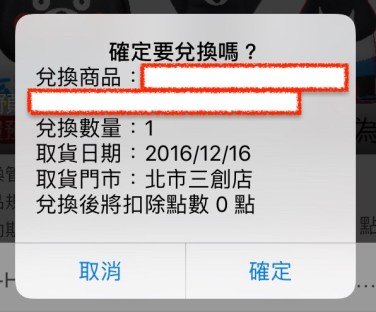
原生的UIAlertController字體靠中,看到高人hack出如何改變字體特性,終於豁然開朗呢!

知道之後,自己學著如何hack吧!
/**
 Theme: UIAlertController Text Alignment
 IDE: Xcode 8
 Language: Objective C
 Date: 105/12/14
 Author: HappyMan
 Blog: https://cg2010studio.wordpress.com/
 */
    UIAlertController *alert = [UIAlertController alertControllerWithTitle:@"確定要兌換嗎?"
                                                                   message:message
                                                            preferredStyle:UIAlertControllerStyleAlert];
    UIAlertAction *cancelAction = [UIAlertAction actionWithTitle:@"取消"
                                                           style:UIAlertActionStyleDefault
                                                         handler:^(UIAlertAction * _Nonnull action) {

                                                         }];
    [alert addAction:cancelAction];

    UIAlertAction *okAction = [UIAlertAction actionWithTitle:@"確定"
                                                       style:UIAlertActionStyleDefault
                                                     handler:^(UIAlertAction * _Nonnull action) {
                                                     }];
    [alert addAction:okAction];

    NSMutableParagraphStyle *paragraphStyle = [[NSMutableParagraphStyle alloc] init];
    paragraphStyle.alignment = NSTextAlignmentLeft;

    NSMutableAttributedString *attributedStr = [[NSMutableAttributedString alloc] initWithString:message attributes:@{NSParagraphStyleAttributeName:paragraphStyle}];
    [alert setValue:attributedStr forKey:@"attributedMessage"];

    [self presentViewController:alert animated:YES completion:nil];
這裡的重點是這個key:attributedMessage。


 逍遙文工作室
隨意留個言吧:)~