
我以為還要去找第三方套件來用,一查網路才發現,從iOS 7開始,SDK已經內建有掃描條碼的API,我想會把這功能納入麾下是必然的,因為在生活中條碼無所不在,除了常見的用途如辨識商品(書籍、食品、識別證等)外,還能做非常有趣的應用(導覽、遊戲等)。

猜猜看可以掃到什麼?
現在就來學一下怎麼掃描QR Code和Bar Code吧!
掃描條碼的API被收錄在AVFoundation Framework,目前可支援以下規格條碼:
- UPC-A
- UPC-E
- Code 39
- Code 39 mod 43
- Code 93
- Code 128
- EAN-8
- EAN-13
- Aztec
- PDF417
- QR
我們直接來寫程式吧~
/**
Theme: Scan QR Code & Bar Code
IDE: Xcode 7
Language: Objective C
Date: 104/11/19
Author: HappyMan
Blog: https://cg2010studio.wordpress.com/
*/
#import <AVFoundation/AVFoundation.h>
@interface TRCRecordRegisterViewController : UIViewController <AVCaptureMetadataOutputObjectsDelegate>
{
IBOutlet UILabel *statementLabel;
IBOutlet UIView *scanView;
}
@property (nonatomic, strong) AVCaptureSession *captureSession;
@property (nonatomic, strong) AVCaptureVideoPreviewLayer *videoPreviewLayer;
@property (nonatomic, strong) AVAudioPlayer *audioPlayer;
@property (nonatomic) BOOL isReading;
-(BOOL)startReading;
-(void)stopReading;
@end
@implementation TRCRecordRegisterViewController
#pragma mark - IBAction method implementation
- (void)viewDidLoad {
[super viewDidLoad];
// Initially make the captureSession object nil.
_captureSession = nil;
// Set the initial value of the flag to NO.
_isReading = NO;
[self startStopReading:nil];
}
- (IBAction)startStopReading:(id)sender {
if (!_isReading) {
// This is the case where the app should read a QR code when the start button is tapped.
if ([self startReading]) {
// If the startReading methods returns YES and the capture session is successfully
// running, then change the start button title and the status message.
}
}
else{
// In this case the app is currently reading a QR code and it should stop doing so.
[self stopReading];
// The bar button item's title should change again.
}
// Set to the flag the exact opposite value of the one that currently has.
_isReading = !_isReading;
}
#pragma mark - Private method implementation
- (BOOL)startReading {
NSError *error;
// Get an instance of the AVCaptureDevice class to initialize a device object and provide the video
// as the media type parameter.
AVCaptureDevice *captureDevice = [AVCaptureDevice defaultDeviceWithMediaType:AVMediaTypeVideo];
// Get an instance of the AVCaptureDeviceInput class using the previous device object.
AVCaptureDeviceInput *input = [AVCaptureDeviceInput deviceInputWithDevice:captureDevice error:&amp;error];
if (!input) {
// If any error occurs, simply log the description of it and don't continue any more.
NSLog(@"%@", [error localizedDescription]);
return NO;
}
// Initialize the captureSession object.
_captureSession = [[AVCaptureSession alloc] init];
// Set the input device on the capture session.
[_captureSession addInput:input];
// Initialize a AVCaptureMetadataOutput object and set it as the output device to the capture session.
AVCaptureMetadataOutput *captureMetadataOutput = [[AVCaptureMetadataOutput alloc] init];
[_captureSession addOutput:captureMetadataOutput];
// Create a new serial dispatch queue.
dispatch_queue_t dispatchQueue;
dispatchQueue = dispatch_queue_create("myQueue", NULL);
[captureMetadataOutput setMetadataObjectsDelegate:self queue:dispatchQueue];
[captureMetadataOutput setMetadataObjectTypes:[captureMetadataOutput availableMetadataObjectTypes]];
// Initialize the video preview layer and add it as a sublayer to the viewPreview view's layer.
_videoPreviewLayer = [[AVCaptureVideoPreviewLayer alloc] initWithSession:_captureSession];
[_videoPreviewLayer setVideoGravity:AVLayerVideoGravityResizeAspectFill];
[_videoPreviewLayer setFrame:scanView.layer.bounds];
[scanView.layer addSublayer:_videoPreviewLayer];
// Start video capture.
[_captureSession startRunning];
return YES;
}
-(void)stopReading{
// Stop video capture and make the capture session object nil.
[_captureSession stopRunning];
_captureSession = nil;
// Remove the video preview layer from the viewPreview view's layer.
[_videoPreviewLayer removeFromSuperlayer];
}
#pragma mark - AVCaptureMetadataOutputObjectsDelegate method implementation
-(void)captureOutput:(AVCaptureOutput *)captureOutput didOutputMetadataObjects:(NSArray *)metadataObjects fromConnection:(AVCaptureConnection *)connection{
// Check if the metadataObjects array is not nil and it contains at least one object.
if (metadataObjects != nil &amp;&amp; [metadataObjects count] &gt; 0) {
NSLog(@"Result:%@", metadataObjects);
// Get the metadata object.
AVMetadataMachineReadableCodeObject *metadataObj = [metadataObjects objectAtIndex:0];
if ([[metadataObj type] isEqualToString:AVMetadataObjectTypeCode93Code] || [[metadataObj type] isEqualToString:AVMetadataObjectTypeCode128Code]) {
// If the found metadata is equal to the QR code metadata then update the status label's text,
// stop reading and change the bar button item's title and the flag's value.
// Everything is done on the main thread.
// 掃瞄完畢停止重複掃描
[self stopReading];
[self performSelectorOnMainThread:@selector(stopReading) withObject:nil waitUntilDone:NO];
_isReading = NO;
}
}
}
@end
以上程式碼需配合IB來實現,呈現的介面如下~
我在程式中設定可以掃所有支援的條碼:
- [captureMetadataOutput availableMetadataObjectTypes]
而在掃瞄到的條碼只對以下兩種做處理:
- AVMetadataObjectTypeCode93Code
- AVMetadataObjectTypeCode128Code
如果想要處理QR Code,可以使用:
- AVMetadataObjectTypeQRCode
實際操作如首圖以及下圖:
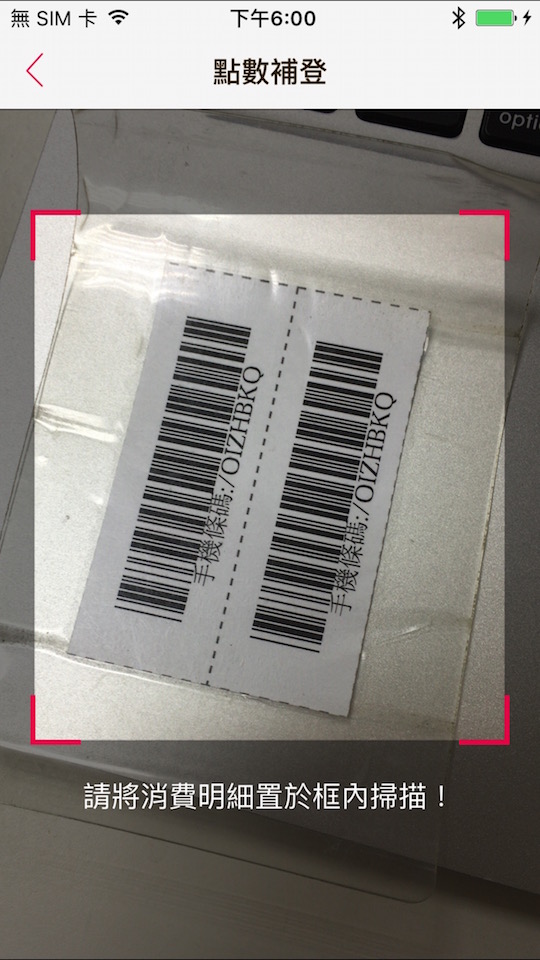
這是我購物時會請店員幫我掃瞄載具手機條碼,方便我記帳和對獎囉~
掃到後會得到分別如下的資訊:
Result:(
“<AVMetadataMachineReadableCodeObject: 0x15055e4c0, type=\"org.iso.QRCode\", bounds={ 0.4,0.5 0.2×0.3 }>corners { 0.4,0.8 0.5,0.9 0.5,0.6 0.4,0.5 }, time 126077075932541, stringValue \"https://cg2010studio.wordpress.com\""
)
Result:(
“<AVMetadataMachineReadableCodeObject: 0x14ed975e0, type=\"org.iso.Code39\", bounds={ 0.2,0.4 0.4×0.1 }>corners { 0.6,0.5 0.6,0.5 0.2,0.4 0.2,0.4 }, time 126242691839958, stringValue \"/OIZHBKQ\""
)
可以試試看掃不是條碼的東西,可能會有很奇妙的發現喔:P~
最近在提攜公司新人,跟他說明很多功能可以找現成的來套,如此能省下非常多的時間,以便把火力集中在核心功能上!什麼是核心功能呢?要是我能做自家的產品,就自己來研發一套演算法流程吧!
參考:How To Scan QR Code Using AVFoundation Framework、Scanning Barcodes with iOS 7 (Objective-C)。


 逍遙文工作室
Comments on: "[iOS] 掃描QR Code和Bar Code" (8)
請問您如何實現除了紅色筐以外都是模糊透明的呢?
讚讚
我想到的有兩種方式:
1使用有透明度影像格式製作
2撰寫繪圖程式碼
我個人偏好第1項!對我來說比較簡單~ 😀
讚讚
[…] 過去嘗試過用相機掃描QRCode,現在想要讀取影像中QRCode,可以怎麼做呢? […]
讚讚
[…] SDK呼叫method來掃描QRCode,那麼是否也能從iOS SDK來產生 QRCode (QRCode […]
讚讚
您好,想請教一下,如果想在掃QRCode那個正方型外面的地方加個像相框的view是可行的嗎?
讚Liked by 1 person
當然可以囉!只是把相框加在螢幕上方,而QRcode依然會被相機掃描到。
讚讚
不好意思,想問一下,為什麼我會一直出錯:
[MC] System group container for systemgroup.com.apple.configurationprofiles path is /private/var/containers/Shared/SystemGroup/systemgroup.com.apple.configurationprofiles
[MC] Reading from public effective user settings.
我已經有在info裡加上
NSCameraUsageDescription
$(PRODUCT_NAME) uses camera
還是一樣一直報錯…
讚讚
[…] SDK內建方法來掃描QR Code和Bar Code。然而似乎還無法產生QR Code和Bar […]
讚讚