
想要將顯示在App上的聯絡人資料加入到通訊錄,但是不想要讓使用者自己到通訊錄一個字一個字慢慢打,這時候就可以用這些複雜的程式碼解決囉!

以下程式碼觸發點為「儲存到手機通訊錄」,接下來就會把欄位上的資料集結起來,經過幾個步驟就能將聯絡人資料加入通訊錄。此外,還可以判斷此人是否已存在於通訊錄,以免重複加入同樣的聯絡人資料。
/**
 Theme: Address Book
 IDE: Xcode 6
 Language: Objective C
 Date: 103/10/13
 Author: HappyMan
 Blog: https://cg2010studio.wordpress.com/
 */
-(IBAction)saveContactAction:(UIButton *)button
{
    ABAddressBookRef addressBook = NULL;
    CFErrorRef error = NULL;

    switch (ABAddressBookGetAuthorizationStatus()) {
        case kABAuthorizationStatusAuthorized: {
            addressBook = ABAddressBookCreateWithOptions(NULL, &error);

            [self addAccountInAddressBook:addressBook withFirstName:nameLabel.text jobTitle:titleLabel.text cellPhone:cellphoneLabel.text officePhone:officephoneLabel.text email:emailLabel.text image:photoImageView.image];

            if (addressBook != NULL) CFRelease(addressBook);
            break;
        }
        case kABAuthorizationStatusDenied: {
            NSLog(@"Access denied to address book");
            break;
        }
        case kABAuthorizationStatusNotDetermined: {
            addressBook = ABAddressBookCreateWithOptions(NULL, &error);
            ABAddressBookRequestAccessWithCompletion(addressBook, ^(bool granted, CFErrorRef error) {
                if (granted) {
                    NSLog(@"Access was granted");
                    [self addAccountInAddressBook:addressBook withFirstName:nameLabel.text jobTitle:titleLabel.text cellPhone:cellphoneLabel.text officePhone:officephoneLabel.text email:emailLabel.text image:photoImageView.image];
                }
                else NSLog(@"Access was not granted");
                if (addressBook != NULL) CFRelease(addressBook);
            });
            break;
        }
        case kABAuthorizationStatusRestricted: {
            NSLog(@"access restricted to address book");
            break;
        }
    }

    // 判斷此人是否已在通訊錄
    if ([self hasExistRecord:nameLabel.text] == YES) {
        addButton.enabled = NO;

        UIAlertView *contactExistsAlert = [[UIAlertView alloc] initWithTitle: @"成功" message:[NSString stringWithFormat:@"已加入【%@】到通訊錄!", nameLabel.text] delegate:nil cancelButtonTitle:@"確認" otherButtonTitles: nil];
        [contactExistsAlert show];
    }
    else {
        UIAlertView *contactExistsAlert = [[UIAlertView alloc] initWithTitle: @"失敗" message:[NSString stringWithFormat:@"未加入【%@】到通訊錄!", nameLabel.text] delegate:nil cancelButtonTitle:@"確認" otherButtonTitles: nil];
        [contactExistsAlert show];
    }
}

- (ABRecordRef)addAccountInAddressBook:(ABAddressBookRef)addressBook withFirstName:(NSString *)firstName jobTitle:(NSString *)jobTitle cellPhone:(NSString *)cellPhone officePhone:(NSString *)officePhone email:(NSString *)email image:(UIImage *)image
{
    ABRecordRef result = NULL;
    CFErrorRef error = NULL;

    //1
    result = ABPersonCreate();
    if (result == NULL) {
        NSLog(@"Failed to create a new person.");
        return NULL;
    }

    //2
    BOOL couldSetFirstName = ABRecordSetValue(result, kABPersonFirstNameProperty, (__bridge CFTypeRef)firstName, &error);
    BOOL couldSetJobTitle = ABRecordSetValue(result, kABPersonJobTitleProperty, (__bridge CFTypeRef)jobTitle, &error);

    // 多個電話
    ABMutableMultiValueRef phoneNumbers = ABMultiValueCreateMutable(kABMultiStringPropertyType);
    BOOL couldSetCellPhone = ABMultiValueAddValueAndLabel(phoneNumbers, (__bridge CFStringRef)cellPhone, kABPersonPhoneMobileLabel, NULL);
    BOOL couldSetOfficePhone = ABMultiValueAddValueAndLabel(phoneNumbers, (__bridge CFStringRef)officePhone, kABPersonPhoneMainLabel, NULL);
    ABRecordSetValue(result, kABPersonPhoneProperty, phoneNumbers, &error);

    // 多個信箱
    ABMutableMultiValueRef emails = ABMultiValueCreateMutable(kABMultiStringPropertyType);
    BOOL couldSetEmail = ABMultiValueAddValueAndLabel(emails, (__bridge CFStringRef)email, CFSTR("email"), NULL);
    ABRecordSetValue(result, kABPersonEmailProperty, emails, &error);

    // 大頭照
    NSData *photoData = UIImageJPEGRepresentation(image, 0.7);
    BOOL couldSetPhoto = ABPersonSetImageData(result, (__bridge CFDataRef)photoData, nil);

    if (couldSetFirstName && couldSetJobTitle && couldSetCellPhone && couldSetOfficePhone && couldSetEmail && couldSetPhoto) {
        NSLog(@"Successfully set the information of the person.");
    } else {
        NSLog(@"Failed.");
    }

    //3
    BOOL couldAddPerson = ABAddressBookAddRecord(addressBook, result, &error);

    if (couldAddPerson) {
        NSLog(@"Successfully added the person.");
    } else {
        NSLog(@"Failed to add the person.");
        CFRelease(result);
        result = NULL;
        return result;
    }

    //4
    if (ABAddressBookHasUnsavedChanges(addressBook)) {
        BOOL couldSaveAddressBook = ABAddressBookSave(addressBook, &error);

        if (couldSaveAddressBook) {
            NSLog(@"Succesfully saved the address book.");
        } else {
            NSLog(@"Failed.");
        }
    }
    return result;
}

-(BOOL)hasExistRecord:(NSString *)name
{
    CFErrorRef error = NULL;
    ABRecordRef result = ABPersonCreate();
    ABRecordSetValue(result, kABPersonFirstNameProperty, (__bridge CFTypeRef)name, &error);

    ABAddressBookRef addressBookRef = ABAddressBookCreateWithOptions(NULL, &error);
    NSArray *allContacts = (__bridge NSArray *)ABAddressBookCopyArrayOfAllPeople(addressBookRef);

    for (id record in allContacts){
        ABRecordRef thisContact = (__bridge ABRecordRef)record;
        if (CFStringCompare(ABRecordCopyCompositeName(thisContact),
                            ABRecordCopyCompositeName(result), 0) == kCFCompareEqualTo){
            return YES;
        }
    }
    return NO;
}
這裡比較需要注意的是,有些欄位可以有多個值,像是電話號碼和電子信箱,就要再以標籤細分。而電子信箱的標簽可以自定名稱,例如Gmail、HotMail、YahooMail等。
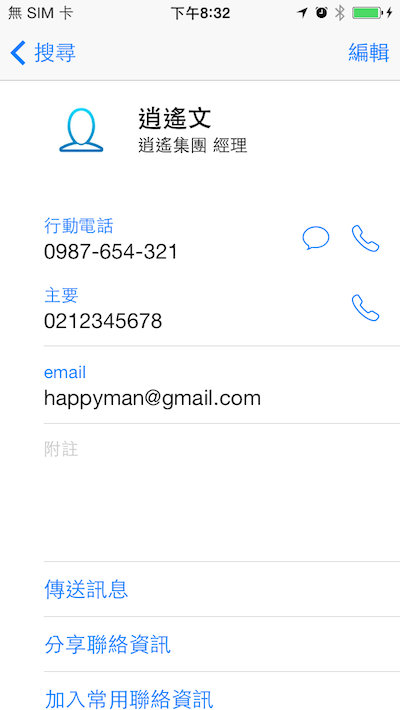
執行結果就是去通訊錄那兒查看~
疑惑:在iPhone 5c測試正常,在iPhone 6測試會掛掉(檢查聯絡人是否存在通訊錄的功能),原以為是裝有SIM卡的問題,不過抽出來之後測試得到一樣的結果。我在想會不會跟SIM卡無法「導入SIM卡通訊錄」有關係?那麼有些機子大概都會有類似的問題吧~公司的iPhone 6不會crash,而我的iPhone 6會crash,真是令人匪夷所思⋯⋯
更新:改用簡潔的程式碼來判斷就沒有問題了,原因可能是遇到通訊錄中某個名稱為空的時候,上頭那個判斷方法沒有處理所導致⋯⋯
-(BOOL)hasExistRecord:(NSString *)name
{
    CFErrorRef error = NULL;
    ABAddressBookRef addressBookRef = ABAddressBookCreateWithOptions(NULL, &error);
    NSArray *allContacts = (__bridge NSArray *)ABAddressBookCopyArrayOfAllPeople(addressBookRef);
    for (id record in allContacts){
        ABRecordRef thisContact = (__bridge ABRecordRef)record;
        NSString *thisName = (__bridge_transfer NSString *)ABRecordCopyValue(thisContact, kABPersonFirstNameProperty);
        if ([thisName isEqualToString:name]){
            return YES;
        }
    }
    return NO;
}
後來客戶想改以手機號碼來判斷是否已加入通訊錄,也不是不能這麼做,只是有人可能沒有手機號碼(雖然這個時代不太可能),好的使用者體驗應是以人名為主(儘管可能有同名同姓),畢竟我是加你這個人,其它聯絡資料如手機號碼、公司號碼、電子信箱從缺沒關係,之後還能加上去。
-(BOOL)hasExistRecordWithCellPhoneNumber:(NSString *)cellPhoneNumber
{
    if ([cellPhoneNumber isEqualToString:@""]) {
        return NO;
    }
    CFErrorRef error = NULL;
    ABAddressBookRef addressBookRef = ABAddressBookCreateWithOptions(NULL, &error);
    NSArray *allContacts = (__bridge NSArray *)ABAddressBookCopyArrayOfAllPeople(addressBookRef);
    for (id person in allContacts) {
        ABMultiValueRef phoneNumbers = ABRecordCopyValue((__bridge ABRecordRef)(person), kABPersonPhoneProperty);
        for (int i = 0; i < ABMultiValueGetCount(phoneNumbers); i++) {
            NSString *thisCellPhoneNumber = (__bridge NSString*)ABMultiValueCopyValueAtIndex(phoneNumbers, i);
//            NSCharacterSet *trim = [NSCharacterSet characterSetWithCharactersInString:@"#();$&-+"];
//            mobile = [[mobile componentsSeparatedByCharactersInSet:trim] componentsJoinedByString: @""];
//            mobile = [mobile stringByReplacingOccurrencesOfString:@"\"" withString:@""];
//            mobile = [mobile stringByReplacingOccurrencesOfString:@" " withString:@""];
            if ([thisCellPhoneNumber isEqualToString:cellPhoneNumber]){
                return YES;
            }
        }
    }
    return NO;
}
參考:Address Book Tutorial in iOS、Add Contacts to the Address Book in iOS7、取得 Address Book 聯絡資訊內容的方法、How can I get all phone numbers from addressbook IOS 5 KABPersonPhoneProperty。


 逍遙文工作室
隨意留個言吧:)~