
iOS 8已經在9/18釋出,所有使用者只要有符合的機型,都可以選擇是否要升級!身為開發者的我,當然要及時讓身旁的測試機更新作業系統,因為想來測試iOS 8 定位服務規則~

現在詢問的文字可以客制化,如較小字體的就是我設定的呢!
話說,昨晚更新我親愛的The New iPad,花了將近一小時的時間完成升級,但畫面卻顯示要我連結iTunes,我也跟著指示做⋯⋯iTunes居然要我回復iPad,也就是裡頭App的資料都會消失殆盡⋯⋯「×!」當下真的很不爽,不過想想裡頭也沒什麼特別的資料,很多重要的資料都儲存在雲端,我只要登入各大小App,就能取回我大部份的資料囉~
仔細看了706 whats new in core location這個session,發現使用定位服務分為兩種:
- 使用App期間:只有App或其中的功能在螢幕上顯示時,才能取用您的位置。
- 永遠:App在背景執行時,仍可取用您的位置。
在.plist要註明我們使用定位的目的:
- 使用App期間:NSLocationWhenInUseUsageDescription
- 永遠:NSLocationAlwaysUsageDescription
以上兩者Key(可以二擇一,或兩者都填,當然是看需求)必須取代舊有的Key:
- NSLocationUsageDescription
在code中可要使用相對應的API:
- 使用App期間:requestWhenInUseAuthorization
- 永遠:requestAlwaysAuthorization
至於它們的作用,API是這麼解釋:
/*
 *  requestWhenInUseAuthorization
 *
 *  Discussion:
 *      When +authorizationStatus == kCLAuthorizationStatusNotDetermined,
 *      calling this method will trigger a prompt to request "when-in-use"
 *      authorization from the user.  If possible, perform this call in response
 *      to direct user request for a location-based service so that the reason
 *      for the prompt will be clear.  Any authorization change as a result of
 *      the prompt will be reflected via the usual delegate callback:
 *      -locationManager:didChangeAuthorizationStatus:.
 *
 *      If received, "when-in-use" authorization grants access to the user's
 *      location via -startUpdatingLocation/-startRangingBeaconsInRegion while
 *      in the foreground.  If updates have been started when going to the
 *      background, then a status bar banner will be displayed to maintain
 *      visibility to the user, and updates will continue until stopped
 *      normally, or the app is killed by the user.
 *
 *      "When-in-use" authorization does NOT enable monitoring API on regions,
 *      significant location changes, or visits, and -startUpdatingLocation will
 *      not succeed if invoked from the background.
 *
 *      When +authorizationStatus != kCLAuthorizationStatusNotDetermined, (ie
 *      generally after the first call) this method will do nothing.
 *
 *      If the NSLocationWhenInUseUsageDescription key is not specified in your
 *      Info.plist, this method will do nothing, as your app will be assumed not
 *      to support WhenInUse authorization.
 */
- (void)requestWhenInUseAuthorization __OSX_AVAILABLE_STARTING(__MAC_NA, __IPHONE_8_0);

/*
 *  requestAlwaysAuthorization
 *
 *  Discussion:
 *      When +authorizationStatus == kCLAuthorizationStatusNotDetermined,
 *      calling this method will trigger a prompt to request "always"
 *      authorization from the user.  If possible, perform this call in response
 *      to direct user request for a location-based service so that the reason
 *      for the prompt will be clear.  Any authorization change as a result of
 *      the prompt will be reflected via the usual delegate callback:
 *      -locationManager:didChangeAuthorizationStatus:.
 *
 *      If received, "always" authorization grants access to the user's
 *      location via any CLLocationManager API, and grants access to
 *      launch-capable monitoring API such as geofencing/region monitoring,
 *      significante location visits, etc.  Even if killed by the user, launch
 *      events triggered by monitored regions or visit patterns will cause a
 *      relaunch.
 *
 *      "Always" authorization presents a significant risk to user privacy, and
 *      as such requesting it is discouraged unless background launch behavior
 *      is genuinely required.  Do not call +requestAlwaysAuthorization unless
 *      you think users will thank you for doing so.
 *
 *      When +authorizationStatus != kCLAuthorizationStatusNotDetermined, (ie
 *      generally after the first call) this method will do nothing.
 *
 *      If the NSLocationAlwaysUsageDescription key is not specified in your
 *      Info.plist, this method will do nothing, as your app will be assumed not
 *      to support Always authorization.
 */
- (void)requestAlwaysAuthorization __OSX_AVAILABLE_STARTING(__MAC_NA, __IPHONE_8_0);

而iOS有個相當方便的API,就是可以把畫面導向系統設定(Settings),讓使用者不再煩惱要去哪兒開啟相關設定!
if ([[[UIDevice currentDevice] systemVersion] floatValue] >= 8.0) {
    [[UIApplication sharedApplication] openURL:[NSURL URLWithString:UIApplicationOpenSettingsURLString]];
}
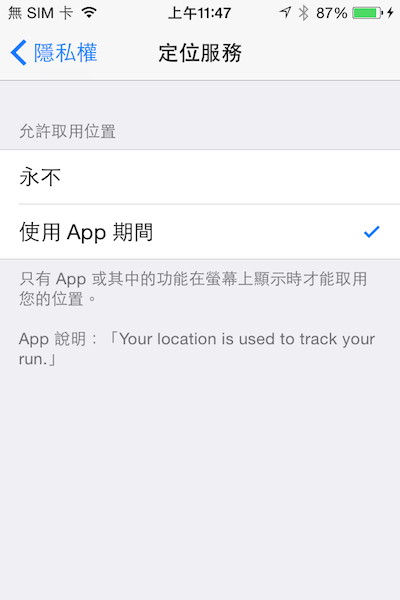
選擇的同時,會讓使用者看到我們設定目的的說明。
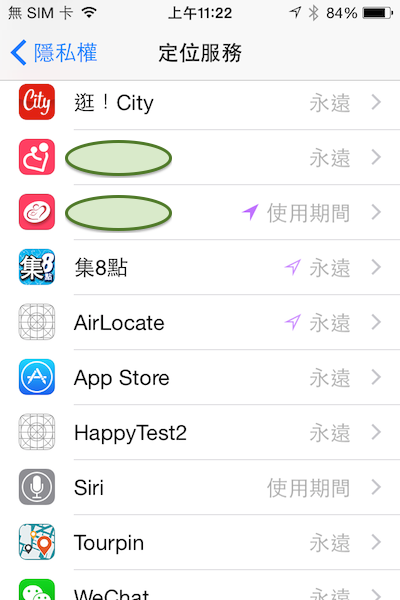
iOS8之後,定位服務會顯示三種狀態:永不、使用期間、永遠。
實作上,設定完info.plist後,在startUpdatingLocation前方,增加兩行code就可以在iOS 8上運作,而且iOS 8以前版本也能照舊運行!
    if ([locationManager respondsToSelector:@selector(requestWhenInUseAuthorization)]) {
        [locationManager requestWhenInUseAuthorization];
    }
    [locationManager startUpdatingLocation];
註:因為要相容iOS 8之前的版本,記得寫condition code喔!
I am a graduate student specializing in Computer Graphics.


標籤雲
- teach
- ios
- illustration
- food
- app
- record
- travel
- life
- chart
- chat
- tool
- restaurant
- work
- service
- photos
- experience
- relationship
- opencv
- technique
- problem
- xcode
- statistics
- health
- activity
- comparison
- design
- information
- exercise
- accessory
- company
- love
- software
- apple
- art
- iphone
- platform
- animation
- book
- map
- user interface
- bike
- marriage
- jog
- device
- article
- photography
- environment
- movies
- memory
- thought
- game
- project
- story
- video
- development
- mrt
- taipei
- taiwan
- Flutter
- festival
- career
- sport
- transportation
- opengl
- image
- research
- ipad
- open source
- youtube
- blender
- notification
- objective c
- income
- wealth
- motocycle
- image processing
- achievement
- glsl
- lecture
- apple watch
- secret
- 財富
- observation
- music
- macbook
- 秘密
- paper
- friend
- start-up
- business
- practice
- file
- product
- user experience
- money
- competition
- experiment
- library
- all you can eat
- gift
- course
- movie
- line
- photo
- programming
- song
- mountain
- trend
- quotation
- birthday
- technology
- definition
- weather
- network
- hotel
- team
- customization
- internet
- wifi
- mac os x
- debug
- truth
- swift
- android
- coffee
- camera
- install
- japan
- time
- job
- performance
- process
- framework
- Ionic
- hamburger
- celebration
- recall
- architecture
- report
- git
- version
- typhoon
- review
- introduction
- track
- repair
- history
- flow
- lyrics
- crash
- breakfast
- function
- c/c++
- salary
- growth
- bluetooth
- cryptocurrency
- shop
- notebook
- face detection
- language
- web
- svm
- friendship
- reunion
- brand
- end banquet
- scenery
- group
- media
- mission
- certificate
- election
- 詐騙
- tone mapping
- stylization
- firework
- future
- sleep
- learn
- event
- advertisement
- screen
- color space
- photograph
- hong kong
- profession
- wwdc
- role
- news
- holiday
- convenience store
- flowchart
- communication
- wedding
- cocoapods
- rule
- 工作
- culture
- flower
- buffet
- photoimpact
- plan
- family
- bbq
- smart phone
- death
- github
- engineer
- korea
- setting
- security
- anniversary
- message
- investment
- banquet
- hike
- google map
- colleague
- marathon
- 人生大挑戰
- 新冠肺炎
- covid-19
- 加密貨幣
- high dynamic range
- algorithm
- sex
- conference
- enterprise
- night market
- concept
- attitude
- itunes
- habit
- bus
- rgb
- park
- value
- api
- specification
- application
- management
- name
- cartoon
- boss
- share
- uiwebview
 逍遙文工作室
隨意留個言吧:)~