
想在通知(Notification)的時候播放我們指定的音樂,可以怎麼做呢?如果都沒有設定的話,APP當然就只會播放預設的音效囉~為了讓我們的APP更有自己的特色,勢必得客製化適合的音樂、音效,像我們常用的Line APP就有它獨特的音效,一聽到聲響就知道是有訊息傳過來~
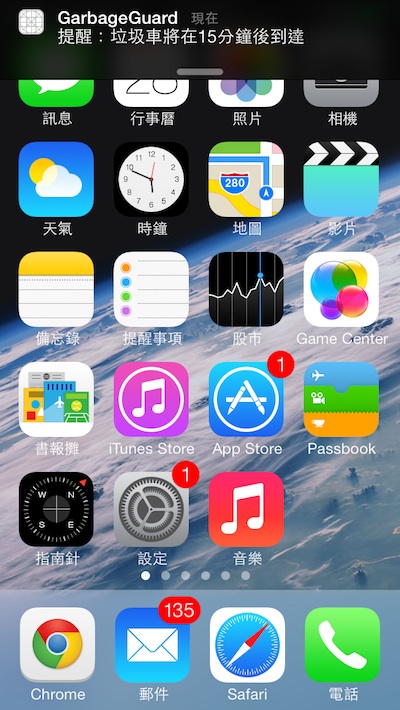
沒有執行APP時若響起垃圾車專屬音樂,就知道我們該去倒垃圾啦~
首先我們來試驗預設的聲音和震動是如何實作⋯⋯
首先匯入<AudioToolbox/AudioToolbox.h>,即能使用相關函式方法!
/**
 Theme: Notification using Our Sound/Music
 IDE: Xcode 5
 Language: Objective C
 Date: 103/05/02
 Author: HappyMan
 Blog: https://cg2010studio.wordpress.com/
 */
-(IBAction)soundButtonClicked:(UIButton *)button
{
    // 震動
//    AudioServicesPlaySystemSound(kSystemSoundID_Vibrate);
    // 系統聲音,編號很多可選
//    AudioServicesPlaySystemSound(1331);

    // 我們自己的音檔
    // 音檔路徑
    NSString *path = [[NSBundle mainBundle] pathForResource:@"Let It Go" ofType:@"wav"];
    SystemSoundID soundID;
    NSURL *filePath = [NSURL fileURLWithPath:path isDirectory:NO];
    // 建立系統聲音
    AudioServicesCreateSystemSoundID((__bridge CFURLRef)filePath, &soundID);
    // 播放音檔
    AudioServicesPlaySystemSound(soundID);
    // 聲音停止
//    AudioServicesDisposeSystemSoundID(soundID);
}
我是透過點擊按鈕觸發方法,透過預設的震動和音效是最簡單的方法,而預設的音效編號,可以參考AudioServices,有至少100種音效可選擇!
當然我們希望使用自製的音樂旋律,這時候就要自己建立系統聲音ID,我是先把音檔內建在APP中,使用最近最風行的「冰雪奇緣」主題曲「Let It Go」。
.
當然我不是使用影片檔,而是將它轉成音樂檔。原本是.mp3檔,接著把它轉成.wav檔,放進去APP中,咦?怎麼沒有聲音⋯⋯查了問題的解答之後,才知曉系統限制音檔長度要在30秒以內,所以又將音樂截取一小段~線上工具Online MP3 Cutter超好用呢!

好,一切準備妥當,這時候利用我之前介紹的區域通知的行為 (Local Notification Behavior),將音檔名稱設定好,即能在APP前景與背景運行時播放我們指定的音樂旋律囉~當然我們也可以惡搞使用者啦⋯⋯
這裡不厭其煩地貼我實作通知的程式碼,我是在AppDelegate.m中實作~
/**
 Theme: Notification using Our Sound/Music
 IDE: Xcode 5
 Language: Objective C
 Date: 103/05/02
 Author: HappyMan
 Blog: https://cg2010studio.wordpress.com/
 */
- (void)applicationDidEnterBackground:(UIApplication *)application
{
    // 從現在開始7秒後
    NSDate *alertTime = [[NSDate date]
                         dateByAddingTimeInterval:7];
    // 從現在開始17秒後
    NSDate *alertTime2 = [[NSDate date]
                          dateByAddingTimeInterval:17];

    // 2014/5/1 16:30
    NSCalendar *cal = [NSCalendar currentCalendar];
    NSDateComponents *comps = [[NSDateComponents alloc] init];
    [comps setDay:1];
    [comps setMonth:5];
    [comps setYear:2014];
    [comps setHour:16];
    [comps setMinute:30];

    NSDate *alertTime3 = [cal dateFromComponents:comps];
    NSLog(@"now time: %@", [NSDate date]);
    NSLog(@"alertTime: %@", alertTime);
    NSLog(@"alertTime2: %@", alertTime2);
    NSLog(@"alertTime3: %@", alertTime3);

    [self addNewSchedult:alertTime];
    [self addNewSchedult:alertTime2];
    [self addNewSchedult:alertTime3];
}

- (void)addNewSchedult:(NSDate *)date {
    UIApplication* app = [UIApplication sharedApplication];
    UILocalNotification* notifyAlarm = [[UILocalNotification alloc] init];
    if (notifyAlarm) {
        notifyAlarm.fireDate = date;
        notifyAlarm.timeZone = [NSTimeZone defaultTimeZone];
        notifyAlarm.repeatInterval = 0;
        notifyAlarm.soundName = @"Let It Go.wav";
        notifyAlarm.alertBody = [NSString stringWithFormat: @"Be happy ^_^\n回到原APP繼續玩~"];
        [app scheduleLocalNotification:notifyAlarm];
    }
}

-(void)application:(UIApplication *)application didReceiveLocalNotification:(UILocalNotification *)notification
{
    // 音檔路徑
    NSString *path = [[NSBundle mainBundle] pathForResource:@"Let It Go" ofType:@"wav"];
    SystemSoundID soundID;
    NSURL *filePath = [NSURL fileURLWithPath:path isDirectory:NO];
    // 建立系統聲音
    AudioServicesCreateSystemSoundID((__bridge CFURLRef)filePath, &soundID);
    // 播放音檔
    AudioServicesPlaySystemSound(soundID);
    // 聲音停止
//    AudioServicesDisposeSystemSoundID(soundID);

    UIAlertView *av = [[UIAlertView alloc] initWithTitle:@"提醒" message:notification.alertBody delegate:nil cancelButtonTitle:@"OK" otherButtonTitles:nil, nil];
    [av show];
}
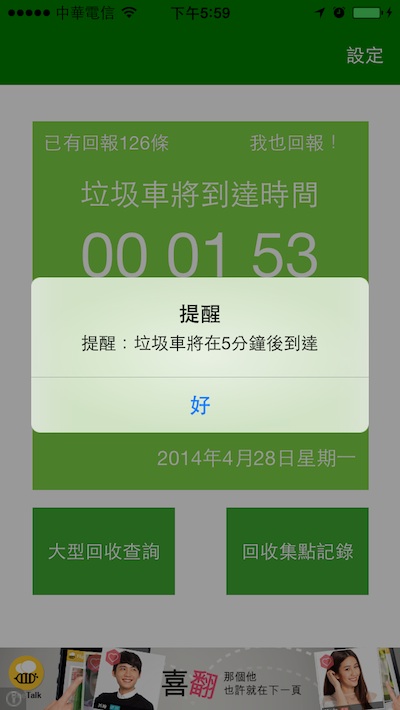
在前景執行的時候也能響起Let It Go的音樂囉~丟垃圾配這首歌真貼切!
參考:


 逍遙文工作室
Comments on: "[iOS] 在收到通知時播放音檔" (1)
[…] 除了播放系統音樂之外,還有第三方套件Cocos2D可以使用,其實它是引入AudioToolbox/AudioToolbox.h來實作。 […]
讚讚