
現今最火紅的應用之一,就是使用地圖進行各種活動,首先我們來使用地圖獲得經緯度和現在位置,這是最基本的使用方式。

依照下列幾個簡單的步驟,就能讓地圖栩栩如生地現身在我們面前,在此我有用IB拉Map View到手機畫面上。
- 加入MapKit.framework
- 引入MapKit/MapKit.h
- 遵從MKMapViewDelegate
- 撰寫相關程式碼
/**
 Theme: Using Map
 IDE: Xcode 5
 Language: Objective C
 Date: 103/04/08
 Author: HappyMan
 Blog: https://cg2010studio.wordpress.com/
 */
- (void)viewDidLoad
{
    [super viewDidLoad];
    [self setupMapView];
}

-(void)setupMapView
{
    // 顯示目前位置(藍色白框的圓點)
    myMapView.showsUserLocation = YES;

    // MapView的環境設置
    myMapView.mapType = MKMapTypeStandard;
    myMapView.scrollEnabled = YES;
    myMapView.zoomEnabled = YES;

    // 將MapView顯示於畫面
    [self.view insertSubview:myMapView atIndex:0];

    // 取得目前MAP的中心點座標
    double X = myMapView.centerCoordinate.latitude;
    double Y = myMapView.centerCoordinate.longitude;
    NSLog(@"latitude: %f", X);
    NSLog(@"longitude: %f", Y);
}

- (IBAction)onNowLocacion:(id)sender {
    // 取得現在位置
    double X = myMapView.userLocation.location.coordinate.latitude;
    double Y = myMapView.userLocation.location.coordinate.longitude;
    NSLog(@"latitude: %f", X);
    NSLog(@"longitude: %f", Y);

    // 自行定義的設定地圖函式
    [self setMapRegionLongitude:Y andLatitude:X withLongitudeSpan:0.05 andLatitudeSpan:0.05];
}
//自行定義的設定地圖函式
- (void)setMapRegionLongitude:(double)Y andLatitude:(double)X withLongitudeSpan:(double)SY andLatitudeSpan:(double)SX
{
    // 設定經緯度
    CLLocationCoordinate2D mapCenter;
    mapCenter.latitude = X;
    mapCenter.longitude = Y;

    // Map Zoom設定
    MKCoordinateSpan mapSpan;
    mapSpan.latitudeDelta = SX;
    mapSpan.longitudeDelta = SY;

    // 設定地圖顯示位置
    MKCoordinateRegion mapRegion;
    mapRegion.center = mapCenter;
    mapRegion.span = mapSpan;

    // 前往顯示位置
    [myMapView setRegion:mapRegion];
    [myMapView regionThatFits:mapRegion];
}
執行結果:
latitude: 25.126245
longitude: 121.577797
真怕我被人家發現,在我的秘密天堂寫著程式:P~
按一下「快樂位置」,畫面就會變成~
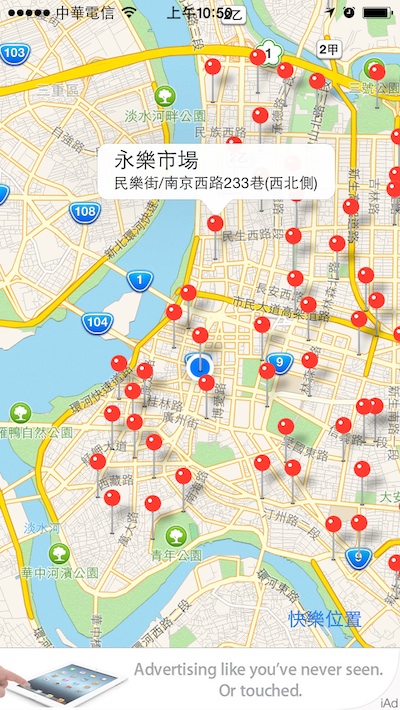
想見我的話,就來抓我吧~(獵人動畫小傑爸爸這麼說道:D~)
參考:使用 MapKit 取得目前地理位置與經緯度的設定、iPhone app 實作練習 – 幫你的地圖 app 加上大頭針。


 逍遙文工作室
Comments on: "[iOS] 使用地圖獲得經緯度" (1)
[…] 會在地圖上顯示自己目前的位置和得知經緯度後,接下來做更有趣的應用吧!在此我想要在YouBike所在地插上地標,未來還可把圖釘換成腳踏車的icon喔! […]
讚讚