[iOS] 使用推特分享 (Using Twitter to Share)
儘管我們台灣人很少人使用推特,然而若我們設計的APP讓外國人也用的到,那麼推特就是個相當好的分享平台。就如同使用者可以很簡單地幾個動作就能分享,我們工程師也能夠容易地實現使用推特分享 (Using Twitter to Share)。
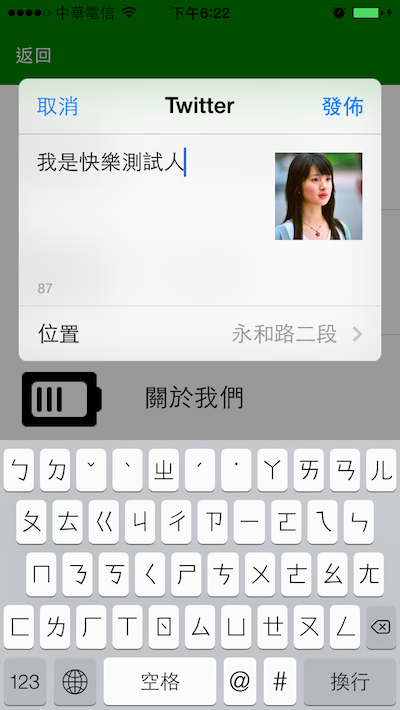
可以分享文字、影像、連結、位置等等。

儘管我們台灣人很少人使用推特,然而若我們設計的APP讓外國人也用的到,那麼推特就是個相當好的分享平台。就如同使用者可以很簡單地幾個動作就能分享,我們工程師也能夠容易地實現使用推特分享 (Using Twitter to Share)。
可以分享文字、影像、連結、位置等等。
原以為使用推特獲取使用者資料 (Using Twitter to Obtain User Information)很麻煩,看了前人的教學之後實作一次,才知原來如此簡單~未來就能夠讓使用者以Twitter的帳號登入我們的APP!

首先在專案加入框架:Accounts.framework。
接著在.h檔中寫:
#import <Accounts/Accounts.h>
@property (nonatomic, strong) ACAccountStore *accountStore;
@property (nonatomic, strong) NSArray *accounts;
最後再.m檔中寫:
- (IBAction)fetchData:(UIButton *)button
{
    if (self.accounts == nil){
        if(self.accountStore == nil){
            self.accountStore = [[ACAccountStore alloc] init];
        }
        ACAccountType *accountTypeTwitter = [self.accountStore accountTypeWithAccountTypeIdentifier:ACAccountTypeIdentifierTwitter];
        [self.accountStore requestAccessToAccountsWithType:accountTypeTwitter                                     withCompletionHandler:^(BOOL granted, NSError *error) {
            if(granted) {
                dispatch_sync(dispatch_get_main_queue(), ^{
                    self.accounts = [self.accountStore accountsWithAccountType:accountTypeTwitter];
                });
            }
            else {
                // User denied access to his Twitter accounts
                NSLog(@"拒絕使用Twitter連接APP");
            }
        }];
    }
    else {
        // This iOS verion doesn't support Twitter. Use 3rd party library
    }
}
- (IBAction)sendTweet:(UIButton *)button
{
    // 建立viewcontroller
    TWTweetComposeViewController *tweetToTwitter = [[TWTweetComposeViewController alloc] init];
    // 推文加入內容
    [tweetToTwitter setInitialText:@"HappyMan's Studio Twitter API Test"];
    // 推文加入圖片資訊
    [tweetToTwitter addImage:[UIImage imageNamed:@"happyman.jpeg"]];
    // 推文加入網址超連結資訊
    [tweetToTwitter addURL:[NSURL URLWithString:@"https://cg2010studio.wordpress.com/"]];
    // 顯示viewcontroller
    [self presentModalViewController:tweetToTwitter animated:YES];
    // 按下Send或是Cancel時的處理動作(block)
    [tweetToTwitter setCompletionHandler:^(TWTweetComposeViewControllerResult result) {        NSString *tweetActionStr;
        switch (result) {
            case TWTweetComposeViewControllerResultCancelled:
            tweetActionStr = @"取消";
            break;
            case TWTweetComposeViewControllerResultDone:
            tweetActionStr = @"完成";
            break;
            default:
            break;
        }
        NSLog(@"%@", tweetActionStr);
        // 移除viewcontroller
        [self dismissModalViewControllerAnimated:YES];
    }];
}
編譯執行點擊按鈕,輸入相關資料,送出去訊息後,馬上就能在它的網站上看到結果呢!

獲得使用者的個人資料:
<__NSArrayI 0x1cd8d700>(
type:com.apple.twitter
identifier:
accountDescription: @HappyMan
username: HappyMan
objectID: x-coredata://
enabledDataclasses: {(
)}
enableAndSyncableDataclasses: {(
)}
properties: {
fullName = HappyMan;
“user_id" = 123456789;
}
parentAccount: (null)
owningBundleID:com.atebits.Tweetie2
)
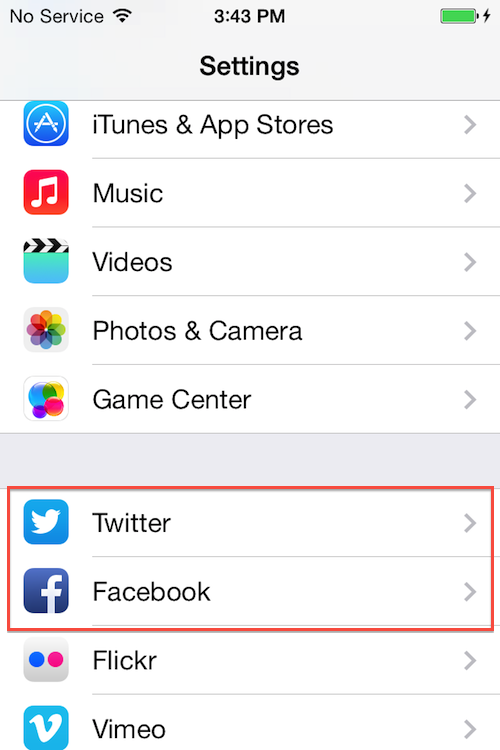
順利使用推特的前提是要在系統的設定(Setting)登入我們的Twitter,不必下載Twitter APP,接著授權給我們的APP,若想更動授權狀態關閉或開啟,必須去系統的APP設定(Setting)那兒去轉開關。
參考:使用 Social Framework 對社群網站發佈訊息、ios5 use Twitter & Accounts framework。
雖然我不是個女生,但很喜歡看女生穿禮服的樣子,因為女孩子會變得更加可愛迷人,這也就是禮服所要呈現的功能啦~最近看到一張知名網站Logo禮服圖解 (Illustrations Well-Known Websites Logo Dress),相當有趣呢!


 逍遙文工作室
HappyMan・迴響