Just My Life & My Work

Posts tagged ‘teach’

[Ionic][AngularJS] Youtube 離開畫面停止播放

承接[Ionic][AngularJS] 載入Youtube影片,想要離開畫面就停止播放,該怎麼做呢?因為進到下一頁,正在播放的影片還沒有被移除,就會持續播放下去。

在controllers.js中寫:

.controller('ResultCtrl', function($scope, $sce) {

  $scope.pauseVideo = function() {
    console.log('postMessage pauseVideo');
    var iframe = document.getElementsByTagName("iframe")[0].contentWindow;
    iframe.postMessage('{"event":"command","func":"' + 'pauseVideo' +   '","args":""}', '*');
  }

  $scope.playVideo = function() {
    console.log('postMessage playVideo');
    var iframe = document.getElementsByTagName("iframe")[0].contentWindow;
    iframe.postMessage('{"event":"command","func":"' + 'playVideo' +   '","args":""}', '*');
  }

  $scope.$on('$ionicView.beforeLeave', function(){
    console.log('pauseVideo');
    $scope.pauseVideo();
  });

  $scope.$on('$ionicView.enter', function(){
    console.log('playVideo');
    $scope.playVideo();
  });

})

還要在Youtube影片網址後方連接參數⋯⋯

?enablejsapi=1

格式會像是:https://www.youtube.com/embed/uSmcLz2FAUI?enablejsapi=1

程式碼才會有作用喔~

參考:How to pause or stop an iframe youtube video when you leave a tab view or minimise your Ionic App

[iOS] 調整HTML中影像寬度 (Adjust Image Width in HTML)

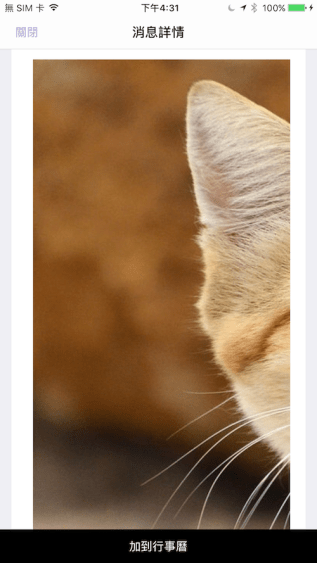
有時候App畫面需要套用Web內容,你就會發現很神奇的地方,就是Web開發者說已經調整好寬度100%,可是在我們App中顯示就是有問題,像是貓咪的臉會被截掉⋯⋯

那到底是誰的問題呢?基本上我是認為Web寫好直接套用就要呈現期望的樣子,App這邊不需要特別設定什麼。

ios-%e8%aa%bf%e6%95%b4html%e4%b8%ad%e5%bd%b1%e5%83%8f%e5%af%ac%e5%ba%a6-adjust-image-width-in-html00001

不過呢⋯⋯也許App元件本身有問題,此時就要找出替代方案,總是有前人遇過類似的問題,google就對了!

(繼續閱讀…)

[iOS] 不要緩存網路資料

原以為已經解決AFNetworking會暫存資料的問題,第二次驗收還是被資安公司給退件,那麼只好使出一勞永逸的絕招!就是讓整個App網路資料都不要暫存資料,也就是說不只是針對AFNetworking,設定NSURLCache就能做到!透過模擬器追蹤Cache資料夾,打開Cache.db查看真的不再暫存撈回來的資料。

Disable AFNetworking Cache00004

可以看到追蹤模擬器資料夾會有個Cache.db。

(繼續閱讀…)

[iOS] DBAccess 資料庫

上次提到FMDB 資料庫,這次講解DBAccess 資料庫,我一個月前才研究,2016/6/23要講給同事們聽時,便發現DBAccess被Shark吃掉了⋯⋯

DBAccess Shark.png

(繼續閱讀…)

[iOS] 背景獲取 (Background Fetch)


背景獲取 (Background Fetch)可用在:有個情境是想在使用者開啟App前,就將所需要的資料從網路載入完畢,當使用者打開App後就會發現,顯示的資料都是最新的,而不用再重新整理來獲取最新資料。

前人教學得知有三件事情要做:

step1:

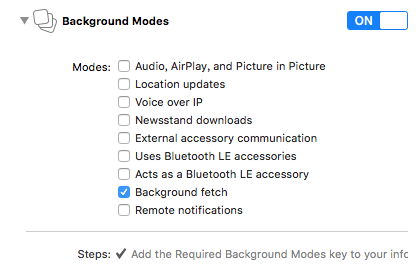
專案Capabilities設定Background Modes打開Background fetch

背景獲取 (Background Fetch).png

/**
 Theme: Background Fetch
 IDE: Xcode 8
 Language: Objective C
 Date: 106/06/06
 Author: HappyMan
 Blog: https://cg2010studio.wordpress.com/
 */
// step2
- (BOOL)application:(UIApplication *)application didFinishLaunchingWithOptions:(NSDictionary *)launchOptions {
  [[UIApplication sharedApplication] setMinimumBackgroundFetchInterval:UIApplicationBackgroundFetchIntervalMinimum];
}
// step3
-(void)application:(UIApplication *)application performFetchWithCompletionHandler:(void (^)(UIBackgroundFetchResult))completionHandler
{
  NSLog(@"performFetchWithCompletionHandler");
}

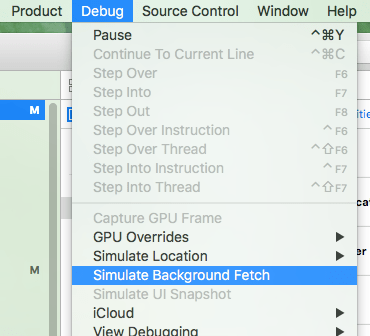
若要測試是否能運作,在工具列操作Debug的Simulate Background Fetch,點下去後原本App在前景就會強制跑到背景,若有在performFetchWithCompletionHandler設中斷點,就會發現App會執行這函式。

背景獲取 (Background Fetch)2.png

至於觸發時機,就要看系統怎麼判定你的App要多久喚醒一次,若它發現使用者時常在晚上九點開啟你的App,也許系統就會在晚上八點五十五分喚醒你的App,於是你可以執行載入最新資料的動作。

參考:Background Modes Tutorial: Getting Started

[iOS] 拆掉和包裝套件 (Unarchive and Archive Library)

又到了要套用第三方套件的時候,一般而言都是找最「受歡迎」的GitHub開源套件,因為做得好大家有目共睹,還會給作者一顆星!不過在台灣的市場,要套Beacon SDK就得找台灣廠商,去年旅遊App套一個廠商的Beacon SDK,搞了一陣子的背景偵測有問題,現在購物App也要來套另一個廠商的Beacon SDK,這個廠商製作各種「可串接」套件都有些問題,這次當然也少不了啦XD~

回想三年多前iBeacon被Apple提出來至今,台灣市場總算熱絡了起來,可以回顧一下我先前撰寫的初探iBeacon

(繼續閱讀…)

[iOS] Label 文字分散對齊 (Label Text Decentralized Alignment)

原本使用的元件UILabel只有置左、中、右三種選擇,然而有時候我們想要Label文字分散對齊,原本我想要找第三方套件,不過想起上個月研蘋果有在粉絲團上分享解法,於是就拿來嘗試,果真用內建的CATextLayer就能做到!

[iOS] Label 文字分散對齊 (Label Text Decentralized Alignment)

(繼續閱讀…)

[iOS] 設定藍芽 (Setting Bluetooth)

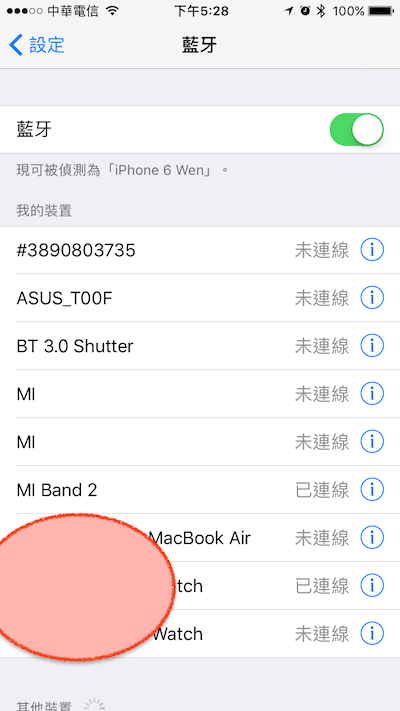
有時候我們需要開啟藍芽來連結裝置,像是BeaconApple Watch小米手環。那麼如果使用者沒有打開權限怎麼辦?請他/她到設定藍芽 (Setting Bluetooth)去打開囉~

iOS 設定藍芽 (Setting Bluetooth).PNG

目前iOS SDK尚未有API可以直接改藍芽設定,要是未來Apple有開放的話請再跟我說唷!不過我想應該要等到天荒地老,非常重視用戶隱私的Apple,是不會輕易讓開發者悄悄開啟Bluetooth來進行任何動作。

剛好我們偉大的技術長有無私分享:

/**
 Theme: iOS 10 Setting Bluetooth
 IDE: Xcode 8
 Language: Objective C
 Date: 106/03/07
 Author: HappyMan
 Blog: https://cg2010studio.wordpress.com/
 */
-(void)openBLESetting
{
    NSURL *bluetoothURLOS8 = [NSURL URLWithString:@"prefs:root=General&path=Bluetooth"];
    NSURL *bluetoothURLOS9 = [NSURL URLWithString:@"prefs:root=Bluetooth"];
    NSURL *bluetoothURLOS10 = [NSURL URLWithString:@"App-Prefs:root=Bluetooth"];
    if ([[[UIDevice currentDevice] systemVersion] intValue] >= 10) {
        [[UIApplication sharedApplication] openURL:bluetoothURLOS10];
    }
    else if ([[[UIDevice currentDevice] systemVersion] intValue] >= 9) {
        [[UIApplication sharedApplication] openURL:bluetoothURLOS9];
    }
    else {
        [[UIApplication sharedApplication] openURL:bluetoothURLOS8];
    }
}

這種沒啥邏輯純粹定義的玩意兒,抄,就對了XD~

參考:opening iOS BLE setting from app

[iOS] 字串去掉前後的空白

寫了四年多的iOS App,還沒有需要字串去掉前後的空白,可是這次卻因為在資料庫發現,居然有email字串中尾端多打了個「空白」,以至於某些功能判定沒有此帳號,而出現非預期的結果。

iOS 字串去掉前後的空白.PNG


(繼續閱讀…)

[iOS] iOS 10 Push Token

過去研究過iOS蘋果推播通知服務 (Apple Push Notification Service),照理說取得Push Token應得心應手,然而理論跟實際有時是有些落差。

像是我自己測試後能順利取得Push Token,誰知道客戶那邊卻收不到⋯⋯

這篇可以說明iOS 10推播問題

ios-10-push-token2

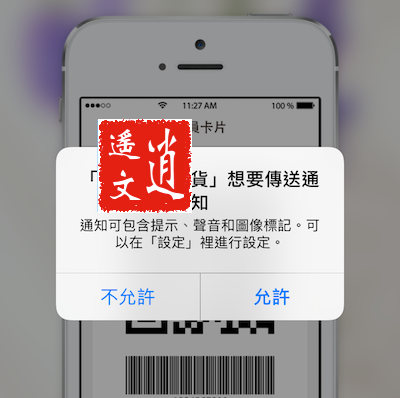
當使用者點擊「允許」後,我們就能取得其Push Token。

(繼續閱讀…)

標籤雲